AgentLoom
Build multi-agent applications from YAML. Operate them from an evidence-aware terminal Studio.
Typed Workers, permissioned edits, resumable Runs, explicit Goal budgets, and review-gated memory share one runtime truth.



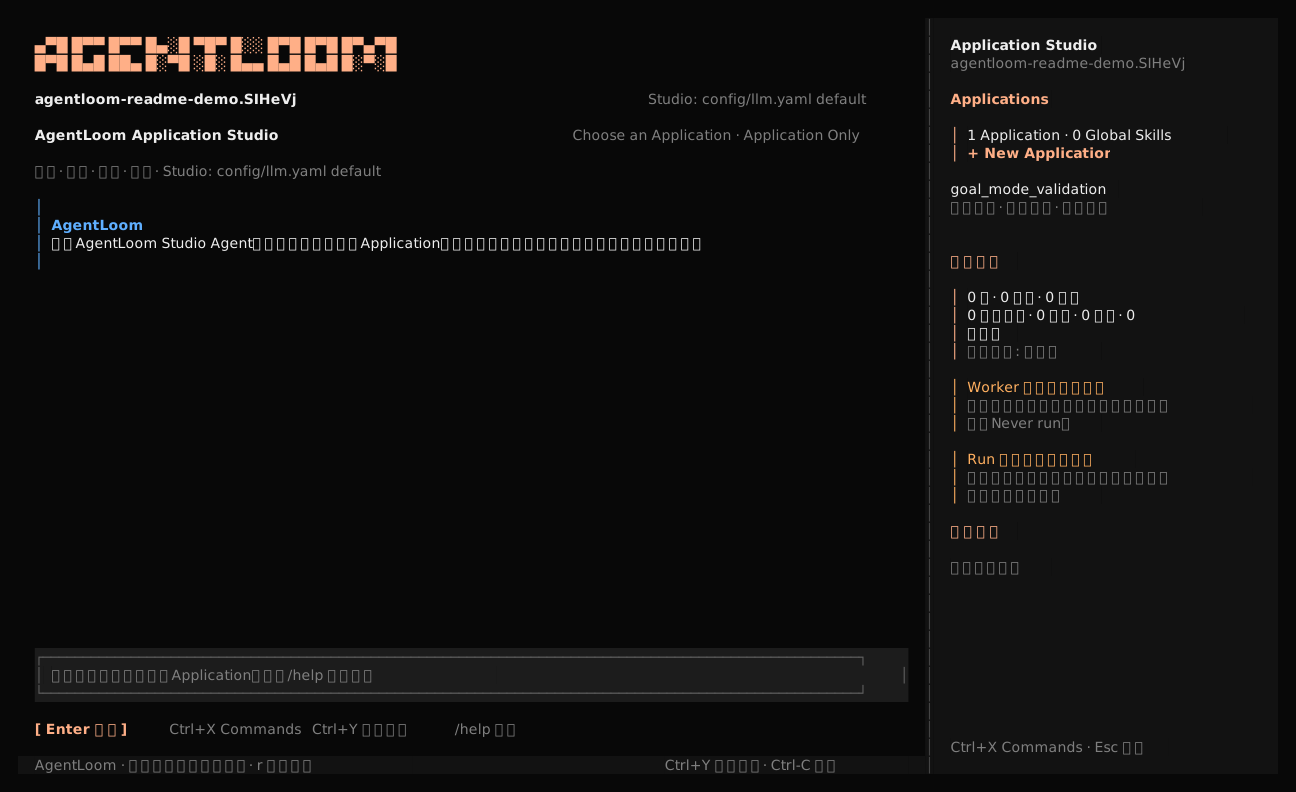
Real reduced-motion terminal session using the current Chinese UI. The Studio indexes Applications, Skills, validation state, Runs, and commands from the project.
AgentLoom treats a multi-agent system as an Application with an execution contract. YAML defines the Supervisor, typed Workers, models, tools, Skills, Hooks, permissions, and runtime policy. Application Studio can change that contract, show the Diff, request permission for side effects, run it, read structured evidence, and continue repairing failures.
Why AgentLoom
Workers become typed tools
A Worker declares agent_function_schema; the runtime turns it into a validated
callable tool for its Supervisor. Workers can use different models and tools,
run concurrently, and expose stable input/output contracts instead of relying on
prompt conventions.
Runs produce evidence, not terminal guesses
Every allocated Run receives an immutable run_id, manifest, and versioned
lifecycle events, with bounded file logs when enabled plus audit records and
artifacts. A logical task_id survives resume. The TUI, CLI JSON/JSONL, and
Python API read the same canonical state. Preflight rejection occurs before a
Run or its storage is allocated.
Long-running work has an explicit owner
Goal Mode keeps one root Supervisor objective active across continuation
segments and Worker delegation. Only that Supervisor can mark the Goal complete
with evidence. An optional token budget covers the whole Agent tree. When
checkpointing is enabled, budget_limited preserves recovery state for a later
resume.
Memory has review boundaries
Self-Learning v6 stores searchable history and evidence-gated memory separately. Fact and experience candidates pass evidence gates and the configured scope-approval policy; promotion to Project scope is always initiated by a person.
Extensions do not silently gain authority
Skills are model-context packages loaded on demand. Hooks are separately and explicitly authorized runtime code. Built-in tool metadata is discoverable without importing implementations, while actual tool, file, Shell, and MCP access remains governed by Agent configuration and permissions.
Quick start
The source installer builds the TUI and prepares a locked Python environment for the current checkout:
git clone https://github.com/linora-u/AgentLoom.git
cd AgentLoom
./install
It currently supports macOS and Linux shells and requires Git and Bash. It
installs missing uv and Bun through their official installers, then places the
compatible unit under ~/.agentloom. Open a new terminal and verify it:
agentloom --version
agentloom --snapshot
Create the local model configuration:
cp config/llm.example.yaml config/llm.yaml
model:
  default_model_type: powerful
  powerful:
    model: "openai/<model-id>"
    api_key: "<api-key>"
    base_url: "https://<openai-compatible-endpoint>"  # optional for OpenAI
    tool_choice: "auto"
  fast:
    model: "openai/<fast-model-id>"
    api_key: "<api-key>"
    base_url: "https://<openai-compatible-endpoint>"
    tool_choice: "auto"
config/llm.yaml is ignored by Git and is the only model catalog used by both
Studio and Application Agents. Start the Studio from any AgentLoom project:
agentloom

# Or inspect another checkout
agentloom --project /path/to/project
Try a request with explicit roles and acceptance criteria:
Create an Application named release_review.
Use one Supervisor and two Workers for API review and test review.
Choose model types from config/llm.yaml.
Validate it and ask before the first real Run.
Studio edits the selected Application directly and shows each Diff. Its loop is:
inspect → edit → validate → request Run permission → execute → inspect evidence → repair
If execution is not approved, Studio reports “configuration validated, not run.” It does not turn static validation into a success claim.
Application Studio
The TUI is an Applications-first control plane, not a thin log viewer.
- Application workspace: browse Effective Config, Supervisor/Worker topology, source attribution, models, Tools, Skills, Hooks, MCP, permissions, and validation.
- Agent Loop: inspect the project, modify the selected Application, display Tool and Diff cards, ask business questions, run smoke checks, and diagnose failed Runs.
- Permission boundary:
Application Onlypermits project reads and writes inside the selected Application. Shell, global files, other Applications, and unknown new paths require a visible decision.Full Accessis an explicit Session toggle and resets on exit. - Session continuity: switching Applications keeps Studio conversation
memory;
/newstarts fresh and/compactcompresses the active context while preserving completed file changes and durable history. - Revision safety: each Run pins its Application content hash. Later edits change the Working Revision but never hot-switch an active Running Revision.
- Run diagnostics: summaries expose terminal state, Goal progress, token usage, completion evidence, and recovery actions without dumping raw events.
| Action | Key / command |
|---|---|
| Send a Studio message | Enter |
| Search Applications, Agents, Skills, Runs, models, permissions, and commands | Ctrl+X |
| Start a fresh conversation | /new |
| Compact the current conversation | /compact |
| Select a Studio model | /models |
| Refresh the project index | /refresh |
| Diagnose the selected failed Run | a |
| Close detail, reject a decision, or interrupt the Agent Loop | Esc |
See Application Studio for screen behavior, architecture, updates, schedules, and contributor commands.
Define an Application
An Application keeps its Supervisor, Workers, prompts, optional tools, and outputs together:
applications/release_review/
├── workflows/
│   ├── release_review_agent.yaml
│   └── worker_agents/
│       ├── api_reviewer.yaml
│       └── test_reviewer.yaml
├── config/system.yaml          # optional Application overlay
├── skills/                     # optional private Skills
└── sysprompt/                  # optional prompt templates
A Supervisor references Worker definitions:
name: "release_review"
description: "Review an API release and its test evidence."
model_type: "powerful"
tool_call_type: "tool_call"

worker_agents:
  - path: "applications/release_review/workflows/worker_agents/api_reviewer.yaml"
  - path: "applications/release_review/workflows/worker_agents/test_reviewer.yaml"

workflow: |
  Ask both Workers for evidence, reconcile conflicts, and return one release decision.

tools: []
max_steps: 12
goal:
  enabled: true
  token_budget: 120000
Each Worker exposes the contract seen by its Supervisor:
name: "api_reviewer"
description: "Review API compatibility risks."
model_type: "fast"
tool_call_type: "tool_call"

agent_function_schema:
  description: "Review one release request."
  inputs:
    request:
      description: "Release scope and API diff."
      required: true
  output:
    description: "Evidence-backed compatibility findings."

workflow: |
  Review the request, cite evidence, and return prioritized findings.

tools: []
worker_agents: []
max_steps: 8
Run the Supervisor directly:
uv run loom run applications/release_review/workflows/release_review_agent.yaml
Or ask a Skill-aware coding assistant to read
agentloom-framework-skill/SKILL.md, create
the files, validate them, run the Application, and inspect .agentloom evidence.
Runtime model
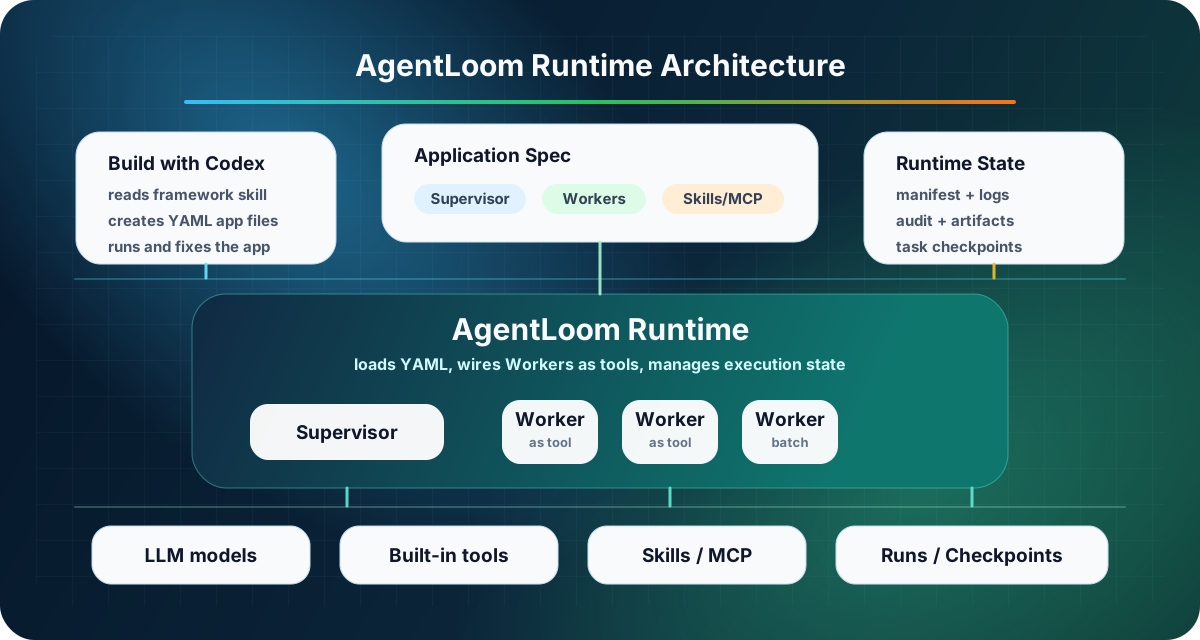
The Python runtime owns model routing, Worker-tool generation, concurrency, permissions, Hooks, checkpoints, and evidence. Deterministic preprocessing, validation, caching, and output writing remain ordinary Python code.
Runtime storage separates attempts from recoverable tasks:
.agentloom/
├── runs/<application_id>/<run_id>/
│   ├── manifest.json
│   ├── logs/runtime.log
│   ├── audit/
│   └── artifacts/
├── checkpoints/<application_id>/<task_id>/
│   ├── checkpoint.json
│   ├── workers/<worker>/calls/<index>/checkpoint.json
│   ├── todos.json
│   ├── goal.json
│   ├── context_store/
│   └── file-history/
└── workspaces/agents/<application_id>/<agent_path>/
    ├── insights.md
    └── tasks/<task_id>/{context.md,trace.md}
Goal, Todo, context-store, file-history, and Recall files appear only when the corresponding feature is configured or used.
Run and integrate
Run the included code-review Application without creating a new Application:
uv run loom run applications/ai_quality_analysis/workflows/code_review_agent.yaml
Use machine-readable lifecycle events when another program owns execution:
uv run loom run <workflow> --output-format json
uv run loom run <workflow> --output-format jsonl
For programmatic execution, execute_app() returns an ApplicationRunResult
with output, timestamps, structured Goal state, and a RunInfo receipt:
from src.runner import execute_app

result = execute_app("applications/release_review/workflows/release_review_agent.yaml")
print(result.output, result.run.run_id)
Post-allocation failures carry the same receipt; preflight rejection emits
run.rejected before storage exists. See
Structured Run API.
Durable schedules use the same Application contract and Run lifecycle. Their automatic firing is a separate foreground service, so closing the TUI does not leave a hidden daemon:
agentloom schedules --project /path/to/project serve
Example Applications
| Application | Demonstrates |
|---|---|
ai_quality_analysis | Twelve specialized Workers coordinated into staged code review |
unit_test_studio | Strict pytest generation with a deterministic Python entrypoint |
repo_map | Deterministic preprocessing, bottom-up Agent analysis, batching, and progress persistence |
codex_exec_demo | Local codex exec exposed as normal Agent tools with fixed arguments |
goal_mode_validation | Explicit Goal completion, budget accounting, and resumable terminal states |
self_learning_smoke | Session history, memory proposals, evidence, and review boundaries |
Documentation
| Document | Covers |
|---|---|
| Configuration Overview | Configuration layers, merging, and isolation |
| Agent Configuration | Supervisor and Worker YAML fields |
| Tool Catalog | Lazy implementation loading, toolsets, metadata, and extension rules |
| Skills | Discovery, on-demand activation, and permission boundaries |
| Hooks | Explicit authorization, events, transforms, and failure semantics |
| Goal Mode | Continuation, completion ownership, budgets, resume, and schedules |
| Checkpoint and Runtime Storage | Run/task identity, evidence, recovery, and retention |
| Self-Learning v6 | History, candidates, review, approval, and promotion |
| Structured Run API | Python receipts, typed failures, JSON, and JSONL |
Development and support
# Framework
uv run pytest tests -q

# TUI
cd agentloom-tui
bun test
bun run typecheck
- Issues: github.com/linora-u/AgentLoom/issues
- Contact: raine_walker@163.com
- TUI provenance and notices: agentloom-tui/upstream/README.md
If AgentLoom helps your project, consider starring the repository or contributing a focused Application, fix, or validation case.