🛡️ CLAUDIT-SEC
Security audit tool for Claude Desktop on macOS and Windows — including CoWork, extensions, plugins, MCP servers, connectors, and scheduled tasks.
One command. Full visibility. Read-only.
⚠️ Windows support is a work in progress. We're aware of a few kinks and bugs and wanted to get something out sooner rather than later. Community feedback and contributions are welcome.
🤔 Why
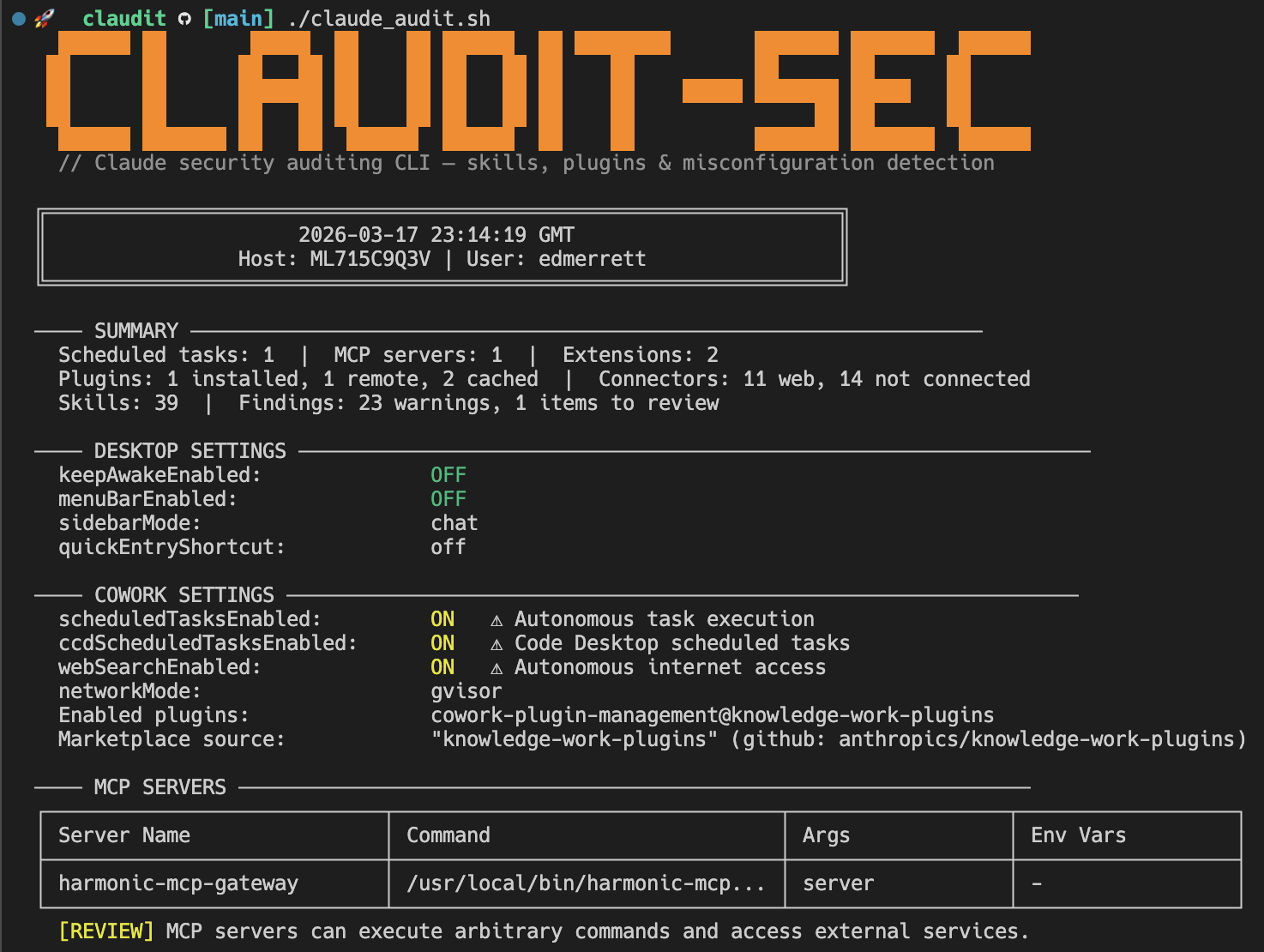
Claude Desktop introduces a new class of endpoint risk: AI agents with autonomous execution, persistent scheduled tasks, MCP server integrations, browser-control extensions, and OAuth-authenticated connectors to external services. Most of this configuration lives in JSON files scattered across multiple directories with no centralised visibility.
CLAUDIT gives you that visibility in a single command.
📝 A note on "Code": Claude Desktop includes a built-in agent coding feature called Code (visible in the app's sidebar). This is not the same as Claude Code, the standalone terminal CLI. CLAUDIT primarily audits Claude Desktop and its CoWork features. It does include a basic check of the Claude Code settings file (
~/.claude/settings.jsonon macOS,%USERPROFILE%\.claude\settings.jsonon Windows), but the focus is squarely on the Desktop app.
📋 What It Audits
| Area | What's Checked |
|---|---|
| 🖥️ Desktop Settings | keepAwakeEnabled, sidebar/menuBar preferences |
| 🤖 CoWork Settings | Scheduled tasks, web search, browser use, dispatch (mobile→desktop), network mode, egress policy, enabled plugins, marketplaces |
| 🏢 Workspaces | Multi-workspace detection, account names, session counts, org indicators (DXT-managed, org-plugins, dispatch-bridge) |
| 🔌 MCP Servers | Server names, commands, arguments, environment variable keys |
| 🧩 Extensions (DXT) | Installed extensions, signature status, dangerous tool grants |
| ⚙️ Extension Settings | Per-extension allowed directories and configuration |
| 🚦 Extension Governance | Allowlist enabled/disabled, blocklist entries |
| 📦 Plugins | Installed, remote (org-deployed), cached (downloaded) |
| 🪝 Plugin Hooks | Lifecycle hooks executing shell commands (PreToolUse, PostToolUse, Stop, etc.) |
| 🔗 Connectors | OAuth-authenticated web services, desktop integrations |
| 🎯 Skills | User-created, scheduled, session-local, and plugin skills across 9 paths |
| ⏰ Scheduled Tasks | Task names, cron expressions (with plain English translation) |
| 🔐 App Config | Network mode, extension allowlist/blocklist keys, device identifiers |
| 📲 Dispatch | Bridge state (OFF/CONFIGURED/ON), active session detection via hostLoopMode and bridge-state.json |
| 🔇 Disabled MCP Tools | Per-session tools explicitly disabled (with dangerous tool callout) |
| 🏃 Runtime State | Running processes, sleep assertions, LaunchAgents, crontab entries |
| 🍪 Cookies | Cookies and Cookies-journal presence |
📖 For a detailed breakdown of every individual check, what it means, and why it matters, see the Findings Reference.
⚡ Getting Started
Prerequisites
macOS:
| Requirement | How to check | How to install |
|---|---|---|
| 🍎 macOS | You're on a Mac | — |
| 🐚 zsh | zsh --version | Ships with macOS since Catalina |
| 🔧 jq | jq --version | brew install jq |
Windows:
| Requirement | How to check | How to install |
|---|---|---|
| 🪟 Windows 10/11 | You're on a PC | — |
| ⚡ PowerShell 5.1+ | $PSVersionTable.PSVersion | Ships with Windows 10+ |
| — | No additional dependencies | Fully self-contained |
Install & Run
macOS:
git clone https://github.com/HarmonicSecurity/claudit-sec.git
cd claudit-sec
chmod +x claude_audit.sh
./claude_audit.sh
Windows:
git clone https://github.com/HarmonicSecurity/claudit-sec.git
cd claudit-sec
powershell -ExecutionPolicy Bypass -File claude_audit.ps1
That's it. The script reads your Claude configuration and prints a colour-coded report to the terminal. It never modifies anything.
🎛️ Usage
macOS:
./claude_audit.sh [OPTIONS]

Options:
  --html [FILE]    Generate a standalone HTML report
  --json           Output structured JSON
  --user USER      Audit a specific user
  --all-users      Audit all users with Claude data (requires root)
  -q, --quiet      Only show WARN and CRITICAL findings
  --version        Print version and exit
  -h, --help       Show usage
Windows:
powershell -ExecutionPolicy Bypass -File claude_audit.ps1 [OPTIONS]

Options:
  -Html [FILE]     Generate a standalone HTML report
  -Json            Output structured JSON
  -User USER       Audit a specific user
  -AllUsers        Audit all users with Claude data (requires admin)
  -Quiet           Only show WARN and CRITICAL findings
  -Version         Print version and exit
  -Help            Show usage
Examples
macOS:
# Default: colour output in terminal
./claude_audit.sh

# Only warnings and critical findings
./claude_audit.sh -q

# Standalone HTML report
./claude_audit.sh --html

# JSON for SIEM ingestion
./claude_audit.sh --json > audit.json

# Specific user
./claude_audit.sh --user jsmith

# All users (run as root via MDM — FleetDM, Jamf, Mosyle, CrowdStrike RTR)
sudo ./claude_audit.sh
Windows:
# Default: colour output in terminal
powershell -ExecutionPolicy Bypass -File claude_audit.ps1

# Only warnings and critical findings
powershell -ExecutionPolicy Bypass -File claude_audit.ps1 -Quiet

# Standalone HTML report
powershell -ExecutionPolicy Bypass -File claude_audit.ps1 -Html

# JSON for SIEM ingestion
powershell -ExecutionPolicy Bypass -File claude_audit.ps1 -Json > audit.json

# Specific user
powershell -ExecutionPolicy Bypass -File claude_audit.ps1 -User jsmith

# All users (run as admin via MDM — Intune, CrowdStrike RTR)
powershell -ExecutionPolicy Bypass -File claude_audit.ps1 -AllUsers
💡 macOS: When run as root (uid 0), the script automatically discovers and scans all users with Claude data. No flags needed.
💡 Windows: When run as Administrator, the script can scan all users with the
-AllUsersflag. MDM tools like Intune and CrowdStrike RTR execute scripts with elevated privileges.
📊 Output Formats
🖥️ Terminal (default)
Colour-coded output with Unicode tables and severity indicators.
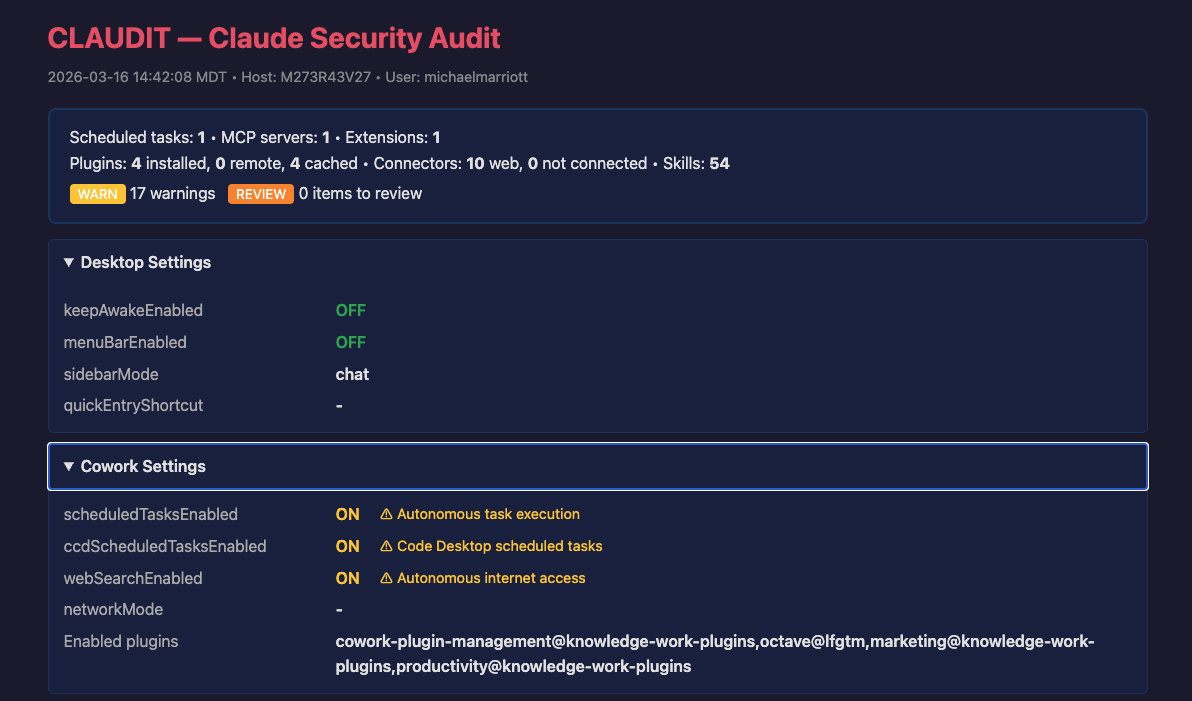
🌐 HTML (--html)
Standalone dark-themed report with collapsible sections. Created with restrictive file permissions (0600).
📄 JSON (--json)
Structured output for SIEM ingestion. Sensitive fields (OAuth tokens, API keys, secrets) are automatically redacted. Multi-user scans produce a JSON array.
🚨 Severity Levels
| Severity | Meaning |
|---|---|
| 🟠 WARN | Increases risk surface — e.g. unsigned extensions, autonomous execution enabled |
| 🟡 REVIEW | Needs human judgement — e.g. org-deployed plugins, MCP servers present |
| 🔵 INFO | Informational — e.g. Claude is running, permissions granted |
📖 Documentation
| Doc | Description |
|---|---|
| Findings Reference | Every individual check CLAUDIT performs, what it means, why it matters (risk, compliance, AI enablement), and what to do about it |
🔒 Security Properties
- Read-only — never writes to, modifies, or deletes any audited file
- No network access — all data collected from local filesystem and system commands
- Sensitive data redacted — tokens, keys, and secrets replaced with
[REDACTED]in all output formats - Minimal privileges — runs as current user; root only needed for multi-user scans
- Single file — macOS requires
jq; Windows is fully self-contained (no external dependencies) - Auditable — the entire tool is one readable script (
claude_audit.shon macOS,claude_audit.ps1on Windows)
💜 Built with Claude Code
This project is built and maintained using Claude Code. We love it. Seriously. If you're building developer tools and haven't tried it yet, you're missing out.
📄 License
Apache License 2.0 — see LICENSE for details.