Building Claude Code Using Harness Engineering
A complete reverse-engineering of Claude Code's architecture — built from a minimal agent loop to a 23-session production system.




This repository is built on top of learn-claude-code
As of early 2026, Claude Code crossed $1 billion in annualized revenue within six months of launch. It did not get there because of better prompts. It got there because Anthropic built the right harness around the right model — a streaming agent loop, a permission-governed tool dispatch system, and a context management layer that keeps the model focused across arbitrarily long sessions. That harness is fully reproducible. This repository builds it.
Architecture Overview
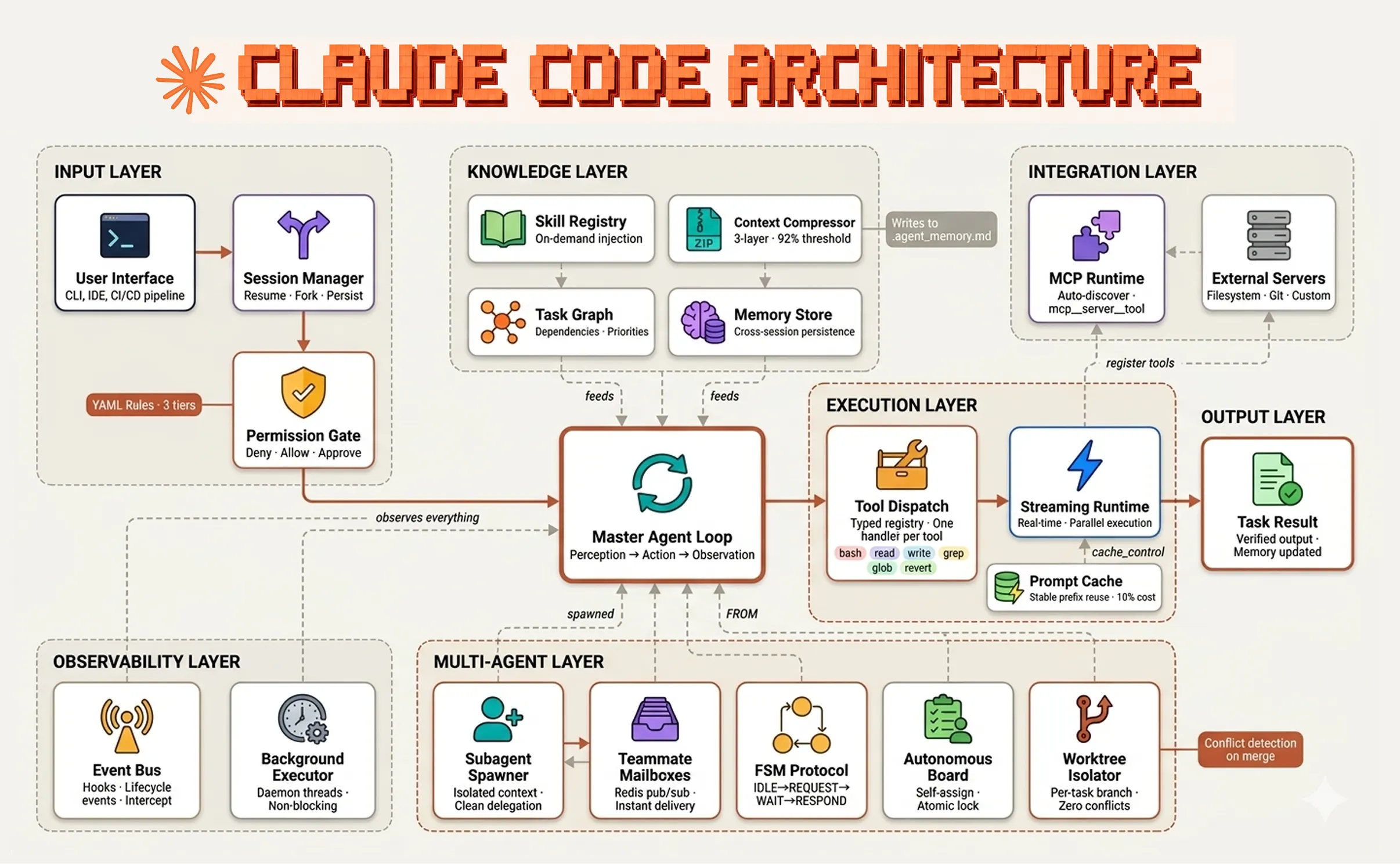
What is Harness Engineering?
Harness engineering is the discipline of building the environment that surrounds an AI model — not the model itself. The model reasons and decides. The harness executes, constrains, and connects.
Four principles define good harness engineering:
- The model is the only source of decisions — the harness never branches on model output, it only executes what the model requests
- Tools are the only interface between the model and the world — every action goes through a typed, schema-validated tool call
- Context is a managed resource — what the model sees at each turn is curated, compressed, and injected deliberately
- Permissions are declarative, not procedural — what is allowed, blocked, or requires approval lives in configuration, not code
Repository Structure
claude_code_push_this/
│
├── core.py                          # Single source of truth — all tools, dispatch, permissions
│
├── 01_perception_action_loop.py     # The minimal while loop
├── s02_tool_use.py                  # Tool dispatch map pattern
├── s03_todo_write.py                # TodoWrite planning before execution
├── s04_subagent.py                  # Subagent context isolation
│
├── s05_skill_loading.py             # On-demand skill loading
├── s06_context_compact.py           # Three-layer context compression
├── s07_task_system.py               # File-based task dependency graph
│
├── s08_background_tasks.py          # Background task execution
├── s09_agent_teams.py               # Persistent teammates with JSONL mailboxes
├── s10_team_protocols.py            # FSM team communication protocol
├── s11_autonomous_agents.py         # Autonomous task self-assignment
├── s12_worktree_task_isolation.py   # Git worktree task isolation
│
├── s13_streaming.py                 # Real-time token streaming
├── s14_tools_extended.py            # Extended tool arsenal and file snapshots
├── s15_permissions.py               # YAML rule-based permission governance
├── s16_event_bus.py                 # Event bus and lifecycle hooks
├── s17_session_management.py        # Session persistence, resume, and fork
│
├── s18_parallel_tools.py            # Parallel tool execution with asyncio.gather
├── s19_interrupts.py                # Real-time interrupt injection
├── s20_cache_optimization.py        # Prompt caching and KV cache optimisation
├── s21_mcp_runtime.py               # Official MCP runtime integration
│
├── s22_production_mailbox.py        # Redis pub/sub production mailboxes
├── s23_worktree_advanced.py         # Advanced worktree lifecycle management
│
├── config/
│   ├── permissions.yaml             # YAML permission rules for s15, s16
│   └── mcp_config.yaml              # MCP server registry for s21
│
├── skills/
│   ├── agent-builder/SKILL.md       # Harness design patterns skill
│   ├── code-review/SKILL.md         # Structured code review skill
│   └── pdf/SKILL.md                 # PDF processing skill
│
├── litellm_config.yaml              # LiteLLM proxy config for non-Anthropic models
└── requirements.txt                 # All dependencies
Quick Start
Option A — Use Anthropic Directly
# 1. Clone the repository
git clone https://github.com/FareedKhan-dev/claude-code-from-scratch.git
cd claude-code-from-scratch

# 2. Create virtual environment
python -m venv .venv
source .venv/bin/activate        # Linux/Mac
.venv\Scripts\activate           # Windows

# 3. Install dependencies
pip install -r requirements.txt

# 4. Set environment variables
cp .env.example .env
# Edit .env and add your ANTHROPIC_API_KEY and MODEL_ID
.env file:
ANTHROPIC_API_KEY=sk-ant-your-key-here
MODEL_ID=claude-sonnet-4-20250514
# 5. Run any session
python 01_perception_action_loop.py
python s03_todo_write.py
python s17_session_management.py
Option B — Use Any Other Model via LiteLLM
This repository supports any model provider through LiteLLM proxy. You can use Nebius, OpenAI, Groq, Mistral, DeepSeek, or any OpenAI-compatible provider without changing a single line of agent code.
Step 1 — Install LiteLLM:
pip install litellm[proxy]
Step 2 — Configure your provider in litellm_config.yaml:
# Example: Nebius AI
model_list:
  - model_name: my-model
    litellm_params:
      model: nebius/deepseek-ai/DeepSeek-V3.2
      api_key: os.environ/NEBIUS_API_KEY

# Example: Groq
model_list:
  - model_name: my-model
    litellm_params:
      model: groq/llama-3.3-70b-versatile
      api_key: os.environ/GROQ_API_KEY

# Example: OpenAI
model_list:
  - model_name: my-model
    litellm_params:
      model: openai/gpt-4o
      api_key: os.environ/OPENAI_API_KEY

# Example: DeepSeek
model_list:
  - model_name: my-model
    litellm_params:
      model: deepseek/deepseek-chat
      api_key: os.environ/DEEPSEEK_API_KEY
Step 3 — Start the proxy:
litellm --config litellm_config.yaml --port 4000
Step 4 — Set your .env to point at the proxy:
ANTHROPIC_BASE_URL=http://localhost:4000
ANTHROPIC_API_KEY=dummy-key-litellm-ignores-this
MODEL_ID=my-model
NEBIUS_API_KEY=your-real-provider-key-here
Step 5 — Run any session normally:
python s03_todo_write.py
The Anthropic SDK hits your LiteLLM proxy, which translates everything to your chosen provider. Zero code changes required.
The Core Foundation
Every session file imports from core.py. Nothing is duplicated across files.
from core import (
    client, MODEL, DEFAULT_SYSTEM,          # Anthropic client + config
    EXTENDED_TOOLS, EXTENDED_DISPATCH,      # Tool definitions + handlers
    run_bash, run_read, run_write,          # Sync tool implementations
    async_bash, async_read, async_write,    # Async tool implementations
    load_rules, check_permission,           # Permission governance
    stream_loop, dispatch_tools,            # Core loop helpers
)
core.py is 392 lines. Each session file is 40–150 lines. This is intentional — every session contains only its one new concept.
Phase 1 — The Core Agent Loop
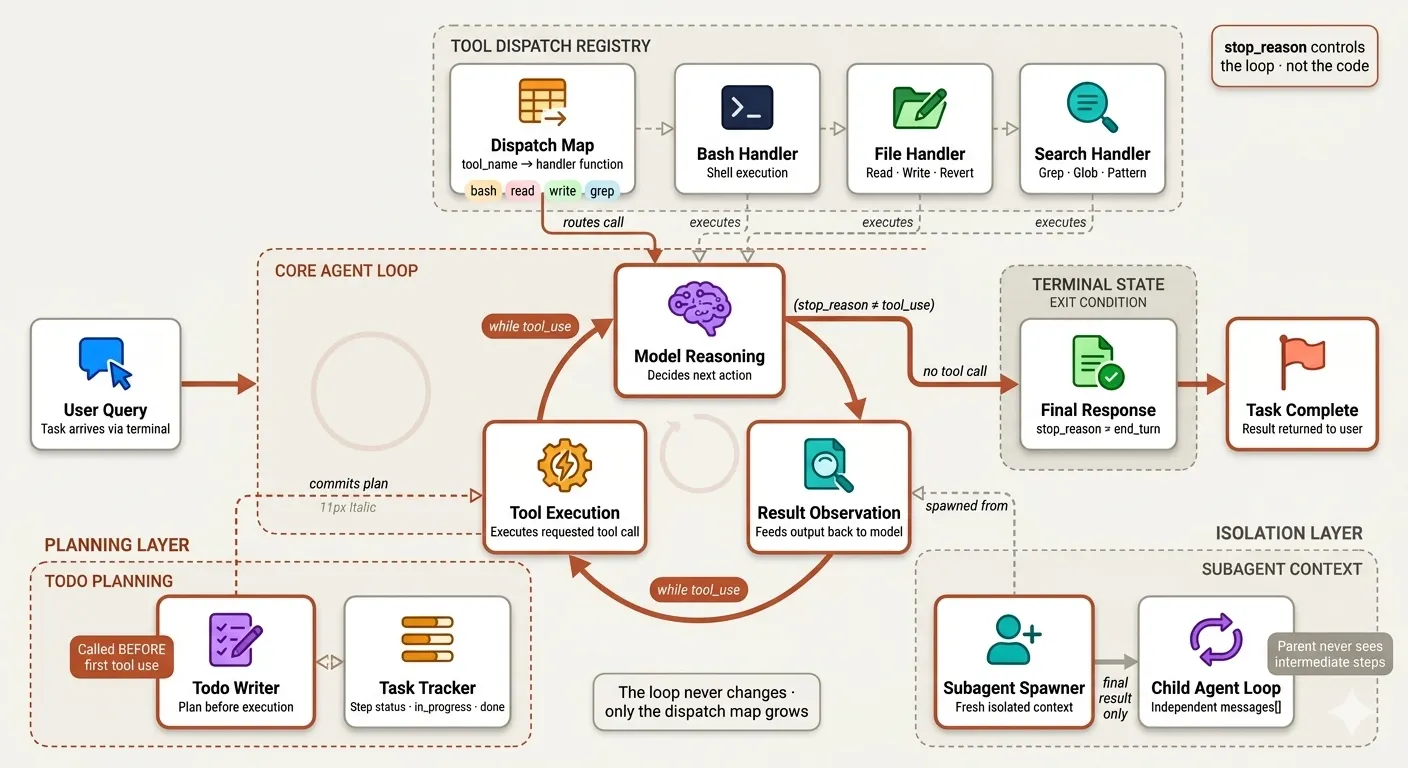
The agent loop is the single architectural primitive everything else builds on. A while loop that calls the model, observes what it wants to do, executes it, and feeds the result back. Every session in this phase adds one mechanism without ever changing the loop itself.
| File | Mechanism | Claude Code Analog |
|---|---|---|
01_perception_action_loop.py | Minimal while loop — the core pattern | nO master loop |
s02_tool_use.py | Dispatch map — tool name → handler | 18-tool registry |
s03_todo_write.py | TodoWrite — plan before execution | TodoWrite tool |
s04_subagent.py | Subagent — isolated child context | dispatch_agent tool |
python 01_perception_action_loop.py   # Start here — understand the loop
python s02_tool_use.py                # Add tool dispatch
python s03_todo_write.py              # Add planning
python s04_subagent.py                # Add context isolation
Phase 2 — Knowledge & Context Management
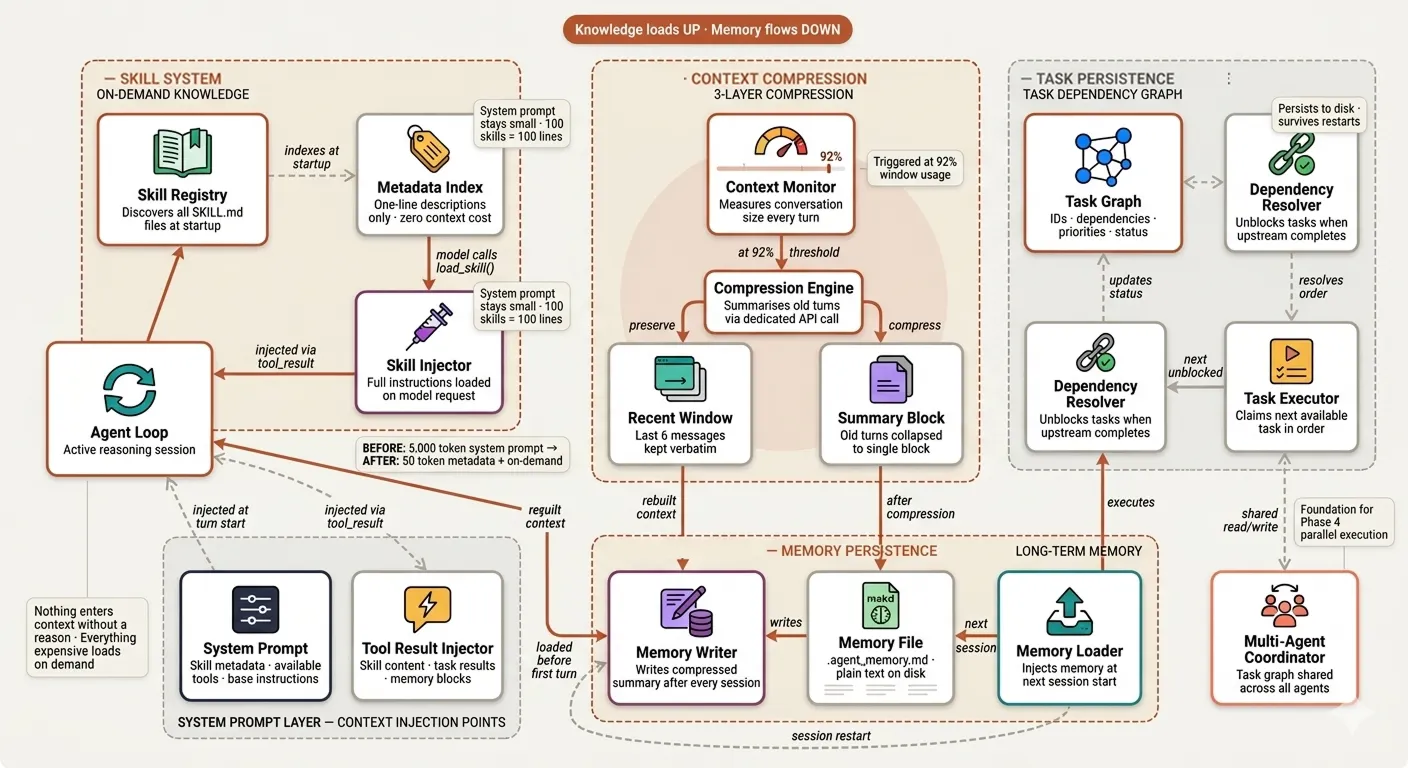
The cognitive infrastructure that moves the agent beyond single-session execution — loading domain knowledge on demand, compressing conversation history before it degrades reasoning quality, and persisting task state across restarts.
| File | Mechanism | Claude Code Analog |
|---|---|---|
s05_skill_loading.py | On-demand SKILL.md injection | Agent Skills system |
s06_context_compact.py | 3-layer compression + disk memory | Compressor wU2 at 92% |
s07_task_system.py | File-persisted dependency graph | Extended TodoWrite |
python s05_skill_loading.py           # Load skills on demand
python s06_context_compact.py         # Compress context, persist memory
python s07_task_system.py             # Task graph with dependencies
Skills available out of the box:
skills/agent-builder/   — harness design patterns and tool checklist
skills/code-review/     — structured 5-step review methodology
skills/pdf/             — library decision tree and code patterns
Phase 3 — Async Execution & Multi-Agent Teams
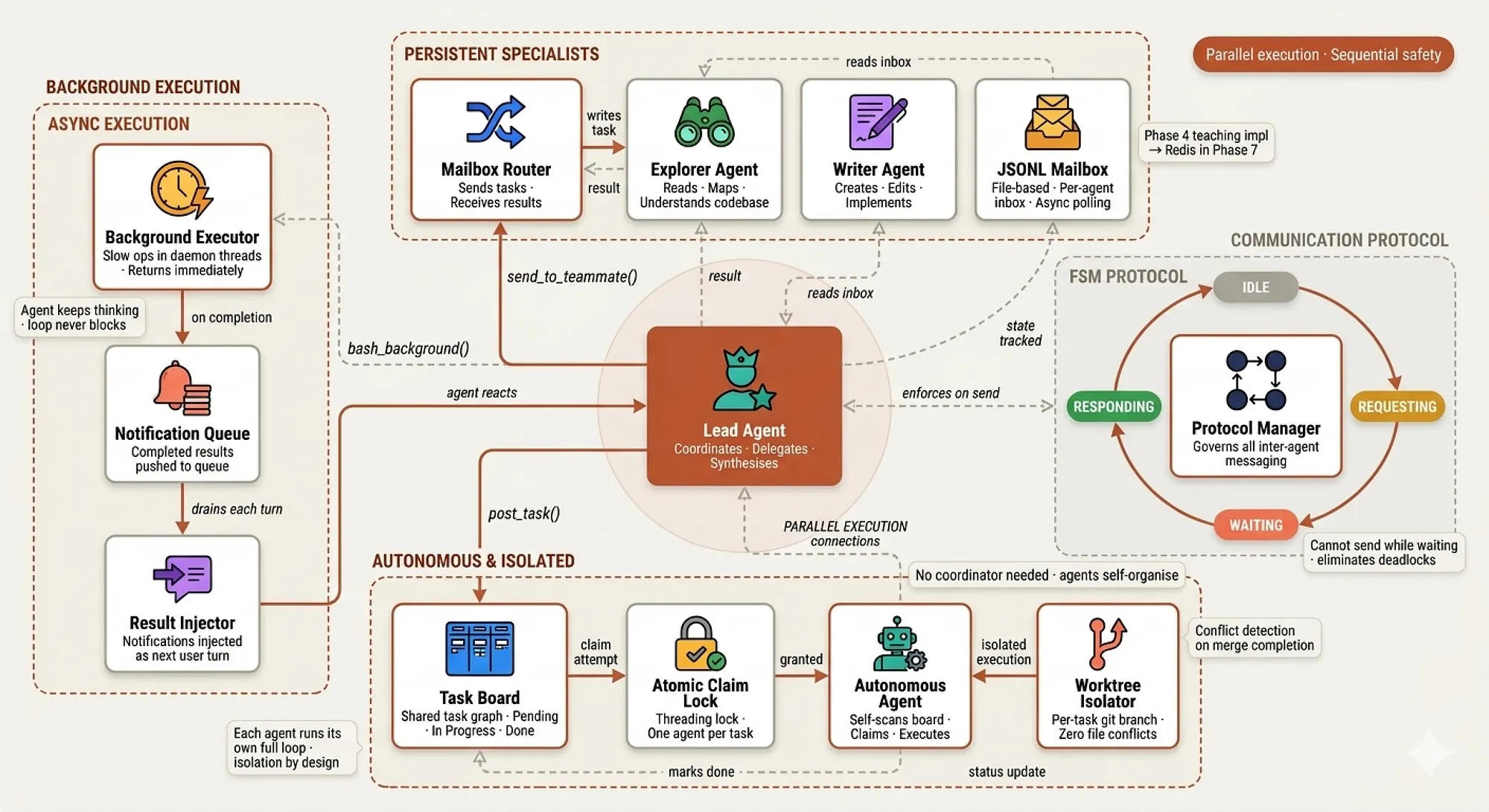
Breaking the single-agent ceiling — background execution for slow operations, persistent specialist teammates, FSM coordination protocols, autonomous task claiming, and git worktree isolation for parallel work.
| File | Mechanism | Claude Code Analog |
|---|---|---|
s08_background_tasks.py | Daemon threads + notification queue | h2A async queue |
s09_agent_teams.py | Persistent teammates + JSONL mailboxes | Parallel subagents |
s10_team_protocols.py | FSM: IDLE→REQUEST→WAIT→RESPOND | Tool-call coordination |
s11_autonomous_agents.py | Agents self-assign from task board | Beyond real CC |
s12_worktree_task_isolation.py | Git worktree per parallel task | File snapshots |
python s08_background_tasks.py        # Background execution
python s09_agent_teams.py             # Persistent specialist teammates
python s10_team_protocols.py          # FSM coordination
python s11_autonomous_agents.py       # Autonomous self-assignment
python s12_worktree_task_isolation.py # Git worktree isolation
Phase 4 — Production Hardening
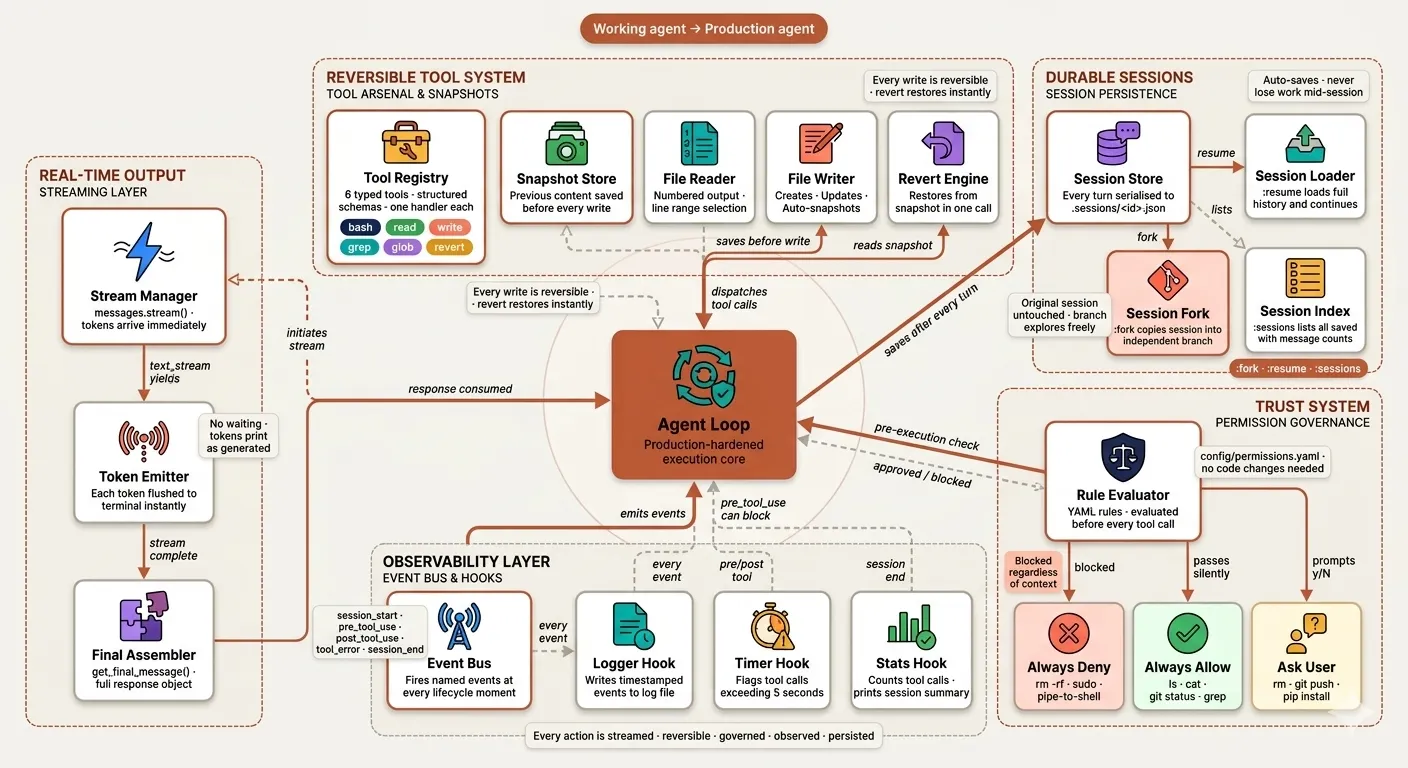
The gap between a working agent and a deployable one — streaming output, reversible file operations, declarative permission governance, lifecycle observability, and durable session persistence.
| File | Mechanism | Claude Code Analog |
|---|---|---|
s13_streaming.py | Real-time token streaming | Always-on in CC |
s14_tools_extended.py | read/write/grep/glob + revert | CC's 18-tool arsenal |
s15_permissions.py | YAML 3-tier trust system | CC permission governance |
s16_event_bus.py | Hooks on every lifecycle event | CC hooks system |
s17_session_management.py | :resume :fork :sessions | CC session persistence |
python s13_streaming.py               # Stream tokens in real time
python s14_tools_extended.py          # Extended tool arsenal
python s15_permissions.py             # Permission governance
python s16_event_bus.py               # Event bus and hooks
python s17_session_management.py      # Session persistence
Session commands in s17:
s17 >> :sessions          — list all saved sessions
s17 >> :resume <id>       — continue any previous session
s17 >> :fork <id>         — branch into independent session
s17 >> :title <text>      — rename current session
s17 >> :save              — save manually
Permission tiers in config/permissions.yaml:
always_deny:   rm -rf / · sudo · pipe-to-shell downloads
always_allow:  ls · cat · git status · grep · version checks
ask_user:      rm · git commit · pip install · .env access
Phase 5 — High-Performance Async Runtime
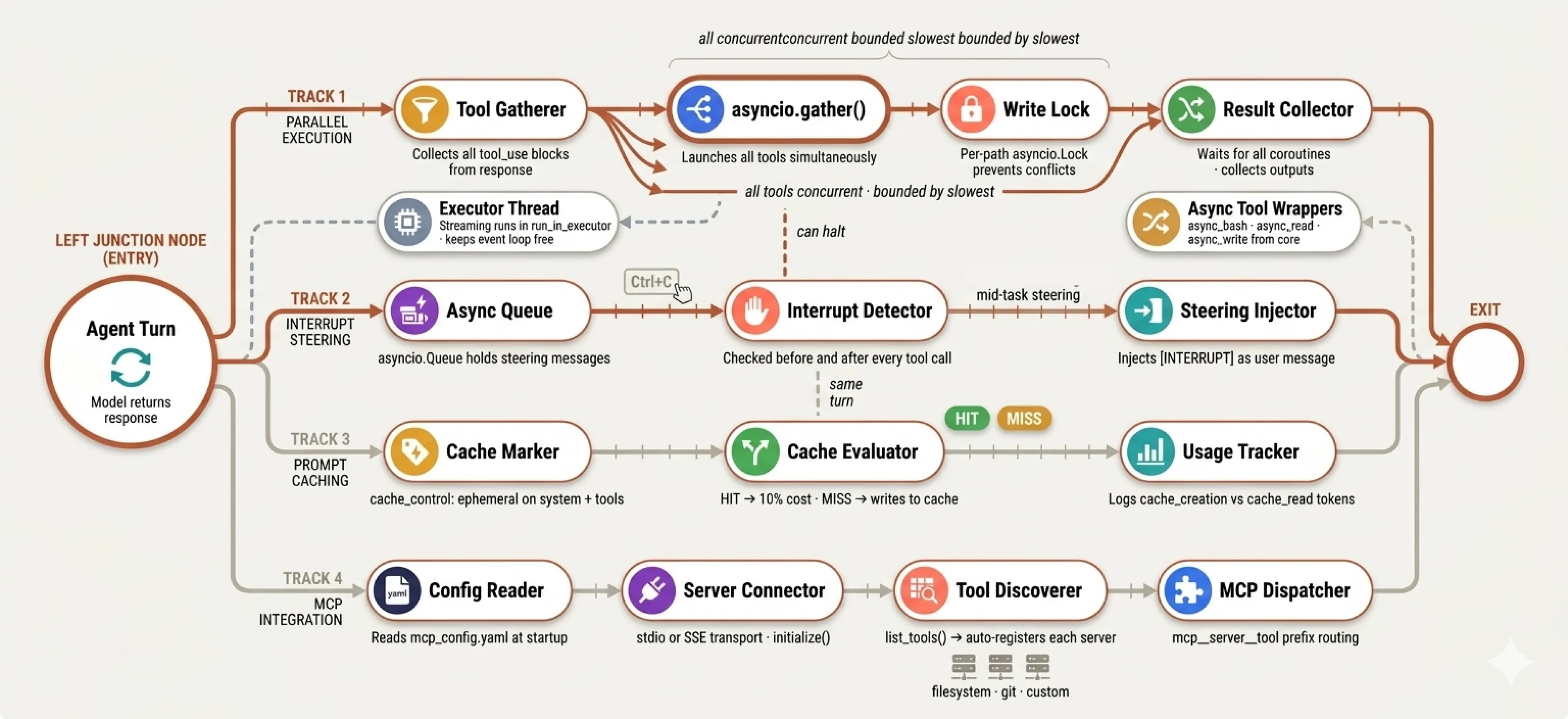
Performance and control — parallel tool execution collapses multi-tool turns from sequential to concurrent, interrupt injection gives real-time steering, prompt caching eliminates redundant token spend, and MCP integration opens the tool registry to any external server.
| File | Mechanism | Claude Code Analog |
|---|---|---|
s18_parallel_tools.py | asyncio.gather all tool calls | CC parallel execution |
s19_interrupts.py | Ctrl+C injects mid-task | h2A steering queue |
s20_cache_optimization.py | Prompt caching HIT/MISS tracking | 92% prefix reuse |
s21_mcp_runtime.py | Official MCP SDK auto-registration | CC MCP support |
python s18_parallel_tools.py          # Parallel tool execution
python s19_interrupts.py              # Real-time interrupt injection
python s20_cache_optimization.py      # Prompt caching
python s21_mcp_runtime.py             # MCP runtime
Cache output example:
[cache] MISS → 1,847 tokens written
[cache] HIT  → 1,847 tokens read (saved ~1,662 tokens)
[cache summary] 6 calls | written=1,847 | hits=5 | total saved≈8,310 tokens
Add MCP servers in config/mcp_config.yaml:
servers:
  - name: filesystem
    transport: stdio
    command: npx
    args: ["-y", "@modelcontextprotocol/server-filesystem", "."]

  - name: git
    transport: stdio
    command: uvx
    args: ["mcp-server-git"]
Phase 6 — Enterprise Upgrades
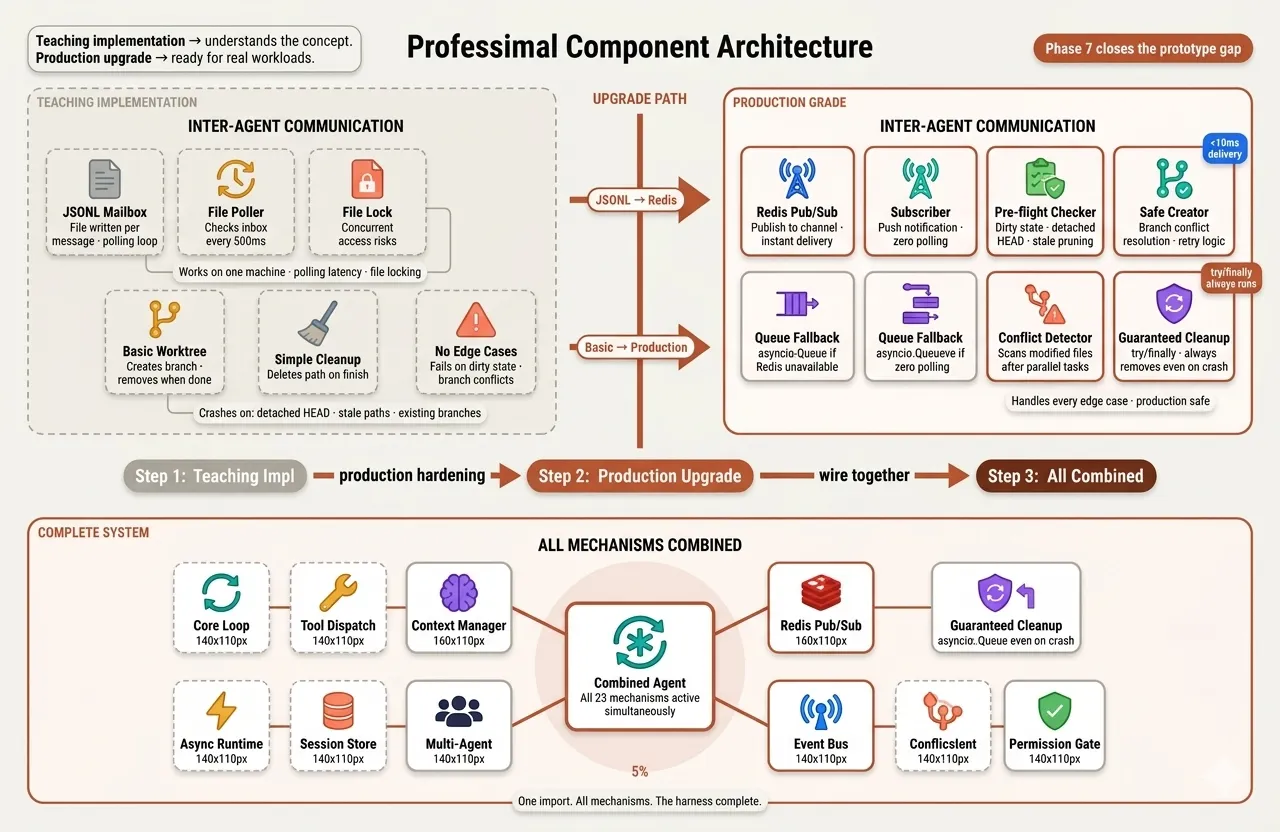
Replacing teaching implementations with production-grade alternatives — Redis pub/sub replaces JSONL mailboxes, advanced worktree lifecycle management handles every edge case, and all mechanisms combine into one deployable reference.
| File | Mechanism | Upgrades |
|---|---|---|
s22_production_mailbox.py | Redis pub/sub channels | Replaces s09 JSONL mailboxes |
s23_worktree_advanced.py | Full lifecycle management | Replaces s12 basic worktrees |
# Start Redis first
docker run -p 6379:6379 redis

python s22_production_mailbox.py      # Redis mailboxes (falls back to Queue)
python s23_worktree_advanced.py       # Advanced worktree management
s23 handles every edge case:
✓ Dirty working tree warning
✓ Stale worktree pruning
✓ Branch name conflict resolution
✓ Detached HEAD detection
✓ Parallel conflict detection
✓ Guaranteed cleanup via try/finally
How to Improve It Further
So far we have built a complete Claude Code harness from a minimal agent loop all the way to a production-grade multi-agent system with streaming, parallel execution, prompt caching, Redis mailboxes, permission governance, session persistence, and an official MCP runtime. There is still room to push it further.
- Parallel Subagent Spawning — refactor
spawn_subagentto useasyncio.gatherand dispatch three explore subagents simultaneously, exactly how Claude Code does it internally - Vector Memory Store — replace the flat markdown memory file with ChromaDB for semantic retrieval — relevant memories instead of full summary injection every session
- Fine-Grained Token Accounting — add a cost ledger that logs spend per task and per tool type to identify which operations are most expensive
- Webhook-Based Event Bus — extend the event bus to forward events to external HTTP endpoints for Slack, Datadog, or PagerDuty integration without modifying the loop
- LLM-as-a-Judge Evaluation — add an evaluation layer that scores agent outputs on accuracy, tool efficiency, and plan adherence to turn the repo into a benchmarkable system
Dependencies
pip install -r requirements.txt
| Package | Used By | Purpose |
|---|---|---|
anthropic>=0.40.0 | All sessions | Anthropic SDK |
python-dotenv>=1.0.0 | All sessions | .env loading |
colorama>=0.4.6 | All sessions | Windows ANSI color |
PyYAML>=6.0.1 | s15, s16, s21 | YAML config parsing |
mcp>=1.0.0 | s21 | Official MCP SDK |
redis>=5.0.0 | s22 | Redis pub/sub (falls back to Queue) |
litellm[proxy]>=1.50.0 | Optional | Non-Anthropic model support |
Read the Full Blog
Every phase in this repository is explained in depth in the companion blog post — with theory, architecture diagrams, full code walkthroughs, and real execution outputs showing the agent working on actual tasks.
