🛫 Fli - Flight Search MCP Server and Library

A powerful Python library that provides programmatic access to Google Flights data with an elegant CLI interface. Search flights, find the best deals, and filter results with ease.
🚀 What makes
flispecial? Unlike other flight search libraries that rely on web scraping, Fli directly interacts with Google Flights' API through reverse engineering. This means:
- Fast: Direct API access means faster, more reliable results
- Zero Scraping: No HTML parsing, no browser automation, just pure API interaction
- Reliable: Less prone to breaking from UI changes
- Modular: Extensible architecture for easy customization and integration
MCP Server
pipx install flights

# Run the MCP server on STDIO
fli-mcp

# Run the MCP server over HTTP (streamable)
fli-mcp-http  # serves at http://127.0.0.1:8000/mcp/
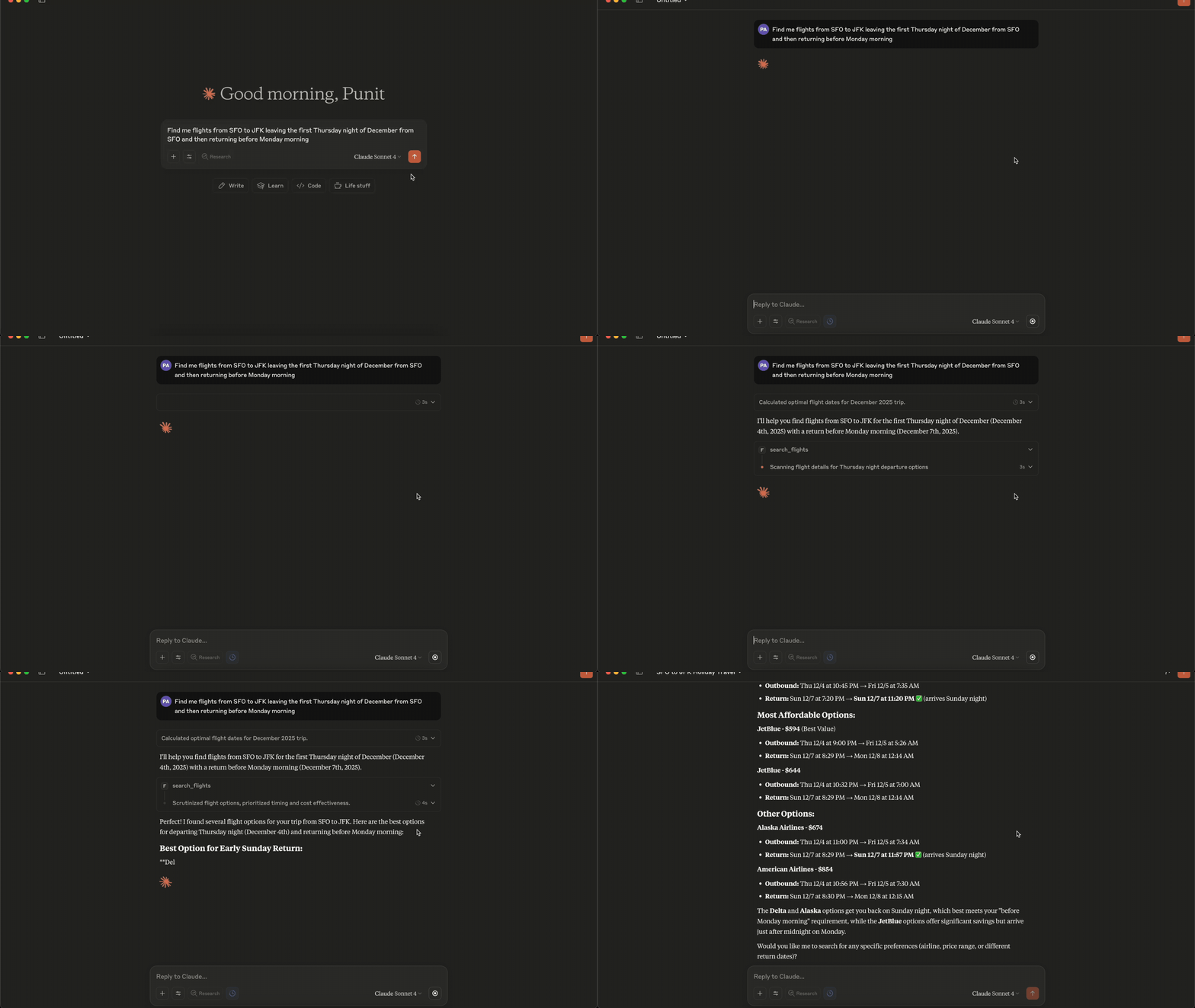
Connecting to Claude Desktop
{
  "mcpServers": {
    "fli": {
      "command": "/Users/<user>/.local/bin/fli-mcp"
    }
  }
}
Note: Replace
<user>with your actual username. You can also find the path to the MCP server by runningwhich fli-mcpin your terminal.
MCP Tools Available
The MCP server provides two main tools:
| Tool | Description |
|---|---|
search_flights | Search for flights on a specific date with detailed filters |
search_dates | Find the cheapest travel dates across a flexible date range |
search_flights Parameters
| Parameter | Type | Description |
|---|---|---|
origin | string | Departure airport IATA code(s) — comma-separated for multi |
destination | string | Arrival airport IATA code(s) — comma-separated for multi |
departure_date | string | Travel date in YYYY-MM-DD format |
return_date | string | Return date for round trips (optional) |
cabin_class | string | ECONOMY, PREMIUM_ECONOMY, BUSINESS, or FIRST |
max_stops | string | ANY, NON_STOP, ONE_STOP, or TWO_PLUS_STOPS |
departure_window | string | Time window in 'HH-HH' format (e.g., '6-20') |
airlines | list | Filter by airline codes (e.g., ['BA', 'AA']) |
exclude_airlines | list | Airline IATA codes to exclude (e.g., ['DL', 'B6']) |
alliance | list | Restrict to alliances: ONEWORLD, SKYTEAM, STAR_ALLIANCE |
exclude_alliance | list | Alliance names to exclude from results |
min_layover | int | Minimum layover duration in minutes (multi-stop only) |
max_layover | int | Maximum layover duration in minutes (multi-stop only) |
currency | string | ISO 4217 code (e.g. 'EUR', 'JPY') — flows to curr= param |
language | string | BCP-47 language code (e.g. 'en-GB') — flows to hl= param |
country | string | ISO 3166-1 alpha-2 country code (e.g. 'GB') for gl= param |
sort_by | string | CHEAPEST, DURATION, DEPARTURE_TIME, or ARRIVAL_TIME |
passengers | int | Number of adult passengers |
search_dates Parameters
| Parameter | Type | Description |
|---|---|---|
origin | string | Departure airport IATA code(s) — comma-separated for multi |
destination | string | Arrival airport IATA code(s) — comma-separated for multi |
start_date | string | Start of date range in YYYY-MM-DD format |
end_date | string | End of date range in YYYY-MM-DD format |
trip_duration | int | Trip duration in days (for round-trips) |
is_round_trip | bool | Whether to search for round-trip flights |
cabin_class | string | ECONOMY, PREMIUM_ECONOMY, BUSINESS, or FIRST |
max_stops | string | ANY, NON_STOP, ONE_STOP, or TWO_PLUS_STOPS |
departure_window | string | Time window in 'HH-HH' format (e.g., '6-20') |
airlines | list | Filter by airline codes (e.g., ['BA', 'AA']) |
exclude_airlines | list | Airline IATA codes to exclude |
alliance | list | Restrict to alliances: ONEWORLD, SKYTEAM, STAR_ALLIANCE |
exclude_alliance | list | Alliance names to exclude |
min_layover | int | Minimum layover duration in minutes |
max_layover | int | Maximum layover duration in minutes |
currency | string | ISO 4217 currency code (e.g. 'EUR', 'JPY') |
language | string | BCP-47 language code (e.g. 'en-GB') |
country | string | ISO 3166-1 alpha-2 country code (e.g. 'GB') |
sort_by_price | bool | Sort results by price (lowest first) |
passengers | int | Number of adult passengers |
Quick Start
pip install flights
# Install using pipx (recommended for CLI)
pipx install flights

# Get started with CLI
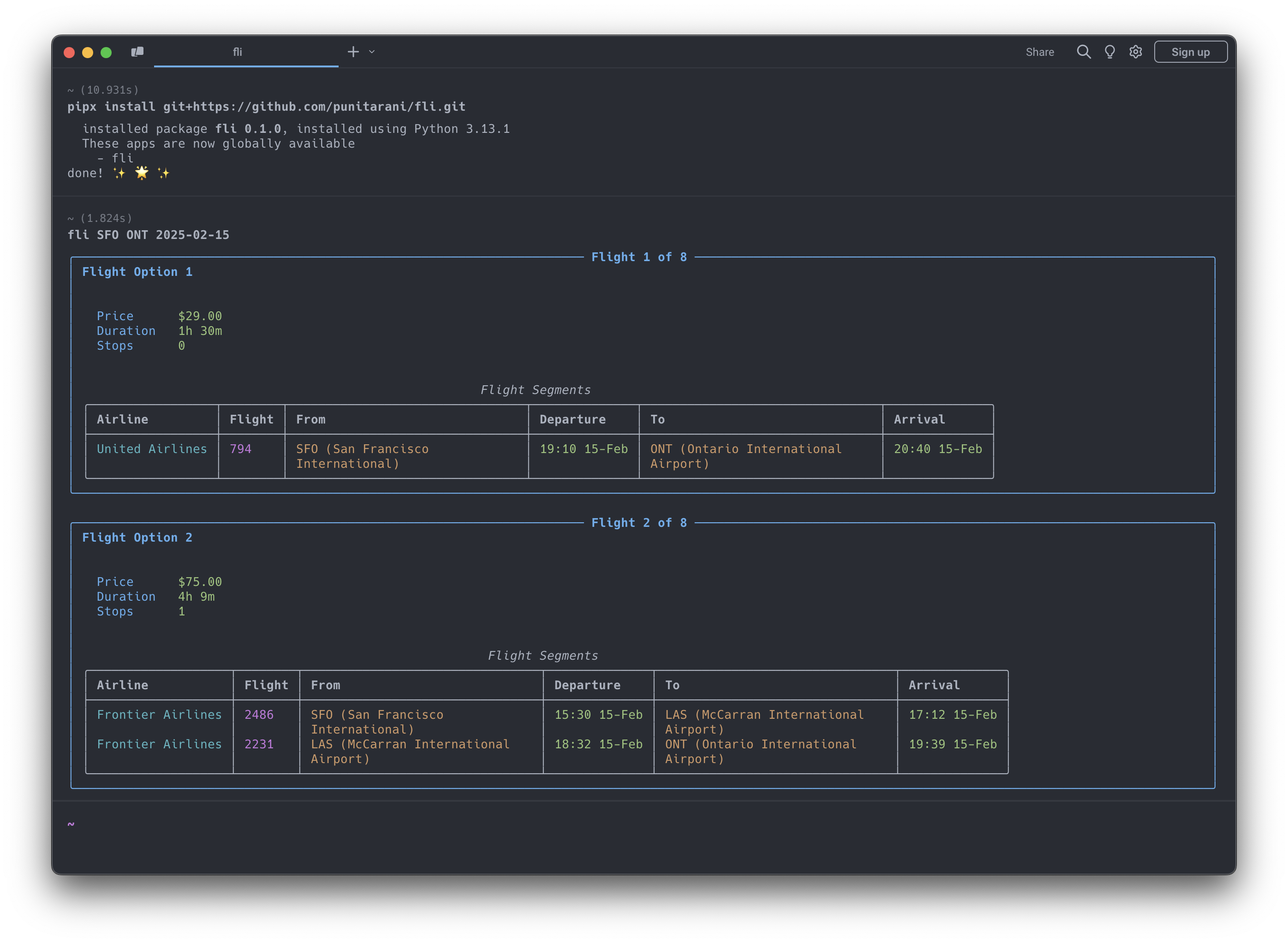
fli --help
Features
-
🔍 Powerful Search
- One-way flight searches
- Multi-city flight searches
- Flexible departure times
- Multi-airline support
- Cabin class selection
- Stop preferences
- Custom result sorting
-
💺 Cabin Classes
- Economy
- Premium Economy
- Business
- First
-
🎯 Smart Sorting
- Price
- Duration
- Departure Time
- Arrival Time
-
🛡️ Built-in Protection
- Rate limiting
- Automatic retries
- Comprehensive error handling
- Input validation
CLI Usage
Search for Flights
# Basic flight search
fli flights JFK LHR 2026-10-25

# Advanced search with filters
fli flights JFK LHR 2026-10-25 \
    --time 6-20 \             # Departure time window (6 AM - 8 PM)
    --airlines BA,KL \        # Airlines (British Airways, KLM)
    --class BUSINESS \        # Cabin class
    --stops NON_STOP \        # Non-stop flights only
    --sort DURATION           # Sort by duration

# Alliance + exclude + locale (May-2026 filter additions)
fli flights JFK LHR 2026-10-25 \
    --alliance ONEWORLD \
    --exclude-airlines AA \
    --min-layover 90 \
    --max-layover 360 \
    --currency EUR --language en-GB --country GB
⚠️ Experimental
--format jsonis experimental. The JSON schema may change while the machine-readable CLI contract settles.# Return machine-readable flight results fli flights JFK LHR 2026-10-25 --format json
Find Cheapest Dates
# Basic date search
fli dates JFK LHR

# Advanced search with date range
fli dates JFK LHR \
    --from 2026-01-01 \
    --to 2026-02-01 \
    --monday --friday      # Only Mondays and Fridays
⚠️ Experimental
--format jsonis experimental for date searches as well.# Return machine-readable date search results fli dates JFK LHR --from 2026-01-01 --to 2026-02-01 --format json
Multi-city Search
# Two-leg multi-city trip
fli multi --leg SEA,HKG,2026-12-26 --leg PEK,SEA,2027-01-02

# Three-leg multi-city trip with filters
fli multi \
    -l SEA,NRT,2026-12-26 \
    -l NRT,HKG,2026-12-30 \
    -l HKG,SEA,2027-01-05 \
    --class BUSINESS \
    --stops 0
CLI Options
Flights Command (fli flights)
| Option | Description | Example |
|---|---|---|
--return, -r | Return date | 2026-10-30 |
--time, -t | Departure time window | 6-20 |
--airlines, -a | Airline IATA codes | BA,KL |
--exclude-airlines, -A | Airline IATA codes to exclude | DL,B6 |
--alliance | Restrict to alliance(s) | ONEWORLD, SKYTEAM |
--exclude-alliance | Alliance(s) to exclude | STAR_ALLIANCE |
--min-layover | Minimum layover (minutes) | 90 |
--max-layover | Maximum layover (minutes) | 360 |
--currency | ISO 4217 currency code | EUR, JPY |
--language | BCP-47 language code (Google hl=) | en-GB |
--country | ISO 3166-1 alpha-2 country (gl=) | GB |
--class, -c | Cabin class | ECONOMY, BUSINESS |
--stops, -s | Maximum stops | NON_STOP, ONE_STOP |
--sort, -o | Sort results by | CHEAPEST, DURATION |
--format | Output format | text, json |
Dates Command (fli dates)
| Option | Description | Example |
|---|---|---|
--from | Start date | 2026-01-01 |
--to | End date | 2026-02-01 |
--duration, -d | Trip duration in days | 3 |
--round, -R | Round-trip search | (flag) |
--airlines, -a | Airline IATA codes | BA,KL |
--exclude-airlines, -A | Airline IATA codes to exclude | DL,B6 |
--alliance | Restrict to alliance(s) | ONEWORLD |
--exclude-alliance | Alliance(s) to exclude | STAR_ALLIANCE |
--min-layover | Minimum layover (minutes) | 90 |
--max-layover | Maximum layover (minutes) | 360 |
--currency | ISO 4217 currency code | EUR, JPY |
--language | BCP-47 language code | en-GB |
--country | ISO 3166-1 alpha-2 country | GB |
--class, -c | Cabin class | ECONOMY, BUSINESS |
--stops, -s | Maximum stops | NON_STOP, ONE_STOP |
--time | Departure time window | 6-20 |
--sort | Sort by price | (flag) |
--[day] | Day filters | --monday, --friday |
--format | Output format | text, json |
Multi Command (fli multi)
| Option | Description | Example |
|---|---|---|
--leg, -l | Flight leg (ORIGIN,DEST,DATE format) | SEA,HKG,2026-12-26 |
--time, -t | Departure time window | 6-20 |
--airlines, -a | Airline IATA codes | DL CX |
--class, -c | Cabin class | ECONOMY, BUSINESS |
--stops, -s | Maximum stops | NON_STOP, ONE_STOP |
--sort, -o | Sort results by | CHEAPEST, DURATION |
MCP Server Integration
Fli includes a Model Context Protocol (MCP) server that allows AI assistants like Claude to search for flights directly. This enables natural language flight search through conversation.
Running the MCP Server
# Run the MCP server on STDIO
fli-mcp

# Or with uv (for development)
uv run fli-mcp

# Or with make (for development)
make mcp

# Run the MCP server over HTTP (streamable)
fli-mcp-http  # serves at http://127.0.0.1:8000/mcp/
Claude Desktop Configuration
To use the flight search capabilities in Claude Desktop, add this configuration to your claude_desktop_config.json:
Location: ~/Library/Application Support/Claude/claude_desktop_config.json (macOS)
{
  "mcpServers": {
    "flight-search": {
      "command": "fli-mcp",
      "args": []
    }
  }
}
After adding this configuration:
- Restart Claude Desktop
- You can now ask Claude to search for flights naturally:
- "Find flights from JFK to LAX on December 25th"
- "What are the cheapest dates to fly from NYC to London in January?"
- "Search for business class flights from SFO to NRT with no stops"
Python API Usage
Basic Search Example
from datetime import datetime, timedelta
from fli.models import (
    Airport,
    PassengerInfo,
    SeatType,
    MaxStops,
    SortBy,
    FlightSearchFilters,
    FlightSegment
)
from fli.search import SearchFlights

# Create search filters
filters = FlightSearchFilters(
    passenger_info=PassengerInfo(adults=1),
    flight_segments=[
        FlightSegment(
            departure_airport=[[Airport.JFK, 0]],
            arrival_airport=[[Airport.LAX, 0]],
            travel_date=(datetime.now() + timedelta(days=30)).strftime("%Y-%m-%d"),
        )
    ],
    seat_type=SeatType.ECONOMY,
    stops=MaxStops.NON_STOP,
    sort_by=SortBy.CHEAPEST,
)

# Search flights
search = SearchFlights()
flights = search.search(filters)

# Process results
for flight in flights:
    print(f"💰 Price: ${flight.price}")
    print(f"⏱️ Duration: {flight.duration} minutes")
    print(f"✈️ Stops: {flight.stops}")

    for leg in flight.legs:
        print(f"\n🛫 Flight: {leg.airline.value} {leg.flight_number}")
        print(f"📍 From: {leg.departure_airport.value} at {leg.departure_datetime}")
        print(f"📍 To: {leg.arrival_airport.value} at {leg.arrival_datetime}")
Running Examples
Runnable examples live in examples/python/:
# Run examples with uv (recommended)
uv run python examples/python/basic_one_way_search.py
uv run python examples/python/round_trip_search.py
uv run python examples/python/date_range_search.py

# Or install dependencies first, then run directly
pip install pydantic curl_cffi httpx
python examples/python/basic_one_way_search.py
Available Examples:
basic_one_way_search.py- Simple one-way flight searchround_trip_search.py- Round-trip flight bookingdate_range_search.py- Find cheapest datesmulti_city_search.py- Multi-city itinerary across several legsadvanced_filters_search.py- Alliances, airline exclusions, layovers, localecomplex_flight_search.py- Advanced filtering and multi-passengertime_restrictions_search.py- Time-based filteringdate_search_with_preferences.py- Weekend filteringprice_tracking.py- Price monitoring over timeerror_handling_with_retries.py- Robust error handlingresult_processing.py- Data analysis with pandascomplex_round_trip_validation.py- Advanced round-trip with validationadvanced_date_search_validation.py- Complex date search with filtering
Examples
Examples are organized by language, with parallel scripts so you can compare the two APIs:
- Python —
examples/python/ - TypeScript —
examples/typescript/
# Python
uv run python examples/python/complex_flight_search.py

# TypeScript (from examples/typescript, after `bun install`)
bun run multi_city_search.ts
Example Categories:
- Basic Usage: One-way, round-trip, date searches
- Advanced Filtering: Time restrictions, airlines, alliances, seat classes, locale
- Data Analysis: Price tracking, result processing with pandas
- Error Handling: Retry logic, robust error management
- Complex Scenarios: Multi-city, multi-passenger, validation, business rules
Each example is self-contained — change the airports, dates, and filters at the top of the script to fit your search.
TypeScript / JavaScript
Fli is also available as a 1:1 TypeScript port, published to npm as
fli-js. Same models, same filter encoding,
same direct-API approach.
bun add fli-js # or: npm install fli-js
import { Airport, FlightSearchFilters, FlightSegment, SearchFlights, SeatType } from "fli-js";

const inDays = (n: number) => new Date(Date.now() + n * 86_400_000).toISOString().slice(0, 10);

const filters = new FlightSearchFilters({
  passenger_info: { adults: 1, children: 0, infants_in_seat: 0, infants_on_lap: 0 },
  flight_segments: [
    new FlightSegment({
      departure_airport: [[[Airport.JFK, 0]]],
      arrival_airport: [[[Airport.LAX, 0]]],
      travel_date: inDays(30),
    }),
  ],
  seat_type: SeatType.ECONOMY,
});

const results = await new SearchFlights().search(filters, { currency: "USD" });
The TypeScript source lives in fli-js/; see the
TypeScript Quick Start
for the full guide.
Development
# Clone the repository
git clone https://github.com/punitarani/fli.git
cd fli

# Install dependencies with uv
uv sync --all-extras

# Run tests
uv run pytest

# Run linting
uv run ruff check .
uv run ruff format .

# Build documentation
uv run mkdocs serve

# Or use the Makefile for common tasks
make install-all  # Install all dependencies
make test         # Run tests
make lint         # Check code style
make format       # Format code
Docker Development
# Build the devcontainer
docker build -t fli-dev -f .devcontainer/Dockerfile .

# Run CI inside the container
docker run --rm fli-dev make lint test-all

# Or run lint and tests separately
docker run --rm fli-dev make lint
docker run --rm fli-dev make test-all
Running CI Locally with act
To run GitHub Actions locally, install act:
brew install act

# Run CI locally (lint + tests on Python 3.10-3.13)
make ci

# Or run CI inside Docker (no local act installation needed)
make ci-docker
Contributing
Contributions are welcome! Please feel free to submit a Pull Request.
License
This project is licensed under the MIT License — see the LICENSE file for details.