Grok-Desktop v1.2.5
Description
Grok-Desktop is an Electron-based desktop application for Windows 10/11 and Linux that wraps grok.com, providing desktop-application-like access to Grok with real-time API usage monitoring, multi-tab support, and seamless authentication for xAI, Google, and Apple accounts.
Screenshot
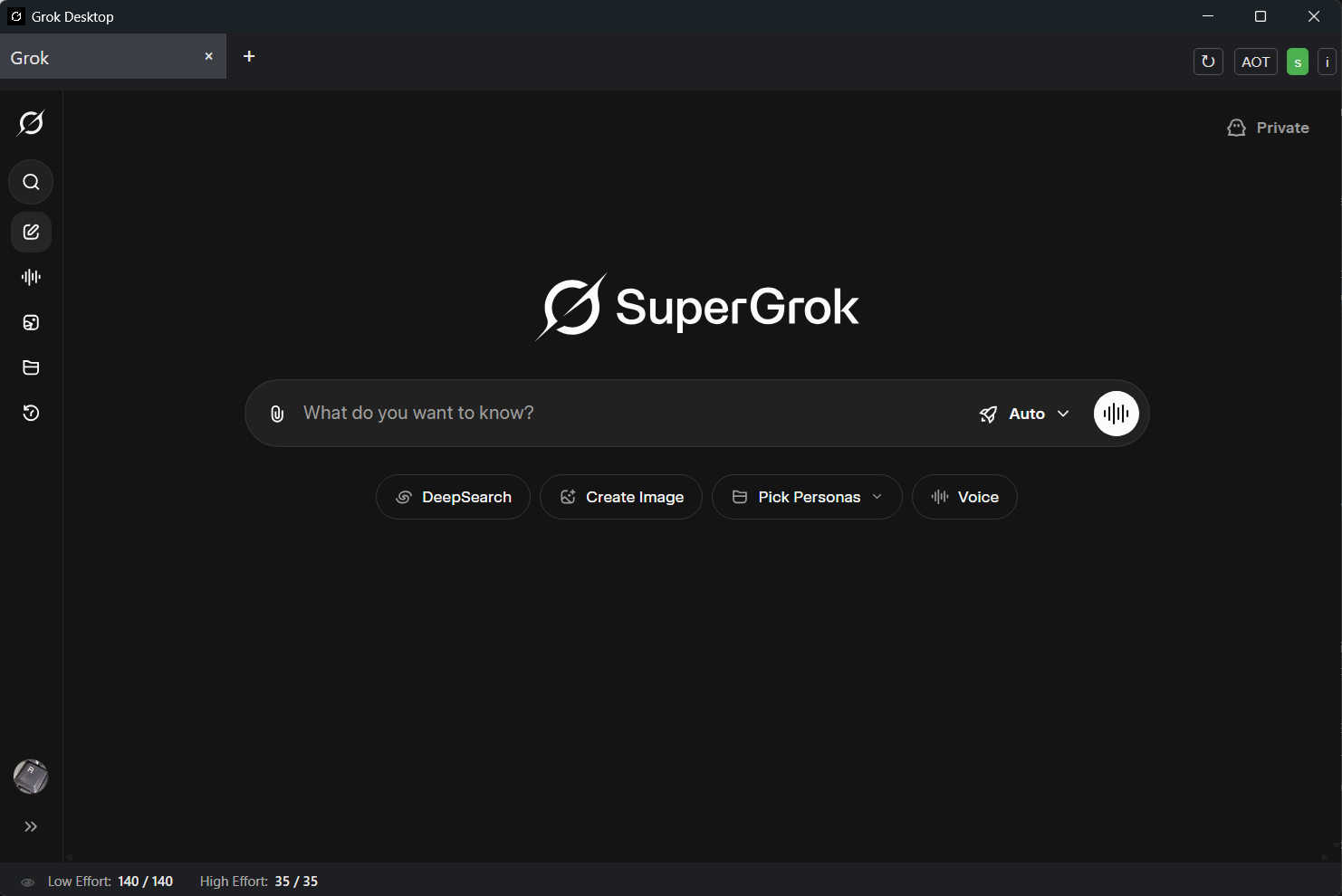
Features
-
Desktop application wrapper for grok.com
-
Tabs functionality for multiple Grok conversations
-
Real-time Usage Monitoring - Track your Grok usage limits:
-
Low Effort: Basic query limits and remaining tokens
-
High Effort: Advanced feature usage tracking
-
Grok 4 Heavy: Specialized model usage limits
-
Refill Timer: Shows when limits reset
-
Keyboard shortcuts:
-
Ctrl+T: Open a new tab -
Ctrl+Tab/Ctrl+Shift+Tab: Cycle through open tabs (next/previous) -
Mouse-wheel-scroll: Scroll open tabs when they are overflowing on the tab bar -
Ctrl+Mouse-wheel-scroll: Cycle through open tabs (next/previous) -
Ctrl+R: Reload the active tab -
Ctrl+I: Show information/about dialog -
Authentication support for xAI, Google, and Apple accounts
-
Clean interface with no menu bar for distraction-free usage
-
Always-on-top function with cross-platform support (Windows & Linux)
-
Dark/Light mode support with system theme detection
-
Grok speech mode support
-
Enhanced security with domain validation and OAuth protection
Download
Windows
-
Grok-Desktop_Installer-v1.2.5.exe - Windows installer (EXE)
-
Grok-Desktop_Installer-v1.2.5.msi - Windows installer (MSI)
-
Grok-Desktop_Portable-v1.2.5.exe - Portable Windows executable
-
Grok-Desktop_Windows-v1.2.5.zip - Windows ZIP archive
Linux
-
Grok-Desktop-v1.2.5.deb - Debian/Ubuntu package
-
Grok-Desktop-v1.2.5.rpm - RPM package (RHEL/Rocky Linux/Fedora)
-
Grok-Desktop_Linux-v1.2.5.tar.gz - Linux tar.gz archive
-
Grok-Desktop_Linux-v1.2.5.7z - Linux 7z archive
System Requirements
For Using the Application
-
Operating System: Windows 10/11 or Linux (Rocky Linux 9/10, RHEL 9, Ubuntu, Fedora, etc.)
-
Internet connection for accessing grok.com
-
Grok account (sign up in-app or use Google/Apple/xAI authentication)
-
Linux AOT (Always-on-Top) requirement: Install
wmctrlfor Always-on-Top functionality: -
Rocky Linux/RHEL/Fedora:
sudo dnf install wmctrl -
Ubuntu/Debian:
sudo apt install wmctrl
For Building from Source
-
Operating System: Windows 10/11 or Linux
-
Node.js: LTS version (20.x recommended)
-
Internet connection for downloading dependencies
Project Structure
Grok-Desktop/
├── src/                    # Main Electron application code
│   ├── main.js            # Main Electron process
│   ├── preload.js         # Preload script for renderer security
│   ├── renderer.js        # Renderer process code
│   ├── custom-tabs.js     # Custom tabs implementation
│   ├── grok.ico           # Windows application icon
│   └── grok.png           # Linux application icon
├── assets/                # Static assets
│   ├── icon.png
│   └── icon.svg
├── build-resources/       # Build configuration and resources
│   ├── icons/            # Application icons for different sizes
│   ├── after-install.sh  # Post-installation script
│   ├── after-remove.sh   # Post-removal script
│   └── com.grok.desktop.metainfo.xml  # App metadata for Linux
├── index.html            # Main application HTML
├── styles.css            # Application styles
├── about.html            # About dialog HTML
├── package.json          # Node.js dependencies and build config
├── build.bat             # Windows build script
├── build-linux.sh        # Linux build script
├── CHANGELOG.md          # Version history and changes
├── LINUX_BUILD_GUIDE.md  # Detailed Linux build instructions
├── new_features.md       # Security features documentation
└── README.md            # This file
<<<<<<< HEAD
Build Grok-Desktop
-
Install Node.js from nodejs.org.
-
Clone this repository or download the files.
-
Install dependencies if needed:
npm install -
Build using npm scripts:
-
Directory build (unpacked):
npm run build-dir -
Portable executable:
npm run build-portable -
Full installers (NSIS + MSI):
npm run build-installer
Notes:
-
These scripts use
npx electron-builder@latest(no global install required). -
All build outputs are written to the
builddirectory.
Usage
-
After building, install
Grok-DesktopwithGrok-Desktop_Installer-v1.2.3.exefrom thebuilddirectory -
Launch
Grok-Desktopfrom the Start Menu -
Log in via
grok.com, using Google, Apple, or xAI authentication as needed. -
Use the + button in the top toolbar (or Ctrl+T) to add new tabs.
-
Click the AOT button in the top right to toggle always-on-top functionality.
-
Use keyboard shortcuts to work faster:
-
Ctrl+T: Open a new tab
-
Ctrl+Tab / Ctrl+Shift+Tab: Cycle through open tabs (next/previous)
-
Ctrl+R: Reload the currently active tab
-
Ctrl+I: Show information/about dialog
Keyboard Shortcuts
-
Ctrl+T: Open a new tab
-
Ctrl+Tab: Switch to the next tab
-
Ctrl+Shift+Tab: Switch to the previous tab
-
Ctrl+R: Reload the active tab (does not reload the entire app window)
-
Ctrl+I: Show information/about dialog =======
Building from Source
Prerequisites
-
Install Node.js LTS (20.x recommended) from nodejs.org
-
Clone this repository:
git clone https://github.com/AnRkey/Grok-Desktop.git -
Navigate to the project:
cd Grok-Desktop -
Install dependencies:
npm install
Build Commands
development
Windows
# Full installer (NSIS + MSI)
npm run build-installer

# Portable executable
npm run build-portable

# Directory build (unpacked)
npm run build-dir
Linux
# RPM + AppImage packages
npm run build-linux

# RPM only for RHEL/Rocky Linux
npm run build-rhel

# All platforms (Windows + Linux)
npm run build-all
Notes:
-
All scripts use
npx electron-builder@latest(no global installation required) -
Build outputs are written to the
build/directory -
For detailed Linux build instructions, see LINUX_BUILD_GUIDE.md
Installation
Windows
-
Download and run
Grok-Desktop_Installer-v1.2.5.exefrom the releases page -
Follow the installation wizard
-
Launch "Grok Desktop" from the Start Menu
Linux
RPM Package (Recommended for RHEL/Rocky Linux)
cd build
sudo dnf install ./Grok-Desktop-v1.2.5.x86_64.rpm
Usage Guide
Getting Started
-
Launch Grok-Desktop from your applications menu or desktop shortcut
-
Sign in to grok.com using your xAI, Google, or Apple account
-
The application opens with your first Grok tab
Interface Overview
-
Tab Bar: Create and switch between multiple Grok conversations
-
Navigation Controls: Back/forward buttons, reload, and URL bar
-
Toolbar Buttons:
-
+: Create new tab
-
↻: Reload current tab
-
AOT: Toggle always-on-top mode
-
s: Toggle API usage statistics display
-
👁: Toggle Grok-4-Heavy stats visibility (eye icon)
-
i: Show about dialog
API Usage Monitoring
Grok-Desktop includes real-time monitoring of your Grok API usage limits:
Usage Statistics Display
When enabled (click the s button), a status bar appears at the bottom showing:
-
Low Effort:
remaining / total- Basic query limits -
High Effort:
remaining / total- Advanced feature usage -
Grok 4 Heavy:
remaining / total- Specialized model limits -
Refill: Time until limits reset (when applicable)
Visual Indicators
-
Green: Normal usage levels
-
Orange: Warning (≤25% remaining)
-
Red: Critical (≤10% remaining)
Features
-
Auto-refresh: Updates every 5 seconds when active
-
Persistent settings: Remembers your display preferences
-
Toggle controls: Hide/show specific statistics as needed
-
Login detection: Shows "Login required" when not authenticated
Thanks to Joshua Wang for his code.
Keyboard Shortcuts
Shortcut Action
Ctrl+T
Open a new tab
Ctrl+Tab
Switch to next tab
Ctrl+Shift+Tab
Switch to previous tab
Ctrl+R
Reload active tab
Ctrl+I
Show information/about dialog
Always-on-Top Feature
-
Click the AOT button to toggle always-on-top mode
-
The button turns green when active
-
On Linux, requires
wmctrlpackage (automatically handled)
Support & Troubleshooting
Getting Help
Need help? Found a bug? Have a feature request?

When Reporting Issues
Please include:
-
Operating System & Version: e.g., "Rocky Linux 10 with GNOME 49"
-
Application Version: Found in Help → About dialog
-
Steps to Reproduce: Detailed step-by-step instructions
-
Expected vs Actual Behavior: What should happen vs what actually happens
-
Screenshots: If applicable, especially for UI issues
-
Error Messages: Co