
项目简介
这是一个非常有趣的项目,以跳一跳游戏式的交互与呈现,帮助零基础用户在移动端(先以平板为主)简单、快速地搭建属于自己的 Agent,把抽象的流程变成可点、可跳跃的步骤,极大降低上手门槛。
本项目把传统平面 workflow 转换为空间化、游戏化流程,通过跳一跳这个载体更动态地演示 Agent 的运行过程。
在这里,你看不到错综复杂的连线与箭头;只需按压屏幕、操控棋子一次次跳跃,就能直观地体会 Agent 工作流是如何一环接一环向前推进的。
介绍视频
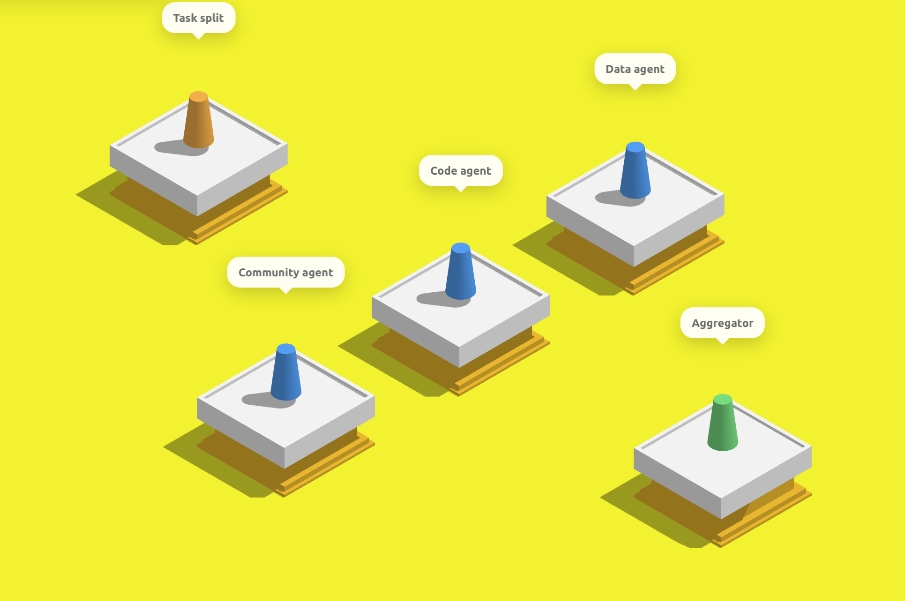
点击上方封面图,在 GitHub 视频播放页直接观看介绍视频。
微信接入
Jumping Agent 现已支持微信作为正式接入渠道。在前端完成 Agent 构建后,可通过扫码绑定微信账号,直接在微信中与你的 Agent 对话。
使用流程
- 在跳一跳式前端中构建并完成 Agent。
- 切换到 微信 标签页,发起扫码登录。
- 使用微信扫描二维码完成账号绑定。
- 在微信中发送消息 — 连接器会将消息转发至编排服务,运行对应 Agent workspace,并将回复发回微信。
相关模块
Frontend/— 微信标签页、二维码展示与登录状态轮询。backend/orchestrator.py— 微信相关 API,以及 Weixin bridge 的自动启动。apps/weixin-main/— 微信 iLink 连接器(扫码登录、账号存储、长轮询、文本/媒体消息)。
默认服务地址:
- Frontend:
http://localhost:6301 - back_agent:
http://localhost:8000/chat - backend / Orchestrator:
http://localhost:8001 - Weixin bridge:
http://localhost:8787
项目结构
Jumping-Agent/
├── Frontend/                 # 跳一跳式 Agent 构建界面(Three.js)
│   ├── js/game/              # 游戏逻辑、流程模板、构建客户端
│   ├── css/                  # 样式
│   └── res/                  # 3D 模型与图标
├── agent_builder/            # Agent 骨架与模板
│   ├── flow_template/        # 流程模板(顺序、路由、并行等)
│   ├── agent_template/       # Agent 类模板
│   ├── project_template/       # 项目脚手架
│   └── config_creator/       # 配置生成
├── back_agent/               # 用于代码补全与改写的 ReAct Agent
│   ├── agent/                # ReAct 核心
│   ├── workflow/             # Agent 工作流执行
│   ├── tools/                # 本地代码工具(读/写/运行项目)
│   └── skill/                # 单/多 Agent 构建技能提示词
├── backend/                  # 编排与运行时服务
│   ├── orchestrator.py       # 主 API:构建、聊天、微信桥接
│   ├── workspace/            # 生成的 Agent 项目工作区
│   ├── tools/                # 后端 MCP 工具(网页、图像、会话等)
│   ├── memory/               # 会话与长期记忆
│   └── agent_manager/        # Agent ID 管理
├── apps/
│   └── weixin-main/          # 微信 iLink 连接器
│       └── src/bridge/       # 与 orchestrator 通信的桥接服务
├── tools/                    # 共享 TypeScript 工具实现
└── assets/                   # 产品 Logo
flowchart TB
    subgraph UI["Frontend(跳一跳构建界面)"]
        FE[Three.js 跳台 UI]
        WXTab[微信扫码登录]
    end

    subgraph Orchestration["backend / orchestrator.py"]
        ORCH[编排 API]
        WS[workspace/]
    end

    subgraph Build["agent_builder + back_agent"]
        AB[agent_builder 模板]
        BA[back_agent 代码补全]
    end

    subgraph WeChat["apps/weixin-main"]
        BR[Weixin bridge :8787]
    end

    subgraph Runtime["生成的 Agent workspace"]
        AG[Agent/*.py]
        PR[project_runtime.py]
    end

    FE -->|创建 / 构建| ORCH
    WXTab -->|/weixin/login/*| ORCH
    ORCH --> AB
    ORCH --> BA
    ORCH --> WS
    ORCH -->|自动启动| BR
    BR -->|/chat| ORCH
    WS --> AG
    WS --> PR
    BR <-->|消息| UserWeChat[微信用户]
架构说明
Frontend/:跳一跳式 Agent 构建界面,负责 workflow 展示、节点配置、聊天入口,以及微信扫码绑定。agent_builder/:Agent 骨架与模板,包括流程模板、Agent 模板、项目模板和配置生成逻辑。back_agent/:读取骨架代码,并结合用户在前端输入的需求,对 Agent 进行补全、改写与落地。backend/:编排服务。orchestrator.py负责串联前端请求、动态加载agent_builder、生成 Agent workspace、通过本地 HTTP 调用back_agent,并提供微信接入 API。apps/weixin-main/:微信 iLink 连接器,提供扫码登录、账号持久化、消息轮询与回复/媒体发送能力。
Quick Start
Prerequisites
- Git
- Python 3.11+
- Node.js 18+
- npm
Clone
git clone https://github.com/answeryt/Jumping-Agent-platform.git
cd Jumping-Agent-platform
Install Frontend Dependencies
cd Frontend
npm install
cd ..
Install Backend Dependencies
建议先创建虚拟环境:
python -m venv .venv
Windows:
.venv\Scripts\activate
macOS / Linux:
source .venv/bin/activate
安装 Python 依赖:
python -m pip install "fastapi" "uvicorn[standard]" "pydantic" "openai"
安装微信连接器依赖:
cd apps/weixin-main
npm install
cd ../..
Configure API Key
back_agent/config/model_config.toml 默认读取 OPENAI_API_KEY 环境变量。你可以直接设置环境变量,也可以使用项目内置脚本写入 .env。
方式一:使用环境变量。
Windows PowerShell:
$env:OPENAI_API_KEY="your_api_key_here"
macOS / Linux:
export OPENAI_API_KEY="your_api_key_here"
方式二:使用项目脚本。
python backend/set_agent_api_key.py
脚本会要求你输入 API Key,并更新 back_agent/.env 以及已生成 workspace 的 .env。
Start Services
需要打开 3 个终端,并都在仓库根目录下执行。
终端 A:启动 back_agent。
cd back_agent
python -m uvicorn api:app --host 0.0.0.0 --port 8000
终端 B:启动 backend / Orchestrator(默认会自动启动 Weixin bridge)。
cd backend
python -m uvicorn orchestrator:app --host 0.0.0.0 --port 8001
终端 C:启动前端。
cd Frontend
npm run server -- --host 0.0.0.0 --port 6301 --allowed-hosts all
打开浏览器访问:
http://localhost:6301
接入微信
- 在前端构建 Agent,并等待构建完成。
- 切换到 微信 标签页。
- 点击获取二维码,使用微信扫码。
- 绑定成功后,在微信中向该账号发送消息即可与 Agent 对话。
iPad / 局域网访问
如果希望在 iPad 上访问前端,需要确保 iPad 和电脑处于同一局域网,并使用电脑的局域网 IP 访问。
Windows 查看 IP:
ipconfig
macOS / Linux 查看 IP:
ifconfig
找到当前网卡的 IPv4 地址,例如 192.168.x.x,然后在 iPad 浏览器中访问:
http://192.168.x.x:6301
CLI 计划
当前仓库可以通过上面的源码命令运行。为了让 GitHub 用户更容易上手,推荐后续把这些步骤封装成 CLI,例如:
agent-jump setup
agent-jump config set OPENAI_API_KEY
agent-jump dev
理想情况下:
agent-jump setup安装前端和后端依赖。agent-jump config set OPENAI_API_KEY写入模型 API Key。agent-jump dev同时启动 back_agent、backend(含 Weixin bridge)和 Frontend。
在 CLI 正式实现前,请使用 Quick Start 中的手动启动方式。
致谢与说明
本项目由我个人独立开发。受限于个人精力和能力,当前版本仍有不少不足,例如:Agent Workflow 目前仅提供 7 种模板、跳台编排与最终构建流程尚不够稳定等。我会持续迭代完善。
若您愿意一起把项目做得更好,欢迎提交 Issue 或 PR。或者您可以直接联系我:answeryt@qq.com。中国朋友可以通过微信联系我:answerYTAarun
也期待更多小白能用它发挥想象力,搭建属于自己的 Agent。