KanVibe
Keyboard-first Kanban workspace for AI coding agents
KanVibe keeps AI coding work out of scattered terminal tabs. Track branch-based tasks on a real-time Kanban board, open each task's tmux/zellij session in the browser or desktop app, and let Claude Code, Gemini CLI, Codex CLI, and OpenCode hooks move tasks through the workflow automatically.
Use shortcuts for project filters, task search, notifications, task detail panels, and common task actions without losing terminal focus.

Buying me a coffee is nice, but honestly? A contribution would make my day even more. :)
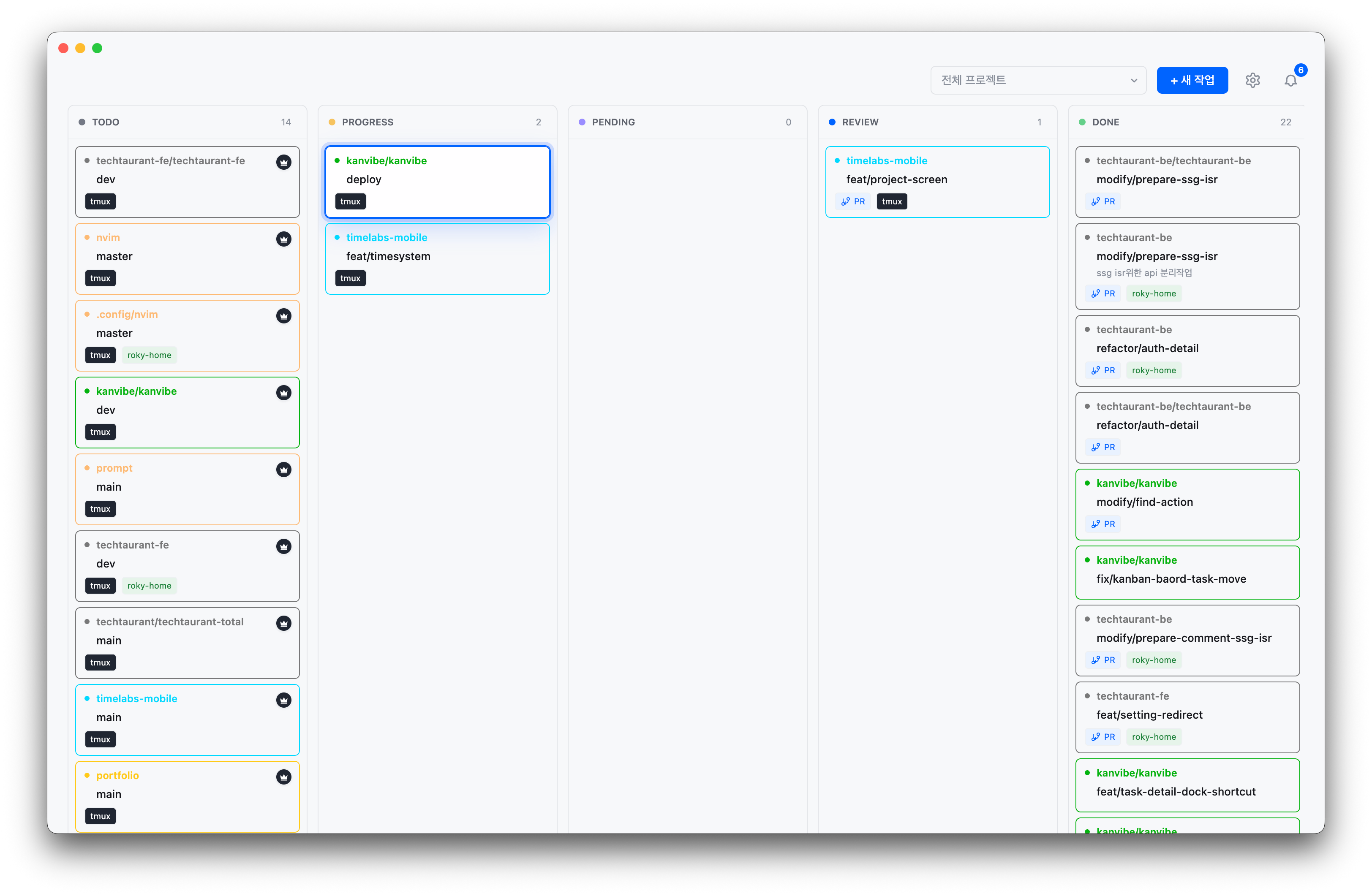
Main Kanban board |
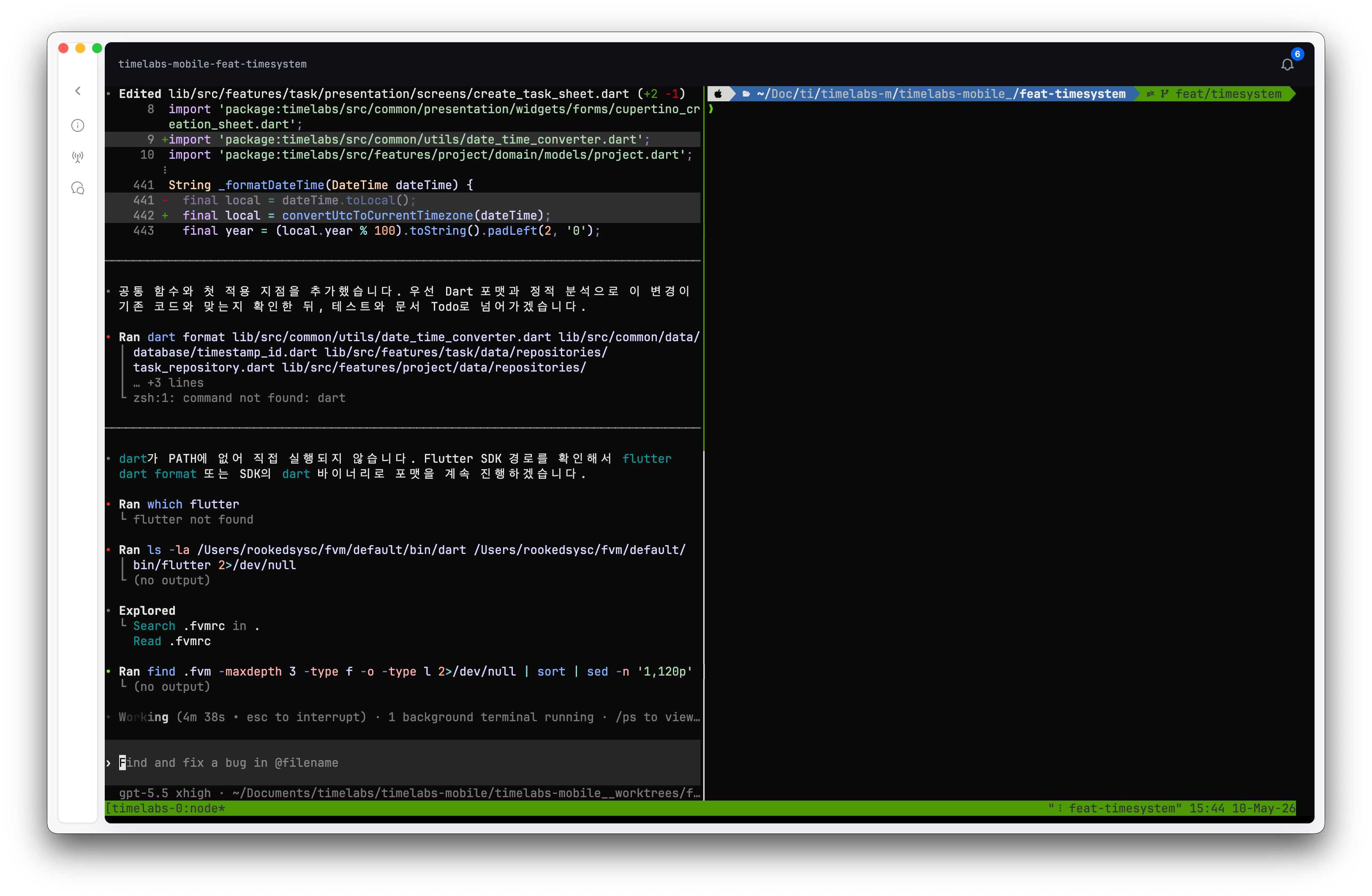
Task detail workspace |
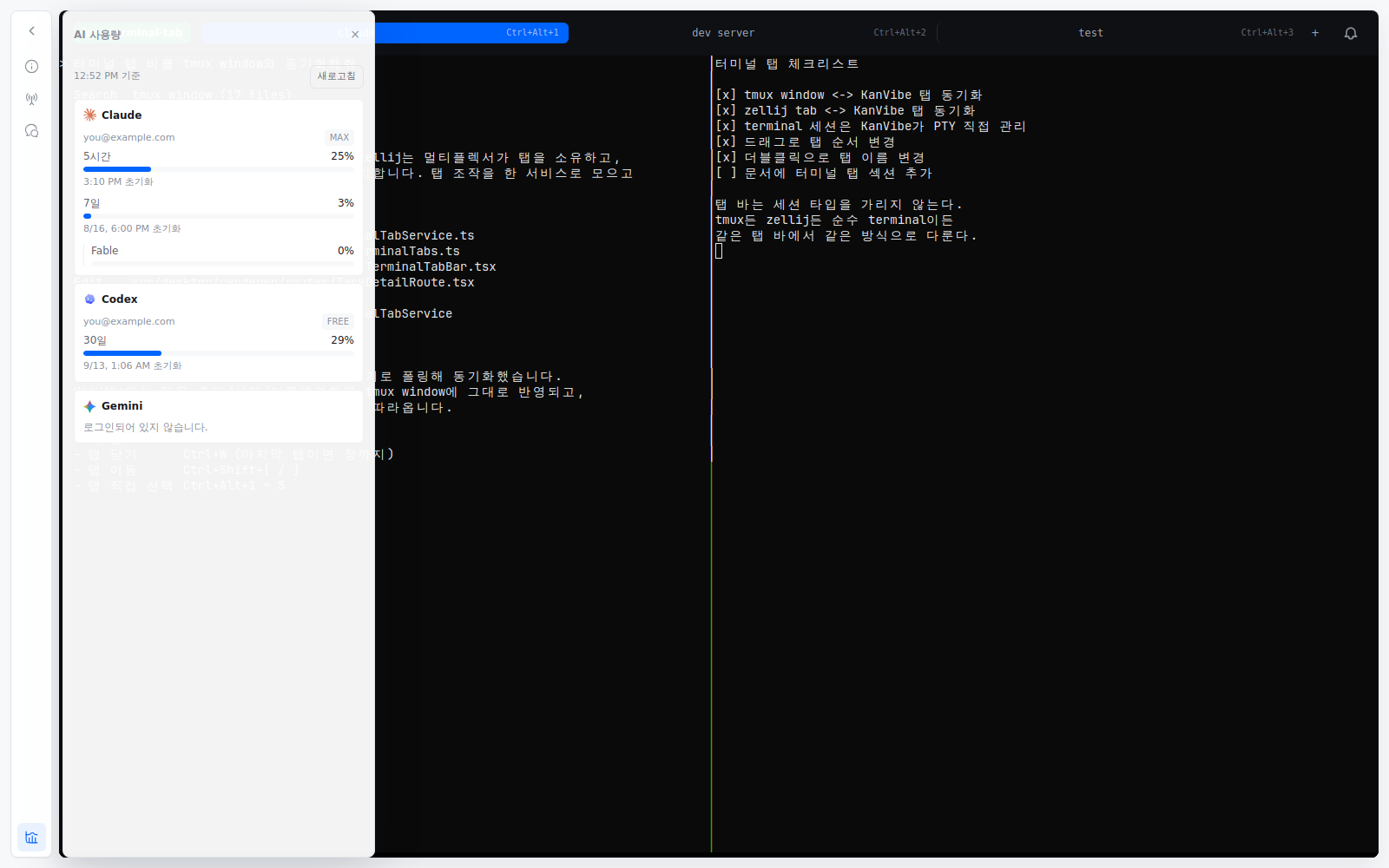
AI usage — remaining quota per account, without leaving the terminal Press Cmd/Ctrl+0 on a task detail page, or click the bottom dock icon. Every card names the account and plan it belongs to, and Claude's per-model weekly limits sit under the weekly total they draw from.
| |
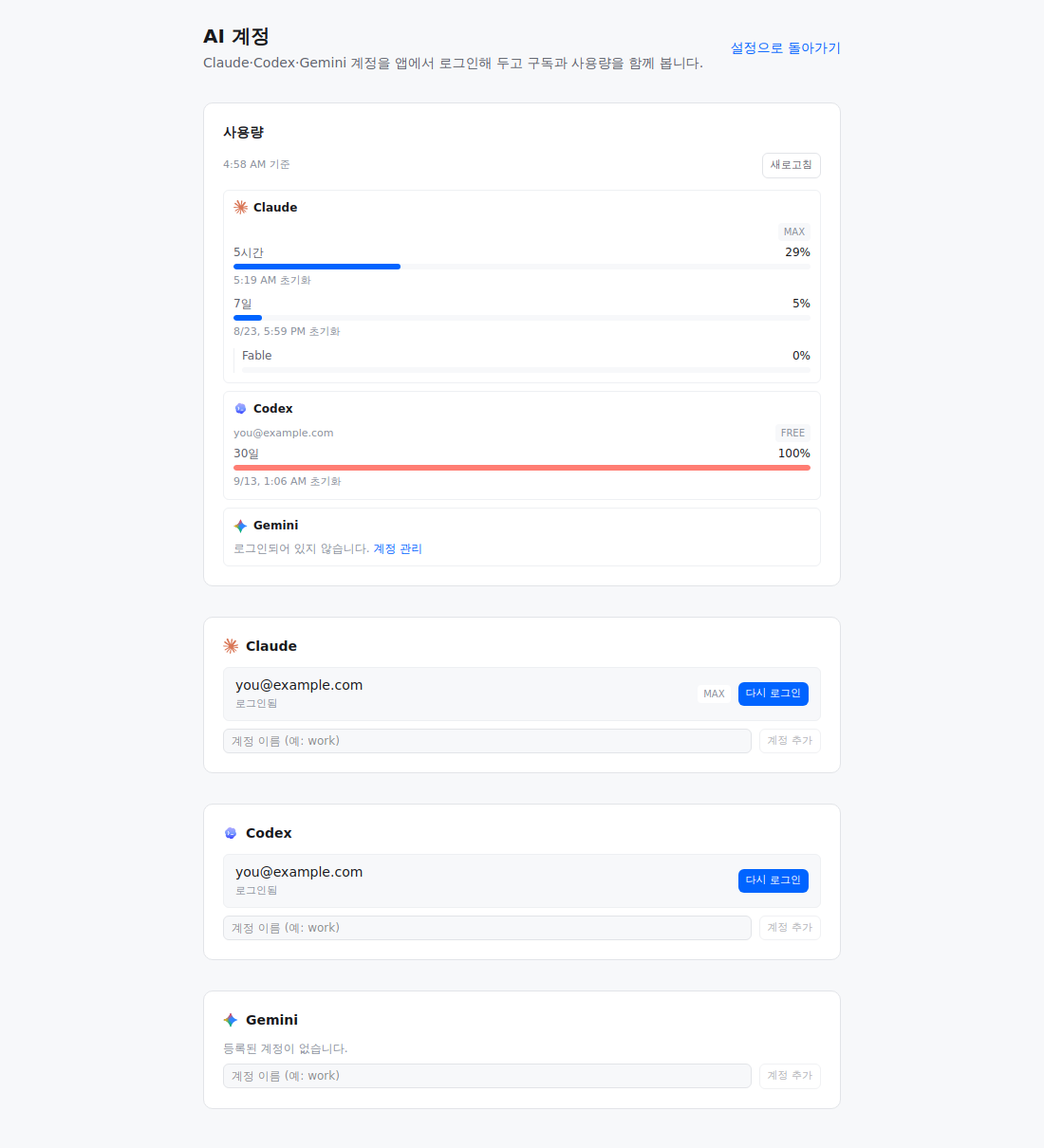
AI accounts — sign in once, in the app, and keep every account visible Open it from Settings → AI accounts. Each provider lists the accounts it found with their sign-in state and plan tier, and remaining usage sits on the same screen. Signing in runs that CLI's own sign-in command in an in-app terminal, so an expired account never sends you back to a terminal. |
Key Workflows
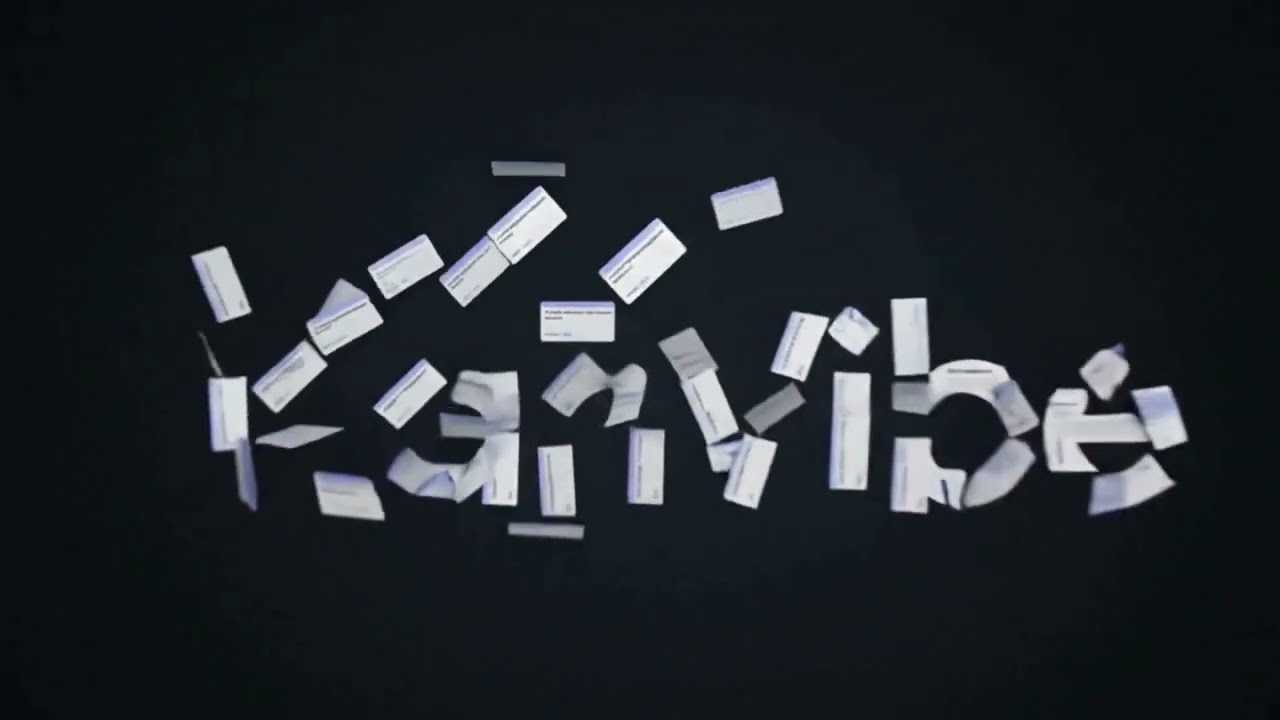
1. Quick Task Search
Open task search from anywhere, filter by project or branch name, and jump directly into the task workspace without returning to the board first.
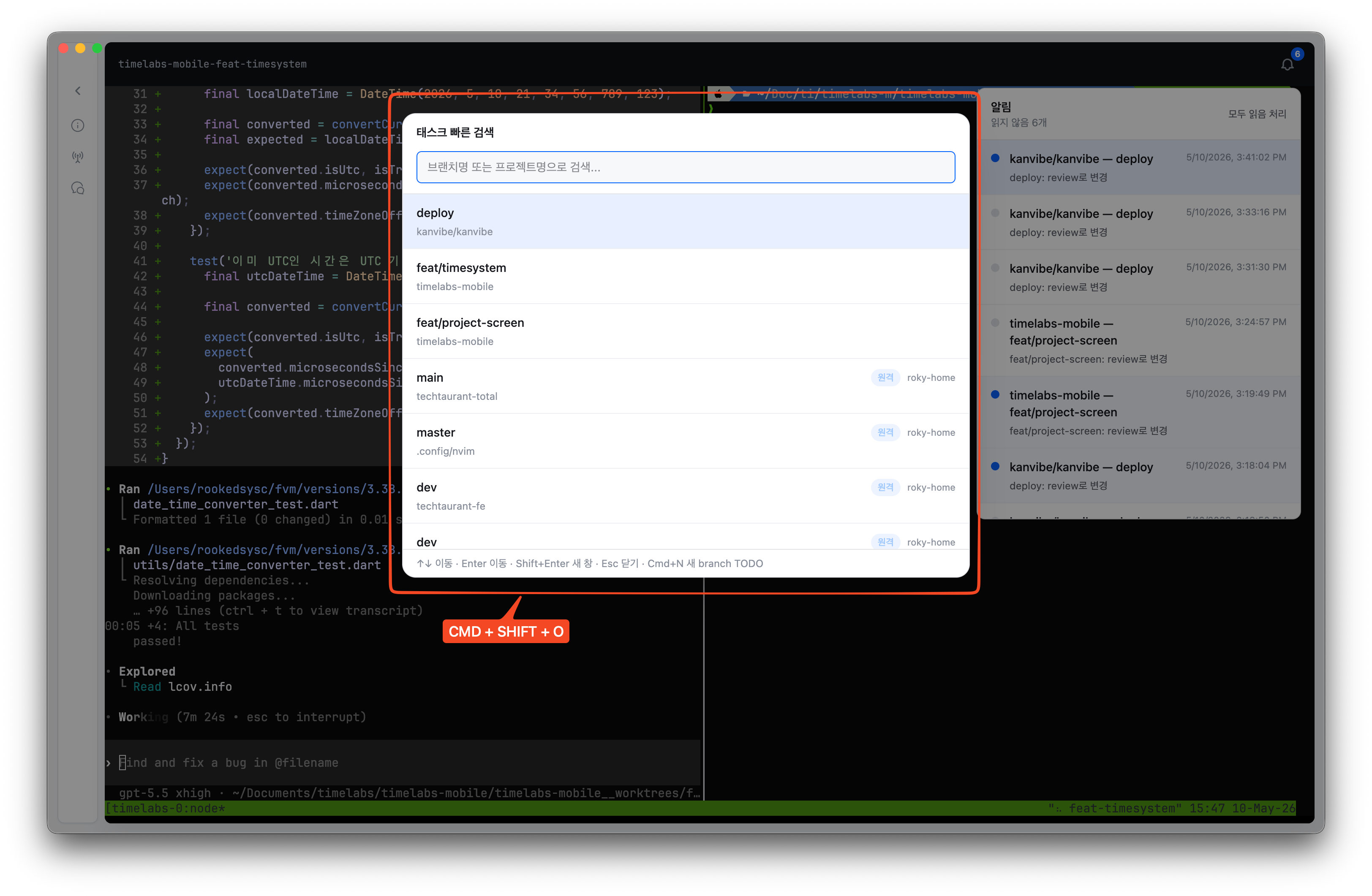
2. Task Detail Shortcuts
Use numbered dock shortcuts on a task detail page to open task metadata, hook status, AI chat, and PR actions before the keystroke reaches the embedded terminal.
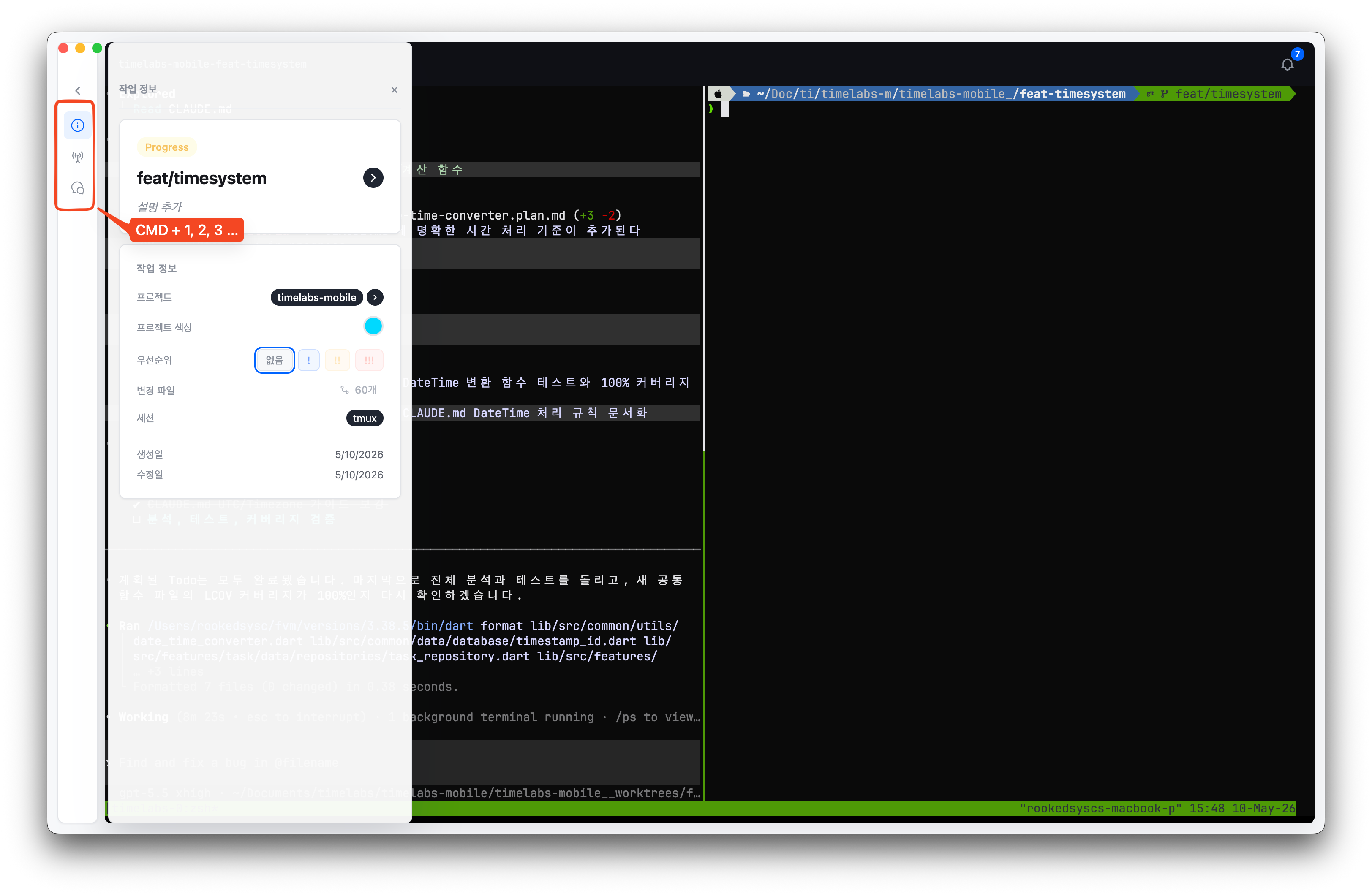
3. Project Filter
Narrow the board to the active projects you care about, with keyboard navigation for switching between repositories quickly.
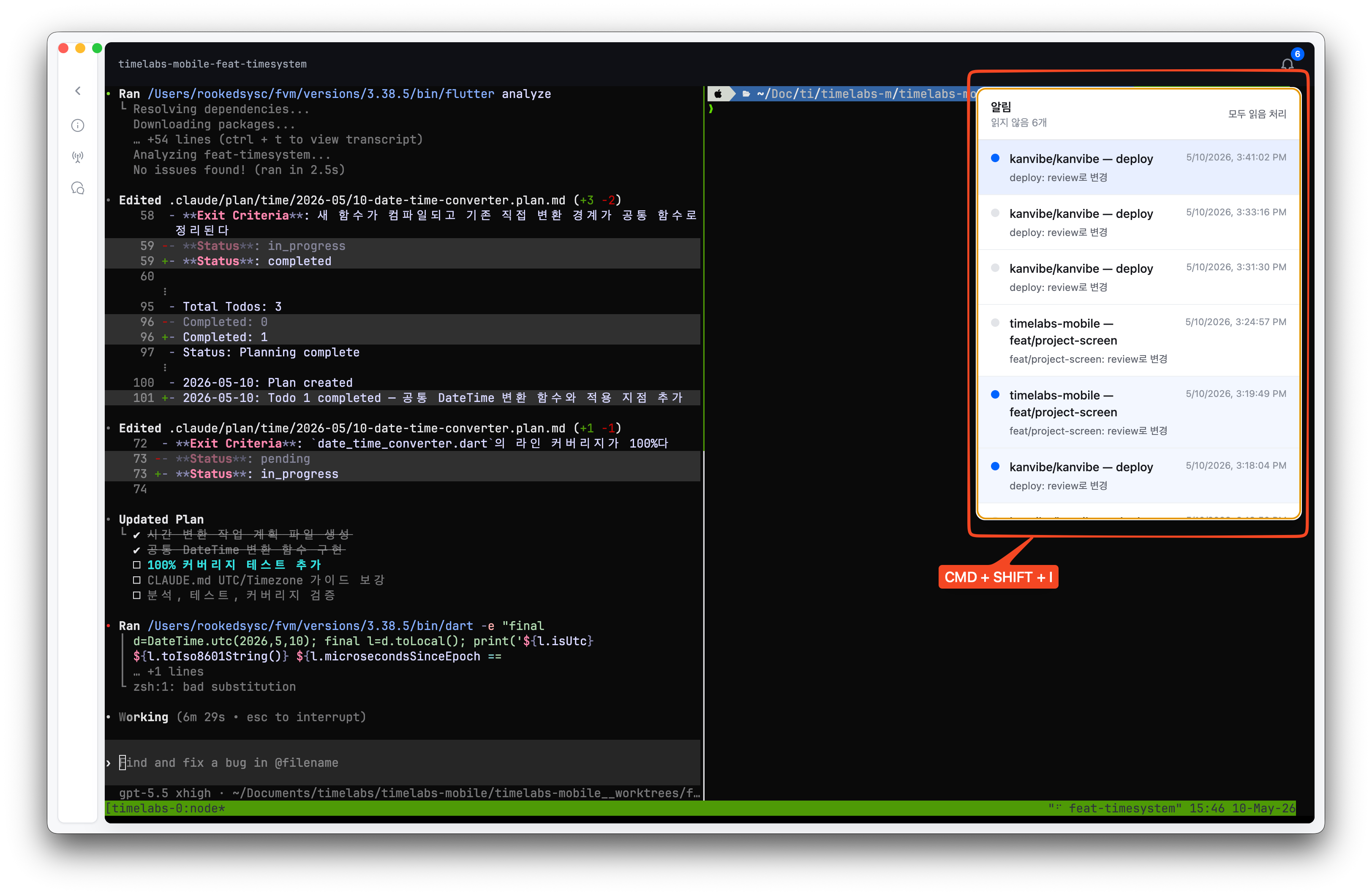
4. Notifications
Open the notification panel to review AI agent status changes, background sync results, and task events, then jump to the related task.
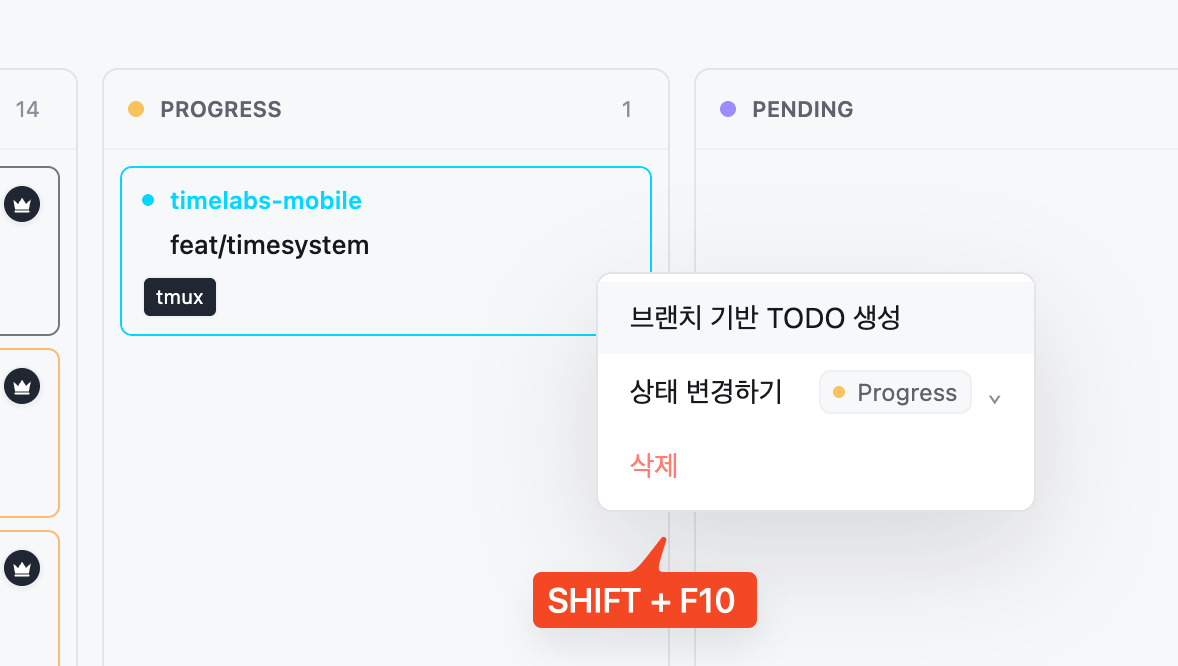
5. Quick Task Actions
Create follow-up branch TODOs directly from the highlighted search result, preserving project and branch context for the next piece of work.
6. Vim-Style Board Controls
Turn on Vim-style board controls in Settings → Keyboard, then move across task cards with h/j/k/l, find visible task text with /, open the new-task modal with n, move statuses with :move progress, and delete a focused task with dd.
Open the Vim controls demo video
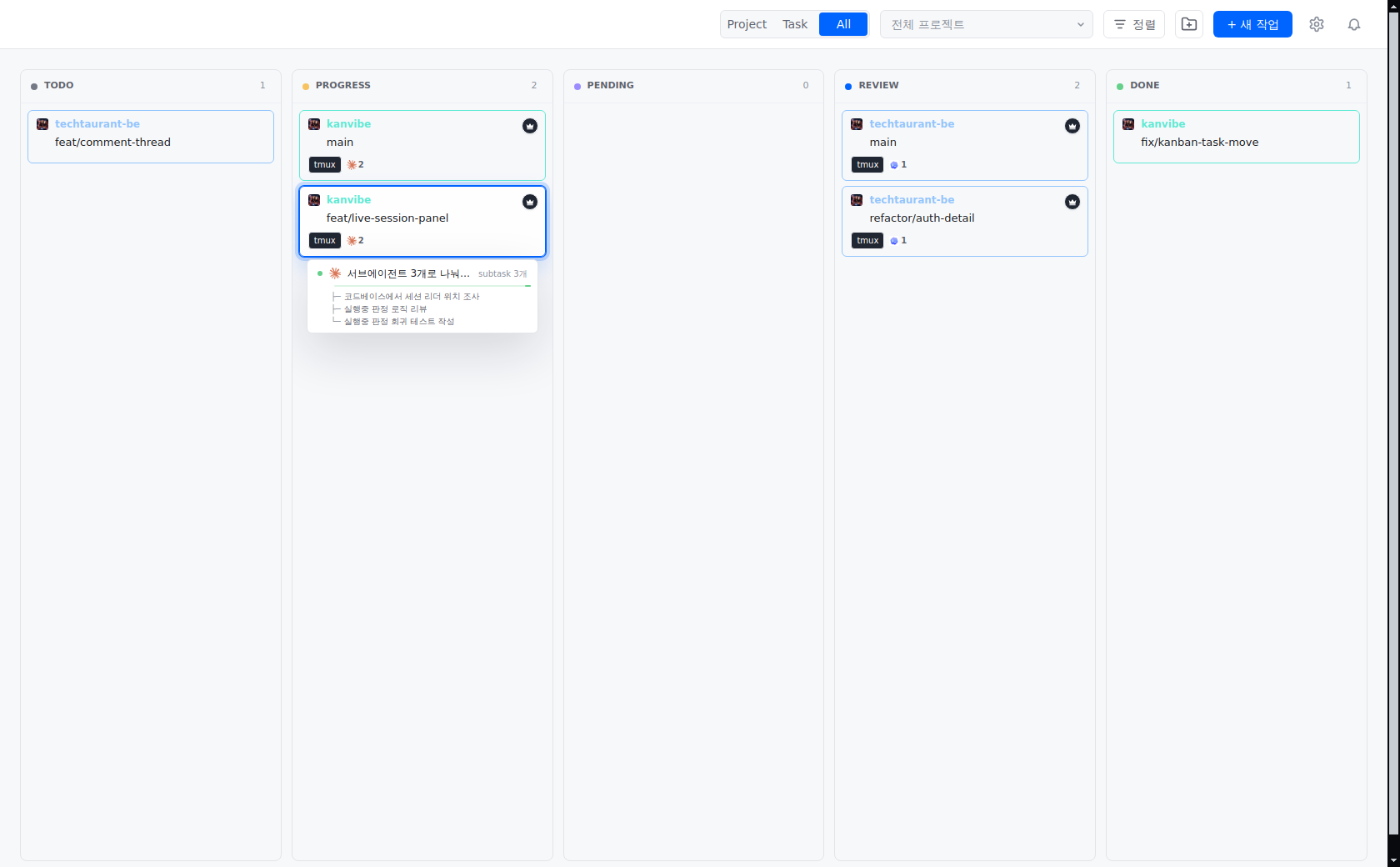
7. Live AI Session Tracking
See which AI agents are running on which task, and how many, straight from the board, then jump into the terminal that owns one. Focus or hover a card and hold for a moment to open the session panel; it lists each running session with what it is doing and the subtasks branching off it right now. Clicking a session switches to the tmux window that session is attached to and moves input focus to the terminal.
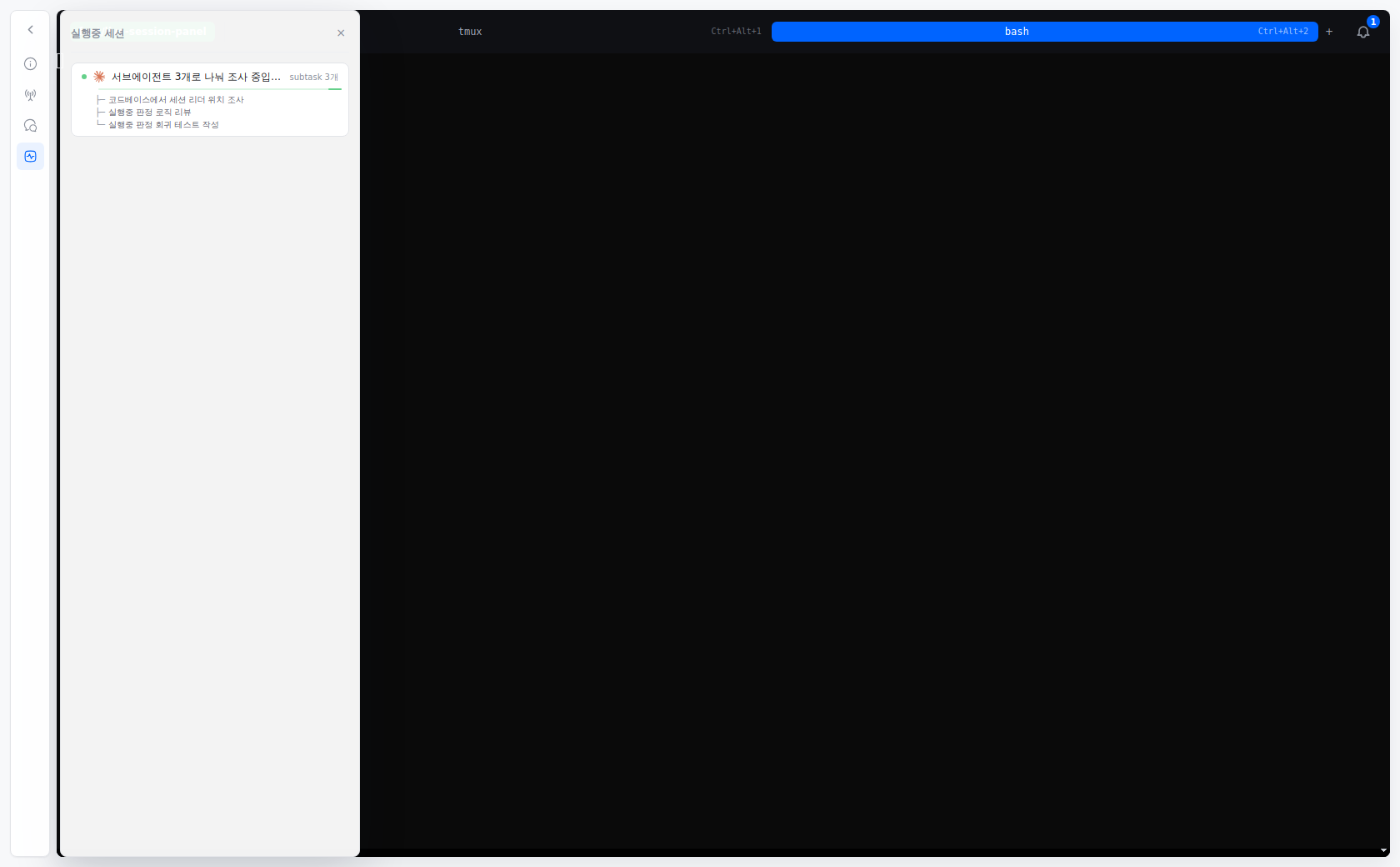
The same panel opens from the task detail dock, so you can keep watching subtasks while you work in the terminal.
Prerequisites
| Dependency | Version | Required | Install |
|---|---|---|---|
| git | latest | Yes | brew install git |
| tmux | latest | Yes | brew install tmux |
| gh | latest | Yes | brew install gh (requires gh auth login) |
| zellij | latest | No | brew install zellij |
Quick Start
Install with Homebrew
Until KanVibe is accepted into the official Homebrew Cask repository, install it from the KanVibe Homebrew tap:
brew install --cask rookedsysc/kanvibe/kanvibe
open -a KanVibe
After the official Homebrew Cask is accepted, the install command becomes:
brew install --cask kanvibe
Update or Remove
brew update
brew upgrade --cask kanvibe
brew uninstall --cask kanvibe
brew untap rookedsysc/kanvibe
Usage Flow
1. Register a Project
Click the magnifying-glass directory scan button on the main board toolbar — it sits between the project filter and + New Task — to open the project registry dialog. In the dialog, choose a local or remote git repository path and click Scan & Register; KanVibe then registers the repository, detects existing worktree branches, and installs supported agent hooks.
To stop managing a project, delete it from the registered-project list in the registry dialog. This removes only the SQLite project record and associated KanVibe task records; git branches, worktrees, and files on disk are kept.
2. Create Tasks
Add a TODO task from the Kanban board. When creating a task with a branch name, KanVibe automatically:
- Creates a git worktree for the branch
- Spawns a tmux window or zellij tab for the session
- Links the terminal session to the task
3. Work with the Kanban Board
Tasks are managed through 5 statuses: TODO → PROGRESS → PENDING → REVIEW → DONE
Change statuses via drag & drop, or let AI Agent Hooks transition them automatically. When a task moves to DONE, its branch, worktree, and terminal session are automatically deleted.
4. Select Pane Layouts
Each task's terminal page supports multiple pane layouts:
| Layout | Description |
|---|---|
| Single | One full-screen pane |
| Horizontal 2 | Two panes side by side |
| Vertical 2 | Two panes stacked |
| Left + Right TB | Left pane + right top/bottom split |
| Left TB + Right | Left top/bottom split + right pane |
| Quad | Four equal panes |
Each pane can run a custom command (e.g., vim, htop, lazygit, test runner, etc.). Configure layouts globally or per-project from the settings dialog.
Features
Real-Time Kanban Board
- 5-status task management (TODO / PROGRESS / PENDING / REVIEW / DONE)
- Drag & drop task ordering with project colors, priority markers, PR badges, and session labels
- Multi-project filtering with keyboard search for visible project and task text
- Done column pagination for long-running projects
- Real-time WebSocket updates across browser and desktop windows
Branch-Based Task Workspace
- Create branch TODOs that automatically prepare a git worktree and terminal session
- Use the board toolbar magnifying-glass scan dialog to register repositories and detect existing worktree branches as TODO tasks
- Open each task into a dedicated terminal workspace with task metadata, hook controls, chat, and PR actions in the side dock
- Move a task to DONE to clean up its branch, worktree, and terminal session automatically
- Delete a project from the scan dialog without touching existing git branches, worktrees, or files on disk
Terminal Sessions (tmux / zellij)
- tmux and zellij are both supported as terminal multiplexers
- Browser-based terminal streaming through xterm.js and WebSocket
- SSH remote terminal support that reads
~/.ssh/config - Non-interactive remote SSH commands reuse an app-local ControlMaster socket pool under
~/.kanvibe, with per-host concurrency capped at 4x available CPU cores - Remote terminal attach executes tmux/zellij directly over SSH; trusted X11 forwarding (
ssh -Y) is requested only when localDISPLAY, remoteX11Forwarding, andxauthare available - Nerd Font rendering support
Live AI Session Tracking
- Board cards show a per-agent icon and count next to the tmux badge, so you can tell at a glance which agents are running on which task and how many
- Focus or hover a card to open a session panel that shows what each running session is doing, taken from its most recent AI response, along with the subtasks it is driving as branches hanging off the session; sweeping past cards does not open it
- Running sessions carry a moving progress bar that conveys progress through motion rather than a ratio, and holds still when the environment asks for reduced motion
- Task detail exposes the same panel through the live sessions dock item (
Mod+4without a PR,Mod+5with one) - Clicking a session switches to its tmux window and moves input focus to the terminal
- Running state combines two signals: an agent attached to a tmux pane counts as running even while it waits for input, and a session whose transcript was just updated counts as running even when no pane is visible
- Subtask counts are available for Claude Code and Codex, depend on version for OpenCode, and are not available for Gemini CLI
- Sessions outside tmux (zellij, plain terminal) are judged by transcript activity alone, so one waiting for input may appear idle
Keyboard-First Controls
- Open quick task search by branch or project name from anywhere
- Filter projects, inspect notifications, and trigger task actions without leaving the board
- Use numbered detail shortcuts to switch task info, status/hooks, AI chat, PR, and other dock panels before keystrokes reach the terminal
- Create a branch TODO directly from quick search with the configured shortcut
AI Usage and Accounts
- Read remaining Claude, Codex, and Gemini subscription usage from the task detail dock or
Cmd/Ctrl+0 - Uses the sign-in each CLI already stored locally, so no extra API key is required
- Normalizes each provider's different window shapes (5-hour, 7-day, per-model) into one bar with reset times and plan tier
- Queries every registered account per provider and labels them when more than one is signed in
- Shows the last saved result immediately and refreshes above it, so the panel never opens blank after a restart
- Manage accounts under Settings → AI accounts: add an account per provider, sign in, sign in again, or remove one
- Adding an account creates its home and launches that CLI's own sign-in command in an in-app terminal, pointed at it
- An expired sign-in is refreshed by asking that CLI to do it; KanVibe never rewrites the credentials a CLI stores
- Account homes follow the sibling-directory convention (
~/.claude-workand so on), so the same account works from a terminal by switching one environment variable - Signed-out accounts stay listed so there is still somewhere to sign in again, and removing one deletes only the account home KanVibe created
Keyboard Shortcuts
| Shortcut | Scope | Action |
|---|---|---|
Cmd/Ctrl+F or / with Vim-style controls enabled | Board | Open page find for visible project/task text; press Enter for next and Shift+Enter for previous |
h / j / k / l or ← / ↓ / ↑ / → | Board task cards | Move focus left/down/up/right across visible task cards; if no task is focused, enter the first visible task |
n | Board | Open the new task modal immediately |
:move todo|progress|pending|review|done | Focused board task card | Move the focused task to the target status without drag-and-drop; press Tab in the command input to autocomplete a unique status prefix |
dd | Focused board task card | Delete the focused task after confirmation |
Cmd/Ctrl+Shift+O | Global | Open quick task search by branch or project name (default, configurable) |
Cmd/Ctrl+Shift+P | Board | Open the project filter dropdown |
Cmd/Ctrl+Shift+I | Board | Open the notifications dropdown |
Cmd+[ / Cmd+] (macOS), Alt+[ / Alt+] (Linux) | Global | Navigate back/forward through app history; back falls back to board home when there is no previous page |
Cmd+1/2/3 (macOS), Alt+1/2/3 (Linux) | Task detail | Activate the numbered detail dock items: info, status/hooks, and AI chat. These shortcuts are intercepted before terminal input |
Cmd+4 (macOS), Alt+4 (Linux) | Task detail | Open the task PR in the browser when a PR exists; otherwise the shortcut belongs to the fourth numbered dock item when present |
Cmd/Ctrl+0 | Task detail | Toggle the AI usage panel. It sits outside the numbered dock order, so dock numbering is unaffected |
Cmd/Ctrl+N | Quick task search | Create a new branch TODO from the currently highlighted task |
↑ / ↓ / Enter / Shift+Enter / Esc | Quick task search | Move selection, open task, open task in a new window, close dialog |
↑ / ↓ / Enter / Esc | Project filter dropdown | Move selection, toggle project filter, close dropdown |
↑ / ↓ / Enter / Esc | Notifications dropdown | Move selection, open notification target, close dropdown |
Task detail dock numbering excludes the back-to-board button and follows the visible dock item order. If a task has a PR URL, PR takes slot 4 and later dock items shift to 5+; without a PR, the next dock item uses slot 4.
Vim-style board controls (h/j/k/l, /, n, dd, and :move ...) can be turned on or off in Settings → Keyboard. Arrow-key task navigation and Cmd/Ctrl+F page find remain available even when Vim-style controls are disabled.
AI Agent Hooks - Automatic Status Tracking
KanVibe integrates with Claude Code Hooks, Gemini CLI Hooks, Codex CLI, and OpenCode to automatically track task status. Tasks are managed through 5 statuses:
| Status | Description |
|---|---|
| TODO | Initial state when a task is created |
| PROGRESS | AI is actively working on the task |
| PENDING | AI asked a follow-up question; waiting for user response (Claude Code only) |
| REVIEW | AI has finished; awaiting review |
| DONE | Task complete — branch, worktree, and terminal session are automatically deleted |
Claude Code
User sends prompt          → PROGRESS
AI asks question (AskUser) → PENDING
User answers               → PROGRESS
AI finishes response       → REVIEW
Gemini CLI
BeforeAgent (user prompt)  → PROGRESS
AfterAgent (agent done)    → REVIEW
Gemini CLI does not have an equivalent to Claude Code's
AskUserQuestion, so the PENDING state is not available.
Codex CLI
UserPromptSubmit                → PROGRESS
PermissionRequest (Bash only)  → PENDING
PreToolUse (Bash only)         → PROGRESS
Stop                           → REVIEW
KanVibe now uses Codex's current lifecycle hooks model with .codex/hooks.json plus [features].hooks = true in .codex/config.toml:
Codex loads project-local .codex/ hooks only for trusted project/worktree paths. If a task runs in a generated worktree, trust that worktree in Codex before expecting the local hook file to fire.
Codex's current
PermissionRequestandPreToolUsematchers are Bash-scoped, soPENDINGrepresents approval waits rather than every kind of conversational follow-up question.
OpenCode
User sends message (message.updated, role=user) → PROGRESS
AI asks a question (question.asked)             → PENDING
User answers question (question.replied)        → PROGRESS
Session idle (session.idle)                     → REVIEW
OpenCode uses its own plugin system instead of shell-script hooks. KanVibe generates a TypeScript plugin at .opencode/plugins/kanvibe-plugin.ts that subscribes to OpenCode's native event hooks (message.updated, question.asked, question.replied, and session.idle) via the @opencode-ai/plugin SDK. This means status updates are handled in-process without spawning external shell commands.
All agent hooks are auto-installed when you register a project through KanVibe's directory scan or create a task with a worktree. You can also install them individually from the task detail page.
| Agent | Hook Directory | Config File |
|---|---|---|
| Claude Code | .claude/hooks/ | .claude/settings.json |
| Gemini CLI | .gemini/hooks/ | .gemini/settings.json |
| Codex CLI | .codex/hooks/ | .codex/config.toml, .codex/hooks.json |
| OpenCode | .opencode/plugins/ | Plugin auto-discovery |
Browser Notifications
Task status changes via AI Agent Hooks trigger browser notifications with project, branch, and status. Click to jump directly to the task detail page.
- Real-time alerts — Instant notifications for task status changes
- Background mode — Notifications work even when KanVibe is not focused
- Smart navigation — Click notification → task detail page (with correct language)
- Configurable — Enable/disable per project and filter by status (PROGRESS, PENDING, REVIEW, DONE)
Setup: Browser will prompt for permission on first visit. Configure filters in Project Settings → Notifications.
Hook API Endpoints
| Endpoint | Method | Description |
|---|---|---|
/api/hooks/start | POST | Create a new task |
/api/hooks/status | POST | Update task status by branchName + projectName; if the target is missing, KanVibe still sends a browser notification and returns 404 without changing status |
GitHub-style Diff View
Review code changes directly in the browser with a GitHub-style diff viewer. Click the Diff badge on the task detail page to see all modified files compared to the base branch.
- File tree sidebar with changed file count
- Inline diff viewer powered by Monaco Editor
- Edit mode for quick fixes directly in the browser
- Viewed file tracking with checkboxes
Pane Layout Editor
- 6 layout presets (Single, Horizontal 2, Vertical 2, Left+Right TB, Left TB+Right, Quad)
- Per-pane custom command configuration
- Global and per-project layout settings
Internationalization (i18n)
- Supported languages: Korean (ko), English (en), Chinese (zh)
- Powered by next-intl
Tech Stack
| Category | Technology |
|---|---|
| Frontend/Backend | Next.js 16 (App Router) + React 19 + TypeScript |
| Database | SQLite + TypeORM + better-sqlite3 |
| Styling | Tailwind CSS v4 |
| Terminal | xterm.js + WebSocket + node-pty |
| SSH | system ssh binary |
| Drag & Drop | @hello-pangea/dnd |
| i18n | next-intl |
| Desktop Packaging | Electron + Electron Builder |
License
This project is licensed under the AGPL-3.0. You are free to use, modify, and extend it for open-source purposes. Commercial SaaS distribution is not permitted under this license. See LICENSE for details.
Contributing
See docs/CONTRIBUTING.md for guidelines.
Inspired By
- workmux — tmux workspace manager
- vibe-kanban — AI-powered Kanban board