🌟 Sync Vault







The missing bridge between your 10 TB cloud drive and your AI brain. Access, sync, and link everything—images, PDFs, audio, video—across devices without filling up local storage.
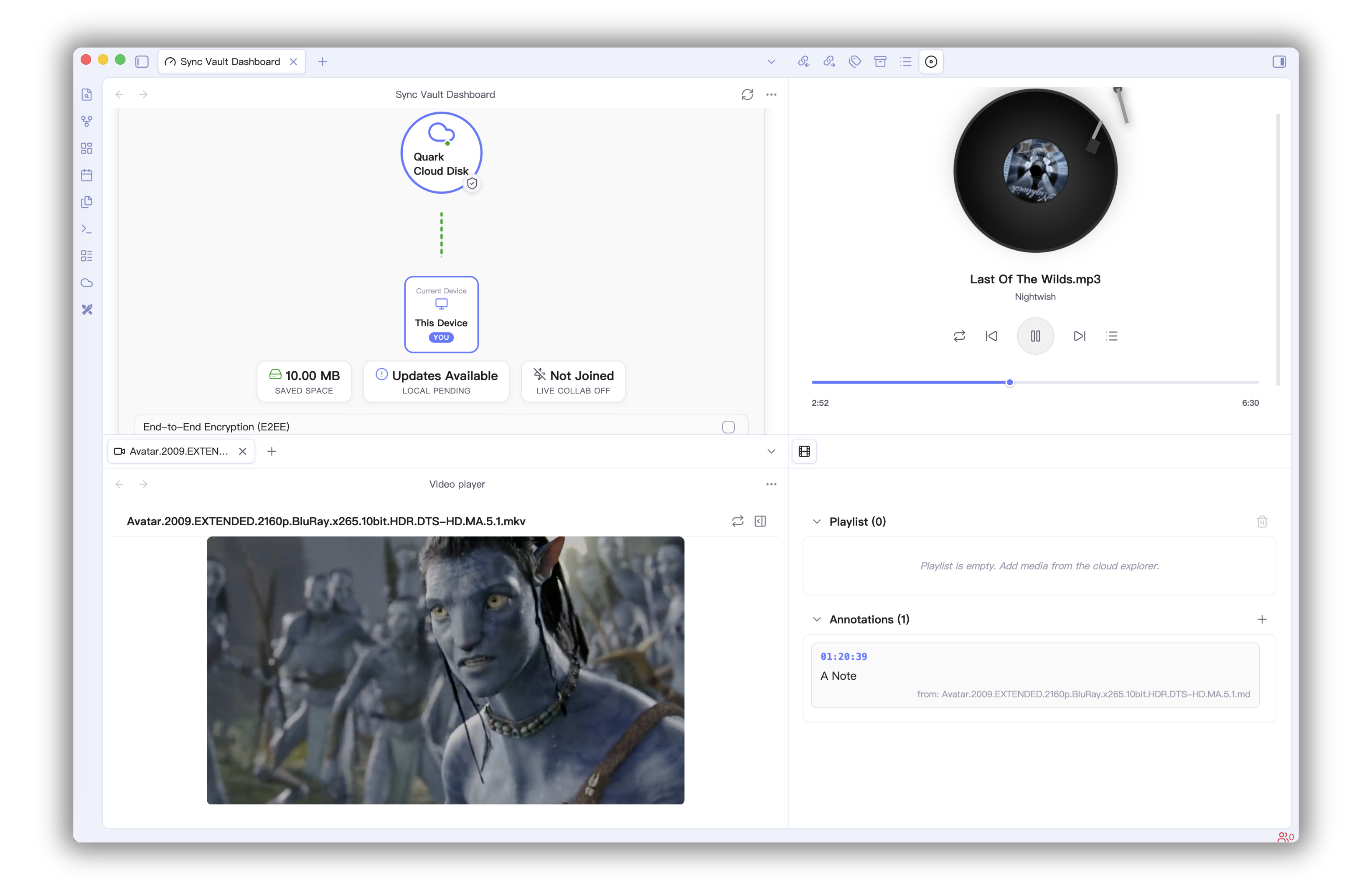
Key Features
🔗 Link Notes and Cloud Resources
Generate links based on file ID and path, integrated into Obsidian notes after rendering.
[]()format to link cloud resources.![]()format to embed cloud resources.
🤖 MCP Server
Built-in Model Context Protocol (MCP) Server, allowing LLMs / AI Agents to directly access and operate on files in your Cloud Storage.
- Compatible with MCP-supported clients such as Claude Code and Cursor.
- Provides real-time context access via SSE (Server-Sent Events).
🛠️ MCP Tool Capabilities
| Tool Name | Description | Note |
|---|---|---|
get_cloud_account_info | Get cloud account and storage capacity info | |
list_cloud_files | List files and folders at a specified cloud path | |
read_cloud_file | Read cloud file content (supports streaming) | |
create_cloud_file | Create a new file or folder in the cloud | |
delete_cloud_file | Delete a cloud file or folder | |
move_cloud_file | Move a cloud file or folder | |
rename_cloud_file | Rename a cloud file or folder | |
download_cloud_file | Download a cloud file to local storage | |
upload_cloud_file | Upload a local file to the cloud | |
semantic_search | Global search based on semantics | Baidu Netdisk only |
sharelink_set | Set/Create a sharing link | Baidu Netdisk only |
upload_by_url | Upload via offline URL task | Baidu Netdisk only |
💻 CLI Commands (1.13.0)
Sync Vault provides Obsidian CLI commands for automation scripts and AI Agent workflows:
| Command | Purpose | Common Parameters |
|---|---|---|
sync-vault:help | Show CLI command help | help=true |
sync-vault:list | List cloud directory files (pagination/filter/recursive) | path cloud limit offset type minSize modifiedAfter recursive |
sync-vault:search | Search cloud files (with pagination/type filter) | query cloud limit offset path type |
sync-vault:read | Read cloud file content | path cloud maxLength |
sync-vault:info | Get account and storage status | cloud |
sync-vault:doctor | Diagnose Sync Vault health status | cloud |
Common examples:
obsidian sync-vault:list path=/ cloud=aliyun limit=100 offset=0
obsidian sync-vault:search query=obsidian cloud=quark type=markdown
obsidian sync-vault:read path=/Notes/Welcome.md cloud=onedrive maxLength=8192
obsidian sync-vault:info cloud=aliyun
obsidian sync-vault:doctor cloud=aliyun
Tip: all sub-commands support
help=trueto show command-specific usage.
✨ Backup
- Easily upload data to various cloud drives.
- Freely switch cloud vaults and backup data to multiple directories.
🔄 Multi-device Auto Sync
Baidu Netdisk Bi-directional Sync Demo
- Supports bi-directional and one-way sync, automatically identifies file deletion & move operations.
- Automatic merge of content conflicts.
- File deletion is recoverable.
- Ignore large files, ignore files by name using regular expressions.
- Sync third-party plugins and themes.
- End-to-end encryption for Markdown files.
🤝 Collaborative Editing
Distributed collaborative editing, Demo.
📱 Cloud Service Features
| No. | Cloud Service | Supported Features |
|---|---|---|
| 1 | Baidu Netdisk | Backup, Sync, Online Image Preview, Online PDF Reading, Video Playback, Audio Playback, Cloud Link |
| 2 | OneDrive | Backup, Sync, Online Image Preview, Online PDF Reading, Audio Playback, Video Playback, Cloud Link |
| 3 | Aliyun Drive | Backup, Sync, Online Image Preview, Online PDF Reading, Audio Playback, Video Playback, Cloud Link |
| 4 | 115 Drive | Online Image Preview, Online PDF Reading, Audio Playback, Video Playback, Cloud Link |
| 5 | Quark Drive | Backup, Sync, Online Image Preview, Online PDF Reading, Cloud Link |
| 6 | Tencent COS | Backup, Sync |
| 7 | Nutstore | Backup, Sync |
| 8 | InfiniCloud | Backup, Sync |
| 9 | 123 Pan | Backup, Sync |
⚙️ Installation and Usage
Install from Plugin Market
Search for sync vault ce in the plugin market, or click here to install quickly.
Get Started
- Click the ☁️ icon in the sidebar to open the dashboard, then find the "Beginner Guide" button in the Quick Actions card.
- Click the Beginner Guide button and follow the prompts to complete cloud drive login and sync mode settings.
Configure MCP (SSE)
Claude Code CLI
Add the following code in .claude/mcp.json (Note: change 3000 to the actual port):
{
  "mcpServers": {
    "sync-vault-mcp": {
      "type": "sse",
      "url": "http://127.0.0.1:3000/sse"
    }
  }
}
Claude Desktop
Since Claude Desktop only supports STDIO method to connect MCP Server, you can choose a bridge to connect Sync Vault MCP. Here you can choose sse-bridge.
npm install -g @mcpwizard/sse-bridge- In Claude Desktop [Settings] - [Developer], click the edit configuration button, copy and paste the following code.
{
  "mcpServers": {
    "sync-vault-mcp": {
      "command": "npx",
      "args": [
        "@mcpwizard/sse-bridge",
        "http://127.0.0.1:3000/sse"
      ]
    }
  }
}
Cursor/Trae
In Cursor/Trae's MCP settings, choose to manually add MCP Server (Sync Vault MCP defaults to http://127.0.0.1:3000/sse).
{
  "mcpServers": {
    "sync-vault-mcp": {
      "type": "sse",
      "url": "http://127.0.0.1:3000/sse"
    }
  }
}
🗺️ Roadmap
- 🌐 More Cloud Services
- 🏠 Collaborative Editing
- 🎨 Better User Experience
- ⎔ Zotero Support
- 🤖 AI Infrastructure