
A desktop GUI for OpenCode




Alpha Software -- Palot is under active development. Expect breaking changes, missing features, and rough edges. Feedback and contributions are welcome!
What is Palot?
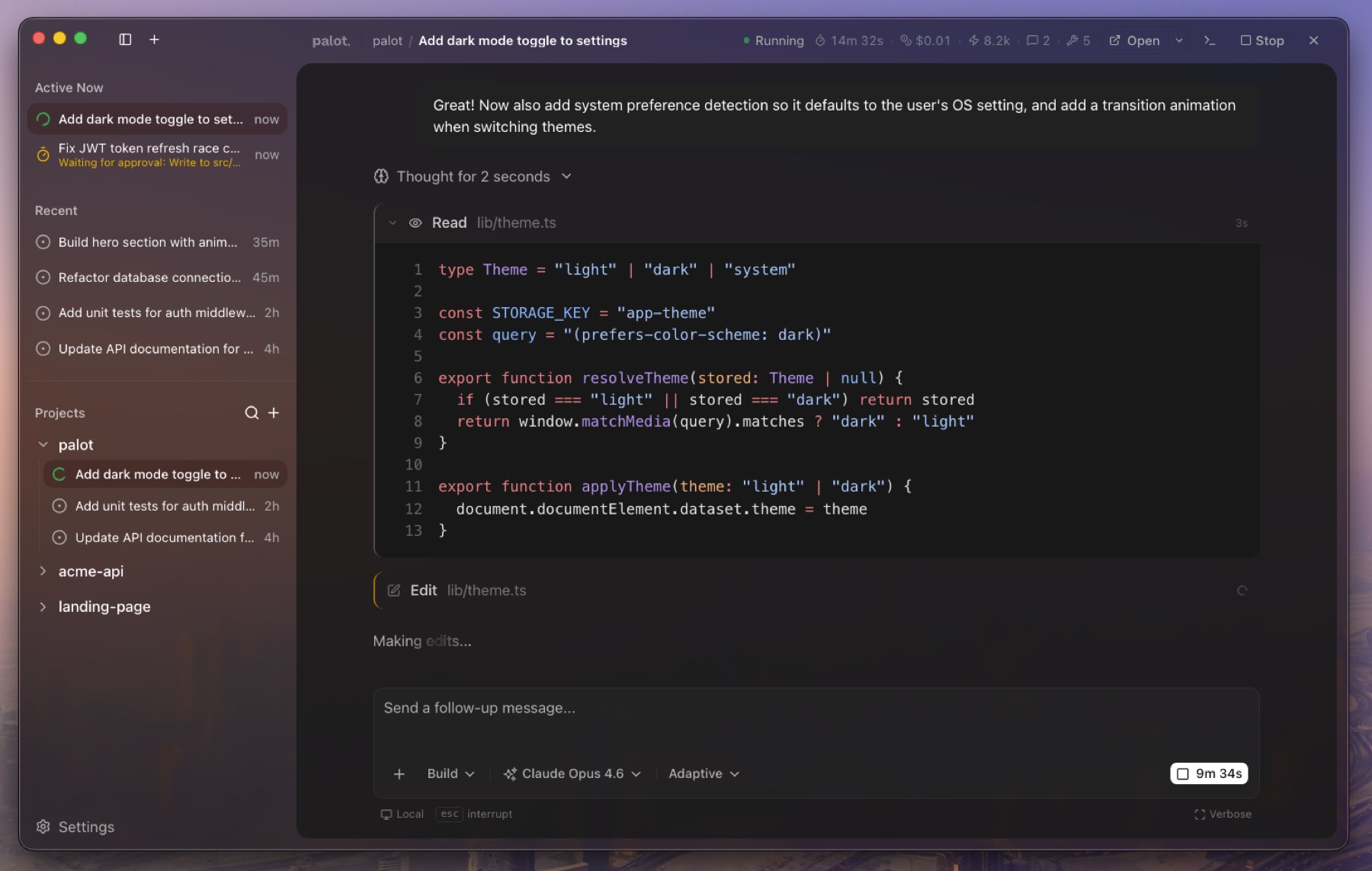
Palot is an open-source Electron app that gives OpenCode a full desktop interface. OpenCode is a powerful terminal-based AI coding agent, but it runs one project at a time and lives in the terminal. Palot wraps it with a visual UI so you can manage multiple projects and sessions from a single window, review file changes in a dedicated diff panel, schedule automated agent runs, and migrate your existing setup from other coding agents.
Palot spawns and manages the OpenCode server automatically, streams responses in real time, and renders tool calls with syntax-highlighted diffs, file previews, and terminal output.
Features
Chat & Agent Interaction
-
Multi-project workspace -- Manage AI sessions across all your projects from a single window. OpenCode is scoped to one project per instance; Palot lifts that limitation.
-
Full chat interface -- Conversational UI with real-time SSE streaming, Markdown rendering, auto-scroll, lazy-load pagination, and draft persistence across session switches.
-
Undo / redo --
Cmd+Zto revert the agent's last turn (including file changes),Shift+Cmd+Zto redo. -
Slash commands -- Type
/to invoke server-side commands like/compactand/helpdirectly from the chat input. -
File and context mentions -- Use
@to reference files or specific context, giving the agent precise scope. -
Rich tool call visualization -- Every tool call is rendered inline:
- File reads with line numbers and syntax highlighting
- Edits as inline diffs (old vs new)
- Bash commands with ANSI-colored terminal output
- Search results (glob, grep) with matched patterns
- Web fetches with URL and content preview
- Task lists with real-time progress tracking
-
Sub-agent cards -- Live activity cards for delegated tasks, with collapsible child session views and automatic collapse on completion.
-
Model and agent selector -- Searchable model picker across all connected providers (Anthropic, OpenAI, Google, and more), with reasoning variant support, a "recently used" section, and favorites. Switch between available agents.
-
Permission management -- Inline approve/deny UI for agent permission requests, with "allow once" and "allow always" options.
-
Interactive questions -- Radio, checkbox, and free-text input for agent questions, with keyboard shortcuts.
-
File attachments -- Drag-and-drop images (PNG, JPEG, GIF, WebP) and PDFs into the chat, with model capability warnings.
-
Session compaction -- Summarize long conversations to reclaim context window tokens, manually or automatically.
Review & Git Workflow
-
Review panel -- A dedicated, collapsible side panel that shows all file changes from the current session. Powered by virtualized rendering and a worker pool for off-thread syntax highlighting, so it stays fast even with hundreds of changed files.
-
Diff commenting -- Click any line in the diff viewer to leave a comment. Comments are automatically collected and injected into the chat input so you can send feedback to the agent in one go.
-
Commit and push -- Integrated dialog to create branches, commit changes, push to remotes, and open a GitHub Pull Request, all without leaving Palot.
-
Smart diff gates -- Auto-collapses generated files (lockfiles, etc.) and very large diffs to keep the review panel responsive.
Automations
-
Scheduled agent runs -- Define recurring tasks with RRule-based scheduling. Palot runs the agent in the background and queues the results for your review.
-
Human-in-the-loop review -- Automation runs land in a
pending_reviewstate so you can inspect changes in the review panel before accepting or archiving them. -
Auto-archiving -- Runs with no actionable changes are automatically archived to keep the list clean.
-
Retry with backoff -- Configurable execution retries with exponential backoff for flaky tasks.
Migration & Onboarding
-
Migrate from Claude Code and Cursor -- A guided wizard detects existing configurations and chat history from Claude Code and Cursor. It converts global/project settings, MCP servers, custom agents, commands, rules (e.g.
CLAUDE.mdtoAGENTS.md), and hooks to the OpenCode format. -
History import -- Convert past sessions and conversations from Cursor (
state.vscdb) and Claude Code into OpenCode, so you don't lose context when switching. -
Backup and restore -- Automatic backups before any migration, with a one-click restore option.
-
CLI setup helper -- Built-in UI to check, install, or repair the OpenCode CLI environment.
Desktop & OS Integration
-
Liquid Glass (macOS 26+) -- Native
NSGlassEffectViewwindow chrome on macOS Tahoe, with vibrancy fallback for older versions and an opaque mode for other platforms. -
System accent color -- The UI adapts to the OS accent color on macOS and Windows.
-
System tray -- Runs in the background with a tray icon (including a dedicated Linux variant).
-
Dock / app badges -- Badge count on the app icon for pending tasks or required permissions.
-
Secure credential storage -- Encrypts server passwords and API keys using Electron's
safeStorage. -
mDNS server discovery -- Automatically scans the local network for OpenCode servers, letting you connect to remote or headless instances.
-
Open in editor -- Quick-launch buttons to open the current project in VS Code, Cursor, JetBrains IDEs, or the terminal.
-
Command palette --
Cmd+Kto search sessions, switch projects, toggle feature flags, and run commands. -
Auto-updates -- Built-in update mechanism with download progress and one-click restart.
Download
| Platform | Architectures | Formats |
|---|---|---|
| macOS | Apple Silicon, Intel | DMG, ZIP |
| Windows | x64, ARM64 | NSIS installer |
| Linux | x64 | AppImage, DEB, RPM |
Download the latest release from the Releases page.
macOS: unsigned app warning
Palot is not yet code-signed or notarized. macOS Gatekeeper will block the app on first launch with a message like "Palot is damaged and can't be opened" or "Apple could not verify Palot". To fix this:
Option A -- Right-click (or Control-click) the app in Finder and select Open, then click Open in the dialog.
Option B -- Remove the quarantine attribute from the terminal:
xattr -cr /Applications/Palot.app
This is expected behavior for unsigned apps and does not indicate malware.
Getting Started
From a release (recommended)
- Download and install from the Releases page
- Make sure OpenCode CLI is installed (
~/.opencode/bin/opencode) - Palot will automatically manage the OpenCode server
OpenCode needs at least one AI provider configured (Anthropic, OpenAI, Google, etc.). Run
opencodein a terminal once to complete initial setup.
Coming from Claude Code or Cursor?
On first launch, Palot offers a guided migration wizard that detects your existing config and history. You can also trigger it later from Settings.
Configuration
Palot is a GUI layer on top of OpenCode, so core configuration like model providers, MCP servers, custom tools, and agent behavior is managed through OpenCode's own config files. Refer to the OpenCode documentation for setup instructions.
From source
Prerequisites: Bun 1.3.8+ and OpenCode CLI
git clone https://github.com/ItsWendell/palot.git
cd palot
bun install

# Run the Electron app
cd apps/desktop && bun run dev
Browser-only mode (no Electron)
For frontend development without Electron:
# Terminal 1: Start the backend
cd apps/server && bun run dev     # port 3100

# Terminal 2: Start the renderer
cd apps/desktop && bun run dev:web  # port 1420
Architecture
apps/
  desktop/       Electron 40 + Vite + React 19 desktop app
  server/        Bun + Hono backend (browser-mode dev only)
packages/
  ui/            Shared shadcn/ui component library (@palot/ui)
  configconv/    Universal agent config converter (Claude Code, Cursor, OpenCode)
  configconv-cli/ CLI wrapper for the config converter
The desktop app has three runtime contexts:
- Main process (Node.js) -- Window management, IPC handlers, OpenCode server lifecycle, automation scheduler
- Preload -- Secure bridge exposing
window.palotAPI viacontextBridge - Renderer (Chromium) -- React app with components, hooks, services, and Jotai atoms
Tech Stack
| Layer | Technology |
|---|---|
| Desktop shell | Electron 40, electron-vite |
| Frontend | React 19, Vite 6, TypeScript |
| Styling | Tailwind CSS v4 |
| State | Jotai |
| Routing | TanStack Router |
| UI components | shadcn/ui, Base UI, cmdk |
| Code highlighting | Shiki |
| Diff rendering | @pierre/diffs |
| Virtualization | TanStack Virtual |
| AI integration | @opencode-ai/sdk |
| Monorepo | Turborepo + Bun workspaces |
| Linting | Biome |
| Packaging | electron-builder |
| Versioning | Changesets |
Commands
# Development
bun run dev              # Electron dev mode (from apps/desktop)
bun run dev:web          # Browser-only dev mode (from apps/desktop, needs apps/server)

# Build and package
bun run build            # Production build
bun run package          # Package for current platform
bun run package:all      # Package for all platforms

# Quality
bun run lint             # Lint with Biome
bun run lint:fix         # Lint and auto-fix
bun run check-types      # Type-check all packages

# Testing
cd packages/configconv && bun test   # Run tests

# Versioning
bun changeset            # Add a changeset
bun run version-packages # Apply changesets and bump versions
Contributing
Palot is in early alpha and we welcome contributions! Here's how to get started:
- Fork the repository
- Create a feature branch (
git checkout -b feature/my-feature) - Make your changes
- Run quality checks:
bun run lint && bun run check-types - Add a changeset:
bun changeset - Open a pull request
Please see the AGENTS.md file for code style conventions, naming patterns, and important architectural notes.
Acknowledgments
Palot is built on top of OpenCode, an open-source AI coding agent. Palot communicates with the OpenCode server via the @opencode-ai/sdk package.
The UI component library is built with shadcn/ui, Base UI, and Tailwind CSS.
See THIRD-PARTY-NOTICES.md for a full list of third-party dependencies and their licenses.