Smart Illustrator


🆕 v1.4.0 — Tri-Engine System (Feb 2026)
New Excalidraw engine for hand-drawn concept diagrams. Three-tier priority: Gemini → Excalidraw → Mermaid. All diagram engines now output PNG by default. Details →
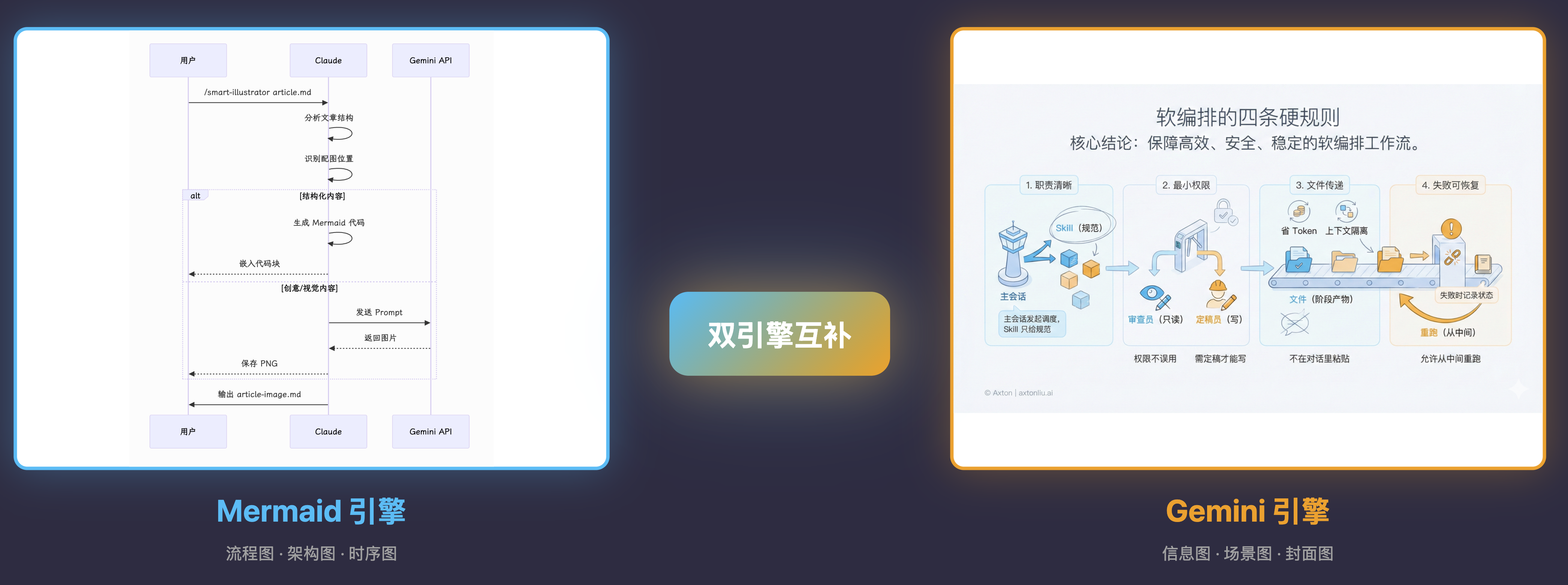
Intelligent article illustration Skill for Claude Code with tri-engine system: automatically selects Gemini (for creative visuals), Excalidraw (for hand-drawn diagrams), or Mermaid (for structured diagrams) based on content type.
Status
Status: Experimental
-
This is a public prototype that works for my demos, but does not yet cover all input scales and edge cases.
-
Output quality varies based on model version and input structure; results may fluctuate.
-
My primary focus is demonstrating how tools and systems work together, not maintaining this codebase.
-
If you encounter issues, please submit a reproducible case (input + output file + steps to reproduce).
Why Smart Illustrator?
Creating illustrations for articles is time-consuming: manual design takes hours, stock photos lack context, and generic AI tools don't understand article structure. Smart Illustrator combines intelligent position detection, tri-engine system (Gemini + Excalidraw + Mermaid), and cover learning to generate contextual illustrations in minutes.
Who it's for: Newsletter writers, YouTube creators, technical bloggers, course instructors.
When to use: When you need high-quality illustrations for articles, YouTube thumbnails with best practices, or consistent visual style across content series.
Background: the Make workflow version (auto-illustrate + WeChat publish)
Before packaging this into a Skill, I had already built an end-to-end Make workflow: search → write → auto-illustrate → format/publish (WeChat Official Account).
Full walkthrough (workflow logic & design trade-offs): https://youtu.be/TbyJ3imLuXQ
Features
-
Tri-Engine System: Auto-selects Gemini, Excalidraw, or Mermaid based on content type
-
Smart Position Detection: Analyzes article structure to identify optimal illustration points
-
10+ Illustration Types: flowchart, sequence, mindmap, concept, comparison, scene, metaphor...
-
Extensible Style System: Light, Dark, Minimal, Cover, and custom styles
-
Cover Mode: Generate high-CTR YouTube thumbnails with best practices built-in
-
Multi-Platform Sizes: YouTube, WeChat, Twitter, Xiaohongshu presets
-
Resume Generation: Skip already-generated images, regenerate specific ones
-
Brand Customizable: Modify
styles/to apply your brand style -
Multiple Backends: Gemini API for creative visuals (2K resolution), Excalidraw for hand-drawn diagrams, Mermaid CLI for structured diagrams — all output PNG by default
What Are Skills?
Skills are prompt-based extensions for Claude Code that give Claude specialized capabilities. Unlike MCP servers that require complex setup, skills are simple markdown files that Claude loads on demand.
Installation
Prerequisites
-
Claude Code CLI installed
-
Bun runtime (for scripts)
-
Mermaid CLI (for Mermaid diagrams):
npm install -g @mermaid-js/mermaid-cli -
Excalidraw export dependencies (optional, for Excalidraw diagrams):
cd ~/.claude/skills/smart-illustrator/scripts && npm install && npx playwright install firefox -
Gemini API Key (optional, for creative visuals): https://aistudio.google.com/apikey
Option A: Manual Installation (Recommended)
# Clone to Claude Code Skills directory
git clone https://github.com/axtonliu/smart-illustrator.git ~/.claude/skills/smart-illustrator
Option B: Copy Individual Files
# If you only want the skill without scripts
cp -r smart-illustrator/SKILL.md ~/.claude/skills/smart-illustrator/
cp -r smart-illustrator/styles ~/.claude/skills/smart-illustrator/
Usage
Basic Usage
# Analyze article and auto-generate illustrations (default)
/smart-illustrator path/to/article.md

# Output prompts only, don't auto-generate images
/smart-illustrator path/to/article.md --prompt-only

# Specify style (loads from styles/ directory)
/smart-illustrator path/to/article.md --style light     # Light style (default)
/smart-illustrator path/to/article.md --style dark      # Dark tech style
/smart-illustrator path/to/article.md --style minimal   # Minimal style

# List available styles
/smart-illustrator --list-styles

# Without cover image
/smart-illustrator path/to/article.md --no-cover

# Specify number of illustrations
/smart-illustrator path/to/article.md --count 5
Parameters
Parameter Default Description
--mode
article
Mode: article, slides, or cover
--engine
auto
Engine: auto, gemini, excalidraw, or mermaid
--mermaid-embed
false
Embed Mermaid code blocks instead of exporting PNG
--platform
youtube
Cover platform: youtube/wechat/twitter/xiaohongshu/landscape/square
--topic
Cover topic (alternative to article path, cover mode only)
--description
Cover visual direction (cover mode only)
--prompt-only
false
Output prompts only, don't call API to generate images
--style
light
Style name, loads styles/style-{name}.md
--list-styles
List all available styles in styles/ directory
--no-cover
false
Skip cover image generation (article mode)
--count
auto
Number of illustrations (auto-determined by article length)
Illustration Count Guidelines
Article Length Suggested Count
Short (< 1000 words) 1-2 images
Medium (1000-3000 words) 2-4 images
Long (> 3000 words) 4-6 images
Tutorials/Guides 1 per major step
Output Files
article.md                    # Original
article-image.md              # Article with illustrations (main output)
article-cover.png             # Cover image (16:9)
article-image-01.png          # Content illustration (3:4)
article-image-02.png
article-image-03.png
Manual Script Usage
generate-image.ts (Single Image)
export GEMINI_API_KEY=your_key

# From prompt text
npx -y bun ~/.claude/skills/smart-illustrator/scripts/generate-image.ts \
  --prompt "A concept diagram showing..." \
  --output image.png

# From prompt file
npx -y bun ~/.claude/skills/smart-illustrator/scripts/generate-image.ts \
  --prompt-file prompt.md \
  --output image.png
Option Description
-p, --prompt
Image description text
-f, --prompt-file
Read prompt from file
-o, --output
Output path (default: generated.png)
-m, --model
Model (default: gemini-3-pro-image-preview)
batch-generate.ts (Batch Generation)
export GEMINI_API_KEY=your_key

npx -y bun ~/.claude/skills/smart-illustrator/scripts/batch-generate.ts \
  --config slides.json \
  --output-dir ./images \
  --prefix SKILL_01
Option Description
-c, --config
JSON config file (required)
-o, --output-dir
Output directory (default: ./illustrations)
-m, --model
Model (default: gemini-3-pro-image-preview)
-d, --delay
Delay between requests in ms (default: 2000)
-p, --prefix
Filename prefix (default: from config filename)
-r, --regenerate
Regenerate specific images (e.g., "3" or "3,5,7")
-f, --force
Force regenerate all images (ignore existing)
Resume Generation: By default, the script skips images that already exist in the output directory. This allows resuming interrupted generation without re-generating completed images.
Output: {prefix}-01.png, {prefix}-02.png, etc.
mermaid-export.ts (Mermaid to PNG)
# From .mmd file
npx -y bun ~/.claude/skills/smart-illustrator/scripts/mermaid-export.ts \
  --input diagram.mmd \
  --output diagram.png

# From inline content
npx -y bun ~/.claude/skills/smart-illustrator/scripts/mermaid-export.ts \
  --content "flowchart LR
    A[Start] --> B[End]" \
  --output simple.png \
  --theme dark
Option Description
-i, --input
Input .mmd file path
-c, --content
Mermaid diagram content (alternative)
-o, --output
Output path (default: output.png)
-t, --theme
Theme: light (default) or dark
-w, --width
Image width in pixels
-H, --height
Image height in pixels
PPT/Slides Generation Mode
Beyond article illustrations, this skill can generate batch infographics for PPT/Keynote slides.
When to Use
Mode Use Case Output
Article Mode Blog posts, newsletters 3-5 illustrations inserted in article
Slides Mode Video B-roll, presentations 8-15 standalone infographics
JSON Format for Batch Generation
Use pictures[] array format with explicit batch rules:
{
  "instruction": "请为我绘制 7 张图片(generate 7 images)。你是一位「信息图绘制者」。请逐条执行 pictures 数组:每个 id 对应 1 张独立的 16:9 信息图,严禁合并,严禁只输出文字描述。",
  "batch_rules": {
    "total": 7,
    "one_item_one_image": true,
    "aspect_ratio": "16:9",
    "do_not_merge": true
  },
  "fallback": "如果无法一次生成全部图片:请输出 7 条独立的单图绘图指令...",
  "style": "[Complete style prompt - see styles/style-light.md]",
  "pictures": [
    { "id": 1, "topic": "封面", "content": "Course Name\n\nSection Title\n\nLearning objectives..." },
    { "id": 2, "topic": "核心概念", "content": "[Raw content]" }
  ]
}