vue-tui
Public beta — the
@vue-tui/runtimeAPI is stabilizing toward 1.0; dev-mode HMR is still experimental. Bug reports welcome.
vue-tui is a Vue-native application framework for interactive terminal UIs. Build with components, develop with HMR, test with confidence.


- Vue SFC and JSX: Write terminal interfaces with
<template>, TSX, or both. - Flexbox layout: Yoga provides the same layout engine that React Native uses.
- Development tools:
@vue-tui/viteprovides hot module replacement (HMR) in the terminal. - Input and focus: Vue composables handle text, paste, and key events, plus focus state.
- Testing: Use
@vue-tui/testingto render components, send terminal input, and inspect frames.
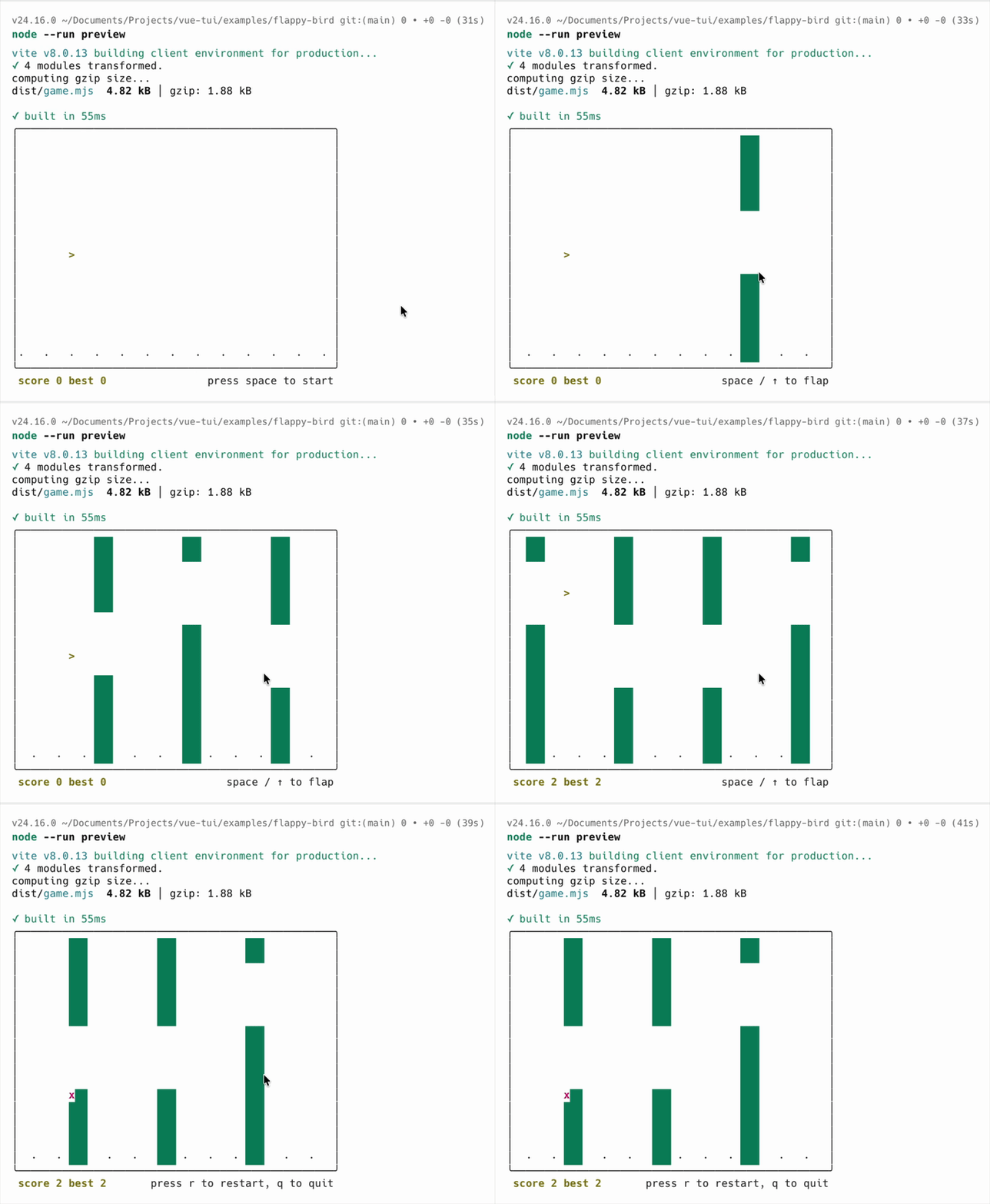
Flappy Bird — one of the examples included in the repo
Quick Start
Choose the method that matches your application.
1. Create a standalone TUI application (recommended)
Use this scaffold for a standalone TUI application that controls the Node process and terminal. The Vite config defines the application entry. During development, @vue-tui/vite starts this entry and provides HMR. During a production build, it configures Vite to create one Node file. The Vue compiler creates client render functions in both modes.
pnpm dlx tiged vuejs-ai/vue-tui/templates/vite my-app
cd my-app
pnpm install
pnpm dev        # in-process terminal dev server with HMR
pnpm build      # Vite builds dist/main.mjs
pnpm build:exe  # Vite builds first, then tsdown creates build/main (requires Node.js 26 or later)
pnpm preview    # build, then run the production bundle
Edit src/app.vue and watch the terminal update instantly.
Building an executable requires Node.js 26 or later. On Windows, the executable is build/main.exe.
2. Embed the runtime
Use the runtime directly when vue-tui is part of an existing Node application. The host application uses its existing compiler, build, entry, and process lifecycle without @vue-tui/vite. For an embedded Vite application, use @vitejs/plugin-vue to compile SFCs or @vitejs/plugin-vue-jsx to compile JSX and TSX.
<!-- app.vue -->
<script setup lang="ts">
import { shallowRef } from "vue";
import { Box, Text, useInput } from "@vue-tui/runtime";

const count = shallowRef(0);

useInput((event) => {
  if (event.type === "key") {
    if (event.key.name === "up") {
      count.value++;
    } else if (event.key.name === "down") {
      count.value--;
    }
  }
});
</script>

<template>
  <Box>
    <Text>Count: </Text>
    <Text bold color="green">{{ count }}</Text>
    <Text dimColor> (↑/↓ to change)</Text>
  </Box>
</template>
// main.ts
import { createApp } from "@vue-tui/runtime";
import App from "./app.vue";

createApp(App).mount({ exitOnCtrlC: true });
Table of Contents
- Quick Start
- Packages
- Examples
@vue-tui/runtime@vue-tui/use@vue-tui/components@vue-tui/testing- Development
- Contributing
- Credits
- License
Packages
| Package | Description |
|---|---|
@vue-tui/runtime | @vue-tui/runtime is a Vue 3 renderer for terminal applications. It provides core components, layout, input, focus, and lifecycle APIs. Its API is stabilizing. |
@vue-tui/use | @vue-tui/use provides composables and components that use only public Runtime APIs. |
@vue-tui/vite | vueTui() provides terminal HMR and default Vite settings for a standalone Node bundle. Embedded applications use their existing build without this plugin. This package is experimental. |
@vue-tui/testing | @vue-tui/testing provides a deterministic host for component tests. Tests can inspect renderer frames or the emulated terminal screen. |
@vue-tui/components | @vue-tui/components provides <ScrollBox>, <Spinner>, <Table>, <Newline>, and <Spacer>. |
Examples
| Example | Description |
|---|---|
basic-template | Vue SFC with <template> syntax |
basic-jsx | Same app in TSX |
coding-agent | AI coding agent with LLM streaming and interactive UI |
flappy-bird | Physics-based terminal game with reactive state and borders |
scroll-box | Bounded viewport with app-controlled scrolling |
@vue-tui/runtime
The core renderer: the terminal primitives and the composables that read renderer-owned facts. Package guide.
Components
| Component | Import from | Description |
|---|---|---|
<Box> | @vue-tui/runtime | Layout container — flex, size, spacing, border, background, clipping, and v-show |
<Text> | @vue-tui/runtime | Text — foreground/background color, six modifiers, wrapping, truncation, and v-show |
<Static> | @vue-tui/runtime/inline | Commits a mounted subtree to Inline terminal history |
Box and Text have closed prop surfaces: unknown props, misspellings, browser attributes, and listeners such as @click are rejected at runtime instead of silently ignored. The full prop tables are in the Runtime guide.
v-show belongs to the visual host layer, not to a component allowlist. Vue forwards v-show through a component chain when its current effective root is one Box or Text. Custom single-root components therefore support it without additional code. Newline, Spacer, Spinner, ScrollBox, and a non-empty Table also support v-show. An empty Table with no explicit columns renders no host node or layout space.
Fragment and text roots produce a Vue development warning, and v-show has no effect. Comment roots ignore v-show without a warning. Static remains the explicit history-boundary exception.
Static is the only export on that subpath, and it is deliberately absent from the package root. It has no collection API — use ordinary Vue iteration with stable keys. Each instance commits its output once and then releases its subtree; effective Fullscreen rejects Static.
<script setup lang="ts">
import { Static } from "@vue-tui/runtime/inline";
</script>

<template>
  <Static v-for="entry in completedEntries" :key="entry.id">
    <CompletedEntry :entry="entry" />
  </Static>
</template>
Composables
Each one must be called inside a mounted render tree.
| Composable | Returns | Description |
|---|---|---|
useInput(handler, opts?) | — | Normalized text, paste, and key events; opts.isActive gates the subscription |
useFocus(target?) | { isFocused, focus, blur } | One explicit focus identity, optionally bound to a rendered component |
useApp() | { exit } | Request normal or error exit from inside the tree |
useLayoutSize() | { width, height } | Readonly reactive root-layout size; height may be Infinity |
useStdin() | { stdin, isRawModeSupported, setRawMode } | Mounted stdin plus an independently owned raw-mode hold |
useBoxMetrics(ref) | { width, height, left, top, hasMeasured } | Parent-relative metrics for one directly referenced <Box> |
useInput() delivers one frozen event per input:
event.type | Payload |
|---|---|
"text" | Non-empty text, plus a nested key when the terminal supplied reliable identity |
"key" | A required nested key and no text |
"paste" | One complete payload, possibly empty, and no key |
A key carries exactly one normalized name or one logical character, plus shift, alt, ctrl, meta, super, and hyper booleans.
Every active subscription receives every event and handler return values are ignored, so nothing consumes input or steers routing. Focus composes directly as useInput(handler, { isActive: focus.isFocused }). See the Runtime guide for ownership and lifecycle rules.
useApp() intentionally exposes only exit(); the coordination barriers waitUntilExit() and waitUntilRenderFlush() belong to the app owner returned by createApp(). Component failures stay Vue failures — Runtime preserves your onErrorCaptured() and app.config.errorHandler policy. See App Lifecycle.
@vue-tui/use
Reusable behavior composed only from public Runtime APIs. Package guide.
Composables
| Composable | Returns | Description |
|---|---|---|
useTextInput(handler, opts?) | — | Text events only; enhanced input preserves its optional logical-key information |
useInputWhileMounted(handler, opts?) | targetRef | Global input, optionally filtered by opts.type, while one directly referenced vnode remains mounted |
Components
| Component | Import from | Description |
|---|---|---|
<UseInputWhileMounted type?> | @vue-tui/use/components | Emits global input, optionally filtered by type, while mounted and renders only its default slot |
useTextInput() delivers the exact frozen text member of TuiInputEvent; it excludes key-only and paste events without discarding an enhanced text event's optional key. It accepts the same live handler and reactive activation forms as useInput().
Both useInputWhileMounted forms retain useInput()'s broadcast semantics. A literal type narrows the handler or emitted event to the selected text, key, or paste member. The bound ref is a lifecycle signal rather than a focus or routing target; v-show remains mounted and active.
@vue-tui/components
Higher-level components composed only from the primitives above, published separately so the core stays small. Package guide.
| Component | Description |
|---|---|
<ScrollBox> | Bounded sticky-bottom viewport; the app drives scrolling through its imperative handle |
<Spinner> | Animated loading spinner — dots / line presets or custom frames, optional label |
<Table> | Non-interactive, terminal-width-aware bordered table for typed object rows |
<Newline> | Emits count newline characters inside a <Text> |
<Spacer> | A growing Box that fills the free main-axis space |
@vue-tui/testing
The test host stores renderer content commits in frames and lastFrame(). It stores the emulated terminal result separately in screen(). Each test can inspect the required output level.
npm install -D @vue-tui/testing
import { defineComponent, shallowRef } from "vue";
import { expect, test } from "vitest";
import { render } from "@vue-tui/testing";
import { Box, Text, useInput } from "@vue-tui/runtime";

test("counter responds to arrow keys", async () => {
  const Counter = defineComponent(() => {
    const count = shallowRef(0);
    useInput((event) => {
      if (event.type === "key") {
        if (event.key.name === "up") {
          count.value++;
        } else if (event.key.name === "down") {
          count.value--;
        }
      }
    });
    return () => (
      <Box>
        <Text>Count: {count.value}</Text>
      </Box>
    );
  });

  const result = await render(Counter);
  expect(result.lastFrame()).toContain("Count: 0");

  await result.stdin.write("\x1b[A"); // Up arrow
  expect(result.lastFrame()).toContain("Count: 1");

  await result.stdin.write("\x1b[B"); // Down arrow
  expect(result.lastFrame()).toContain("Count: 0");

  result.dispose();
});
render(component, options?) takes a flat options object; omitting it models an Inline TTY.
| Option | Default | Description |
|---|---|---|
mode | "inline" | Production screen model to reproduce |
stdin | "tty" | "tty" or "non-tty" |
stdout | "tty" | "tty" or "stream" |
columns | 100 | Layout and emulator width |
rows | 100 | Emulator and TTY height |
patchConsole | false | Route console output through the modeled writer |
exitOnCtrlC | false | Exit before delivering an exact Ctrl+C key |
props | — | Props passed to the component under test |
render() resolves to a RenderResult:
| Member | Description |
|---|---|
frames | Every renderer content commit |
lastFrame(options?) | The most recent content commit |
screen() | Emulated terminal state after queued output; screen().cursor gives row, column, and visibility |
stdin.write(data) | Feed input to the app |
terminal | columns, rows, resize(), suspend(), resume(), rawMode |
unmount() | Tear down the app, keeping the emulated screen readable for restoration assertions |
dispose() | Idempotently tear down and release every test-host resource |
waitUntilExit() / waitUntilRenderFlush() | App-owner barriers |
See the @vue-tui/testing package guide for the complete matrix.
Development
Requires Vite+ (vp) and Node.js 22+.
vp install            # install dependencies
vp run check          # lint, typecheck, test, and build (the full check)
vp run test           # run all test suites with bounded parallelism
vp run build          # build all packages
To run the SFC example with terminal HMR through the repository's Vite+ workflow, use vp run @vue-tui/example-basic-template#dev.
Contributing
Contributions welcome! vue-tui is evolving fast — please open an issue before starting large changes. If you use AI tools, disclose it in your PR and make sure you've reviewed and tested everything before submitting.
Credits
vue-tui is built on the ideas pioneered by Ink — component model, yoga-based layout, focus system, and rendering pipeline — adapted to Vue's philosophy. Thanks to Vadim Demedes, Sindre Sorhus, and the Ink contributors.
License
MIT