🎯 Claude Code Usage Monitor



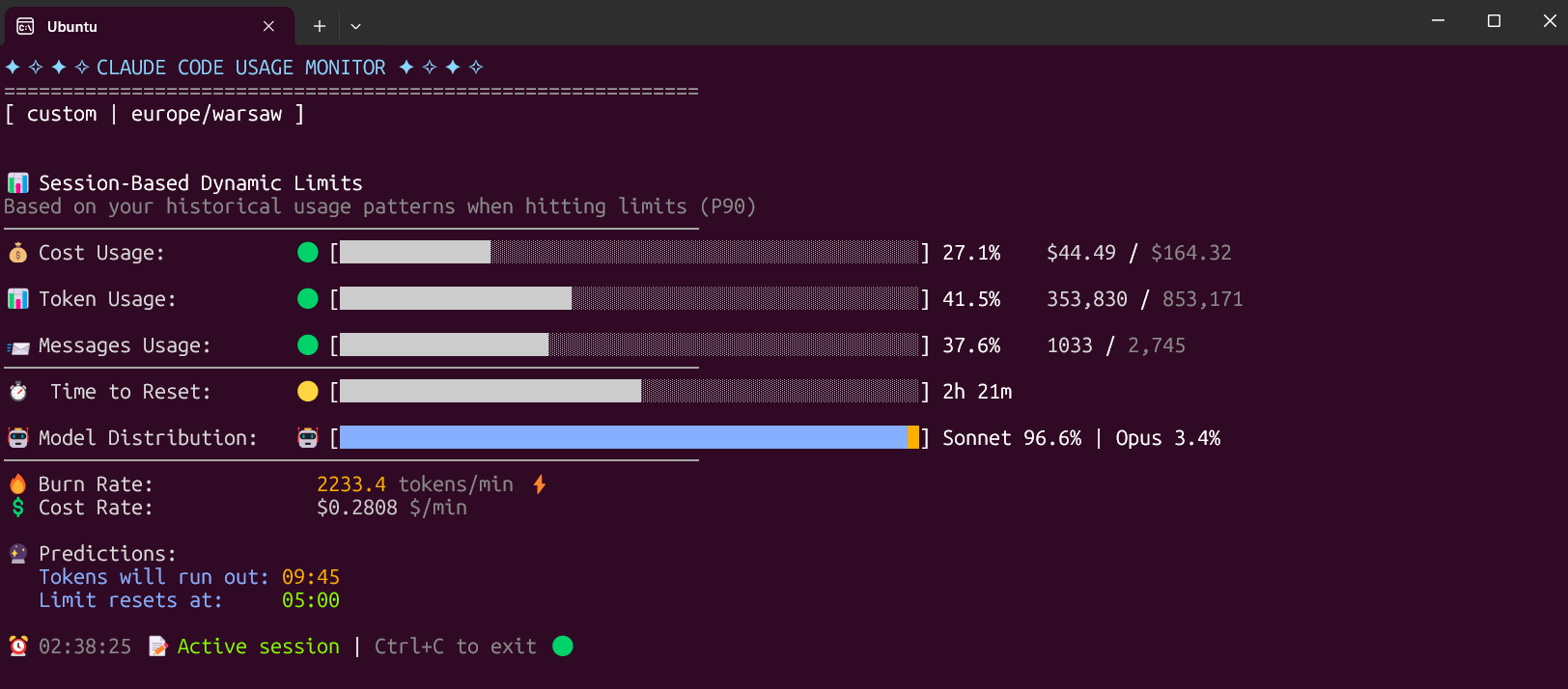
A privacy-first Claude Usage-Ops companion for Claude Code. It combines a Rich live terminal monitor with official statusline rate_limits, machine-readable state/export output, provenance labels, forecasting, and an opt-in local usage warehouse.
📑 Table of Contents
✨ Key Features
🚀 v4.0.0 Major Update - Usage Ops Companion
-
🔎 Official-limit trust layer -
--statuslinecaptures Claude Code's officialrate_limits; stale or expired captures fall back to labeled local estimates. -
📦 Machine-readable protocol -
--once,--compact, and--write-stateall use one versioned snapshot builder with automation exit codes. -
🏷️ Provenance labels - exported and displayed numbers distinguish
official,local_estimate,experimental, andunknownconfidence. -
📈 Persistent usage warehouse - opt-in local history survives Claude's 30-day cleanup with project/model/day dimensions and CSV/JSON reports.
-
🧭 Forecasting and pace - reset-aware pace, date-context forecasts, official-only weekly percentages, and limit-hit freeze behavior.
-
🧩 Multi-source input -
--data-paths,CLAUDE_CONFIG_DIR, and WSL discovery can scan multiple directories without merging unrelated accounts into one 5-hour window. -
🖥️ Rich UI parity - live Rich output, rich one-shot output, compact output, state files, and exports use the same snapshot contract.
-
🧰 External companion boundary - GUIs, trays, provider adapters, and status bars should consume
--write-stateor--once --output json. -
🧪 Regression coverage - the non-integration suite now covers the trust layer, state protocol, warehouse, reports, title updates, multi-source paths, and timezone edge cases.
📋 Default Custom Plan
The Custom plan is now the default option, specifically designed for 5-hour Claude Code sessions. It monitors three critical metrics:
-
Token usage - Tracks your token consumption
-
Messages usage - Monitors message count
-
Cost usage - The most important metric for long sessions
The Custom plan automatically adapts to your usage patterns by analyzing all your sessions from the last 192 hours (8 days) and calculating personalized limits based on your actual usage. This ensures accurate predictions and warnings tailored to your specific workflow.
🚀 Installation
⚡ Modern Installation with uv (Recommended)
Why uv is the best choice:
-
✅ Creates isolated environments automatically (no system conflicts)
-
✅ No Python version issues
-
✅ No "externally-managed-environment" errors
-
✅ Easy updates and uninstallation
-
✅ Works on all platforms
The fastest and easiest way to install and use the monitor:
Install from PyPI
# Install directly from PyPI with uv (easiest)
uv tool install claude-monitor

# Run from anywhere
claude-monitor  # or cmonitor, ccmonitor for short
Install from Source
# Clone and install from source
git clone https://github.com/Maciek-roboblog/Claude-Code-Usage-Monitor.git
cd Claude-Code-Usage-Monitor
uv tool install .

# Run from anywhere
claude-monitor
First-time uv users
If you don't have uv installed yet, get it with one command:
# On Linux/macOS:
curl -LsSf https://astral.sh/uv/install.sh | sh

# On Windows:
powershell -ExecutionPolicy ByPass -c "irm https://astral.sh/uv/install.ps1 | iex"

# After installation, restart your terminal
📦 Installation with pip
# Install from PyPI
pip install claude-monitor

# If claude-monitor command is not found, add ~/.local/bin to PATH:
echo 'export PATH="$HOME/.local/bin:$PATH"' >> ~/.bashrc
source ~/.bashrc  # or restart your terminal

# Run from anywhere
claude-monitor  # or cmonitor, ccmonitor for short
⚠️ PATH Setup: If you see WARNING: The script claude-monitor is installed in '/home/username/.local/bin' which is not on PATH, follow the export PATH command above.
⚠️ Important: On modern Linux distributions (Ubuntu 23.04+, Debian 12+, Fedora 38+), you may encounter an "externally-managed-environment" error. Instead of using --break-system-packages, we strongly recommend:
-
Use uv instead (see above) - it's safer and easier
-
Use a virtual environment - python3 -m venv myenv && source myenv/bin/activate
-
Use pipx - pipx install claude-monitor
See the Troubleshooting section for detailed solutions.
🛠️ Other Package Managers
pipx (Isolated Environments)
# Install with pipx
pipx install claude-monitor

# Run from anywhere
claude-monitor  # or claude-code-monitor, cmonitor, ccmonitor, ccm for short
conda/mamba
# Install with pip in conda environment
pip install claude-monitor

# Run from anywhere
claude-monitor  # or cmonitor, ccmonitor for short
📖 Usage
Get Help
# Show help information
claude-monitor --help
Available Command-Line Parameters
Parameter Type Default Description
--plan string custom Plan type: pro, max5, max20, team, or custom
--custom-limit-tokens int None Token limit for custom plan (must be > 0)
--view string realtime View type: realtime, daily, monthly, session, entries, sessions, or burn-rate
--output string rich Output format: rich, json, text, or csv
--once flag False Measure once, print a snapshot, and exit
--compact flag False Single-line compact output for status bars
--write-state flag False Write the snapshot to a state file for external tools
--state-file path None State file path for --write-state
--statusline flag False Run as a Claude Code statusline hook and capture official rate_limits
--api flag False Enable the opt-in experimental Anthropic OAuth usage API
--data-paths list [] Claude data directories to scan; repeat or comma-separate values
--warehouse flag False Persist usage entries to the opt-in local warehouse
--warehouse-file path None Usage warehouse file path
--warehouse-retention-days int 365 Days of warehouse records to retain
--timezone string auto Timezone (auto-detected). Examples: UTC, America/New_York, Europe/London
--time-format string auto Time format: 12h, 24h, or auto
--theme string auto Display theme: light, dark, classic, or auto
--refresh-rate int 10 Data refresh rate in seconds (1-60)
--refresh-per-second float 0.75 Display refresh rate in Hz (0.1-20.0)
--reset-hour int None Daily reset hour (0-23)
--date-format string None Date format for daily/monthly table periods
--abbreviate-tokens flag False Abbreviate token counts in table views
--sparklines flag False Show opt-in sparklines in table views
--filter-models string all Use all models, or anthropic to exclude routed non-Claude models
--set-terminal-title flag False Set the terminal title from the usage snapshot
--title-format string "{pct}% {plan}" Terminal title template using pct, plan, used, limit, cost, reset
--hide-model-distribution flag False Hide the model distribution bar
--no-header flag False Hide the header banner
--no-emoji flag False Render plain output without emoji
--log-level string INFO Logging level: DEBUG, INFO, WARNING, ERROR, CRITICAL
--log-file path None Log file path
--debug flag False Enable debug logging
--version, -v flag False Show version information
--clear flag False Clear saved configuration
Plan Options
|