ChatGPT Web for Codex
Use ChatGPT Web (including Pro) as native Codex models.
Change the model tier, save your workflow.






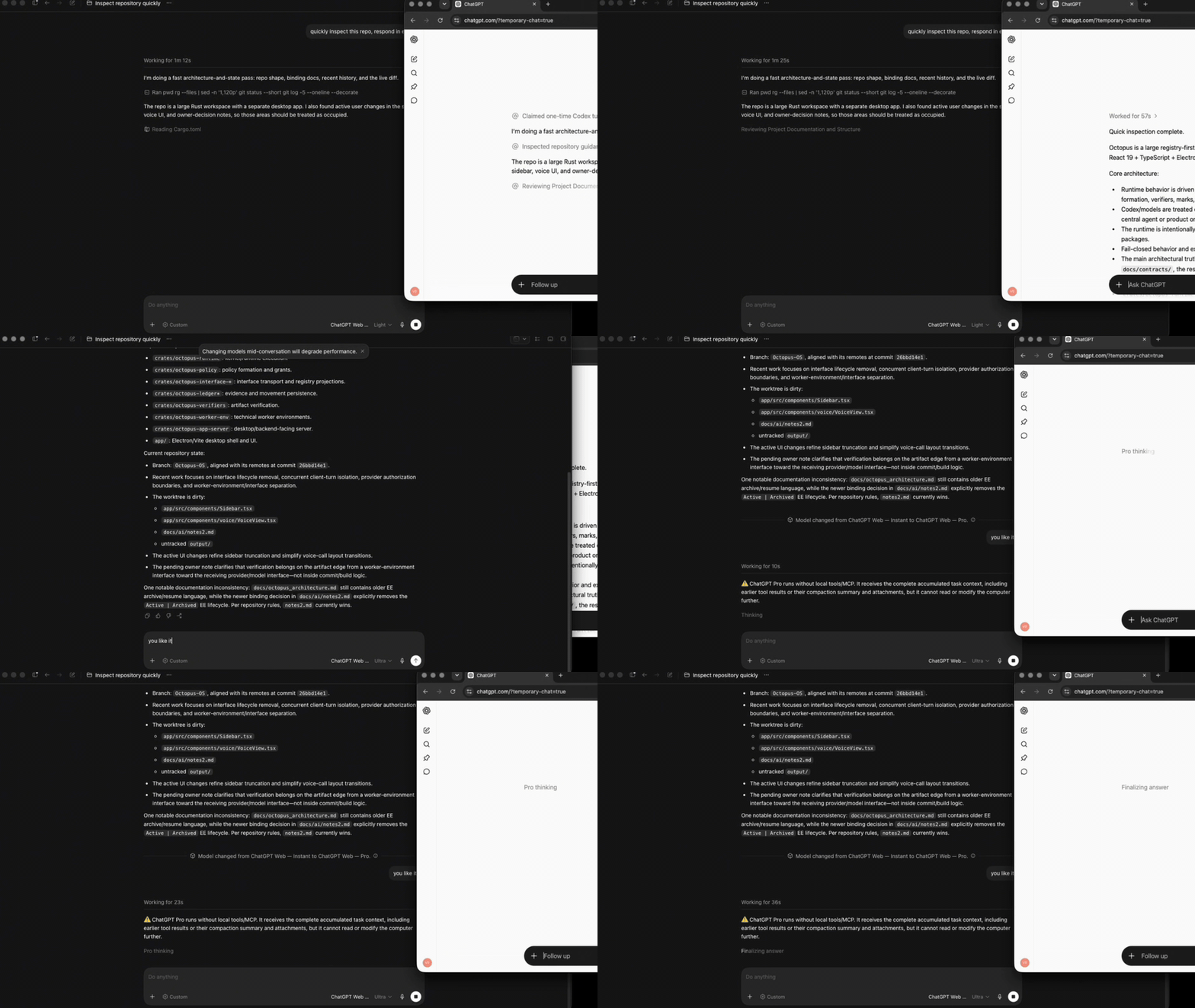
Free and Go accounts get ChatGPT Web — Luna in Codex's native model picker. Accounts that expose the reasoning selector keep Instant, Medium, High, Extra High, and Pro as their subscription allows. The bridge sends the current compiled Codex task context to a fresh ChatGPT Temporary Chat, attaches images, and streams visible reasoning, tool activity, and Markdown back into the same Codex task.
Codex task ──Responses + SSE──▶ codex-chatgpt-web ──embedded browser──▶ ChatGPT
     ▲                                │                                      │
     └──────── native UI, context, images, tracing, and tool lifecycle ──────┘
Codex keeps the native task, context lifecycle, UI, and tool harness. The local Responses bridge routes only the selected model turn through a fresh ChatGPT Temporary Chat; in full mode, MCP connects ChatGPT back to the tools of that same Codex task.
[!TIP] I also built ChatGPT Persona Voice, a local app that changes the ChatGPT/Codex voice in near real time. It never touches your account, browser session, or ChatGPT requests, so using it carries no account-blocking risk. If you like my work, give it a try.
Highlights
- A polished cross-platform launcher. One command installs the native macOS, Windows, or Linux app. It keeps sign-in orchestration, setup, smoke testing, MCP guidance, runtime health, and local logs in one place, while the embedded browser lets you watch every ChatGPT turn as it happens. Up to five task-bound browser tabs can run in parallel; the cap avoids excessive parallel account traffic.
- ChatGPT is the selected model. It runs as a native Codex model, not as a tool called by another host model. The original model picker, task lifecycle, streaming, tracing, and tool UI remain intact.
- Local-first task sessions. Codex remains the source of truth for task history on your computer. Every browser turn starts in a fresh ChatGPT Temporary Chat and receives the current compiled context. Measured browser ceilings trigger compaction, while Luna carries completed state through an adaptive rolling checkpoint. Browser chats are never reused across tasks or added to normal ChatGPT history.
- The full Codex harness over MCP. In Full mode, every effort available to the signed-in account— Luna, Instant, Medium, High, Extra High, and Pro—can use the active Codex task's filesystem, shell, images, approvals, and configured tools/apps through the same turn-bound MCP capability. Calls and real results stay inside the same browser response; nothing is simulated as text.
- No Pro exception. Pro follows exactly the same MCP, context, image, tracing, tool-round, browser-ceiling, and compaction contracts as every other effort. There are no effort-specific MCP exclusions. Browser-only mode remains read-only for every route.
- Fail-closed with an explicit release gate. UI drift and missing capabilities produce explicit errors rather than silent fallbacks. Account-bound model selection, long context, images, streaming, compaction, native tool rounds, cancellation, and Pro are covered by the documented release validation, separately from package smoke.
Temporary Chat is a ChatGPT privacy mode, not anonymity or local-only inference: prompts are still processed by OpenAI and are subject to the account's settings and OpenAI's Temporary Chat policy. This project is unofficial; users remain responsible for complying with applicable OpenAI terms and workspace policies.
Quick start
Install or update the desktop launcher. To update or repair an existing installation, quit the launcher and run the same command again; it replaces the application and embedded runtime while preserving the ChatGPT profile and launcher configuration.
macOS or Linux
curl -fsSL https://github.com/miuuyy/codex-chatgpt-web/releases/latest/download/install-launcher.sh | sh
Windows PowerShell
irm https://github.com/miuuyy/codex-chatgpt-web/releases/latest/download/install-launcher.ps1 | iex
Then complete the three checks in the app:
- Sign in directly in the launcher's embedded ChatGPT browser. Login pages and identity-provider windows stay inside the same launcher-owned private browser profile; no session is copied between browsers.
- Run the browser smoke test.
- Press Install models, restart Codex once, and select a ChatGPT Web — … model.
The launcher detects the current account's ChatGPT controls during setup: Free/Go accounts expose only Luna, while Pro appears only when the signed-in account exposes it. The separate MCP page is optional and guides the full-harness setup without terminal commands.
The packaged launcher keeps sign-in and ChatGPT model turns in its embedded browser. It needs no model API key, installed Chrome/Chromium, system Node/Bun, or project-managed browser download.
Run from source
git clone https://github.com/miuuyy/codex-chatgpt-web.git && \
cd codex-chatgpt-web && \
bun run app
This source path requires Bun 1.4.0. The command installs locked dependencies and opens the app.
Modes
| Mode | Models | Local Codex tools | Extra setup |
|---|---|---|---|
| Browser-only | Free/Go: Luna; Plus: Instant–High; Pro: adds Extra High and Pro | No; Codex shows a warning | None |
| Full harness | Free/Go: Luna; Plus: Instant–High; Pro: adds Extra High and Pro | Yes for every listed effort, including Pro | OpenAI tunnel + ChatGPT connector |
Every picker entry has one fixed ChatGPT mode. Codex still displays its built-in Effort and Speed rows, but changing them cannot silently change the selected browser model. In Full mode every available effort receives the same turn-bound MCP capability. Pro has no separate restriction or reduced tool contract.
Full harness
Full mode connects ChatGPT's tool calls back to the current Codex task through the official OpenAI tunnel-client. The tunnel is outbound: it does not expose a public IP, open an inbound port, or require router forwarding.
[!WARNING] Create a new connector named Codex Native2 and set its permissions to Allow all actions. Do not rename, refresh, or reuse an older Codex Native connector: ChatGPT caches the public MCP contract by connector identity, and Allow low-risk actions blocks commands and patches before they reach the Codex harness.
- Finish the required launcher setup.
- Open MCP in the launcher. Create the Tunnel and a regular API key on the same OpenAI account that will use the ChatGPT connector; creating the key is free and does not consume model API credits.
- Paste the Tunnel ID and API key, then press Connect harness.
- Enable Developer Mode in ChatGPT settings. Create a new connector using Tunnel, select that exact Tunnel, set Authentication to None, and name it exactly Codex Native2.
- If an older Codex Native connector exists, leave it untouched. Do not rename or refresh it: ChatGPT caches the public MCP contract by connector identity, and this release uses a new direct turn-token contract. Under Permissions on Codex Native2, choose Allow all actions; Allow low-risk actions blocks commands and patches before they reach this runtime. The outer Codex harness still enforces its sandbox and approvals.
- Run Verify runtime. It selects Codex Native2 exactly. If only Codex Native is found, verification fails with an explicit migration error instead of accepting the legacy connector.
Write/modify actions also require the ChatGPT workspace and its administrator policy to permit
them. See
developer mode and MCP apps.
Unexpected approval prompts fail closed unless --auto-approve-tool-calls is explicitly enabled;
that option clicks Allow once, never a permanent grant.
Operations
Use Activity for structured local logs and Settings → Run doctor for end-to-end health checks. Use Settings → Cancel retained browser turn if a stopped task leaves ChatGPT working, and Settings → Remove Codex integration before deleting the launcher so the previous Codex route is restored.
Browser turn diagnostics save bounded JSON state at each checkpoint. Screenshots are captured for
stalled and failed turns, where the visible UI is needed to diagnose DOM drift without slowing every
successful step. Set CODEX_CHATGPT_WEB_BROWSER_DIAGNOSTICS=1 before starting the runtime to also
capture a screenshot at every checkpoint during an investigation.
Subagent protocol is an explicit installation setting. New installs use Compatibility V1: it
enables multi_agent, disables the global multi_agent_v2 override, and
restores the user's previous feature lines on disconnect or uninstall. It also raises
[agents].max_depth to at least 2 while active so Web children can spawn Web grandchildren, then
restores the prior value. This is the universal cross-backend surface: native and Web parents can
delegate to Web children without opaque V2 payloads, and targeted waits can observe a child that
completed before the parent began waiting. Web parents expose wait_agent as explicit 10-second
polls so one long wait cannot occupy the connector's MCP channel and block the child's own tools.
Native remains an advanced opt-in that preserves
Codex's own feature settings and supports plaintext Web-to-Web V2 delegation. Switch deliberately,
then restart Codex and start a new task because an existing task cannot change protocol in place:
codex-chatgpt-web subagents status
codex-chatgpt-web subagents compatibility-v1
codex-chatgpt-web subagents native
Limitations and security
- This is unofficial browser automation, not an OpenAI API. ChatGPT UI changes can break selectors; drift fails explicitly instead of silently switching model or transport.
- ChatGPT's account-specific composer ceilings are smaller than some underlying model windows. The measured boundaries and requirements for a larger deterministic transport are tracked in #76.
- Browser state is a sensitive login artifact, and the loopback listener is reachable by processes running as the same local user. Never share the launcher profile; use a trusted workstation.
- Release packages currently target macOS 13+ (arm64/x64), Windows x64, and Linux x64. Runtime, tests, and native packaging are gated on all three operating systems in CI. Account-bound browser and MCP flows require the separate release validation; package smoke is not treated as end-to-end proof.
- Until platform signing credentials are configured for a release, macOS Gatekeeper or Windows SmartScreen may show an unknown-publisher warning. The one-command installers verify the published SHA-256 manifest before installation.
Read the complete architecture and security model before enabling full mode. Report vulnerabilities through SECURITY.md.
Development
bun run app
bun run dev:launcher
bun run src/cli.ts dev status
bun run dev:chat compaction-lab "Reply with exactly: DEV READY"
bun run verify
bun run smoke:subagents
bun run app:package
dev:launcher starts a second launcher profile under ~/.codex-chatgpt-web-dev: separate Electron
state, browser cookies/login, ChatGPT account, configuration, sandboxed CODEX_HOME, chats,
diagnostics, broker, and tunnel profile. It can run beside the normal launcher and never starts a
Responses daemon or changes Codex. Optional Full setup starts and supervises only its isolated MCP
tunnel, using the distinct ChatGPT connector name Codex Native2 DEV.
dev:chat is a named, persistent synthetic outer-Codex harness. It executes the current working
tree through that isolated launcher browser, Temporary Chat, prompt compiler, Responses parser, and
compaction handlers. Optional Full setup also exercises the MCP connector and broker; tool effects
are explicit simulation receipts. Browser-only chats expose no outer tools. It does
not open a Responses listener, change openai_base_url, stop the live daemon, or claim port 17841.
Run it without a message for /status, /fill 30000, /compact, /model, and /reset commands.
Sign in and initialize the profile once inside the window labelled DEV. Configure optional Full
harness only for simulated tool rounds; its launcher keeps the DEV tunnel ready while named chats
attach their broker on demand. Production credentials and the Codex Native2 connector are never
reused implicitly. See
DEV chat harness.
Star History
Disclaimer
This is independent software and is not affiliated with or endorsed by OpenAI. Use it only with your own account and in accordance with applicable Terms of Use and workspace policies; it does not bypass authentication or access controls.