Codex Taskboard
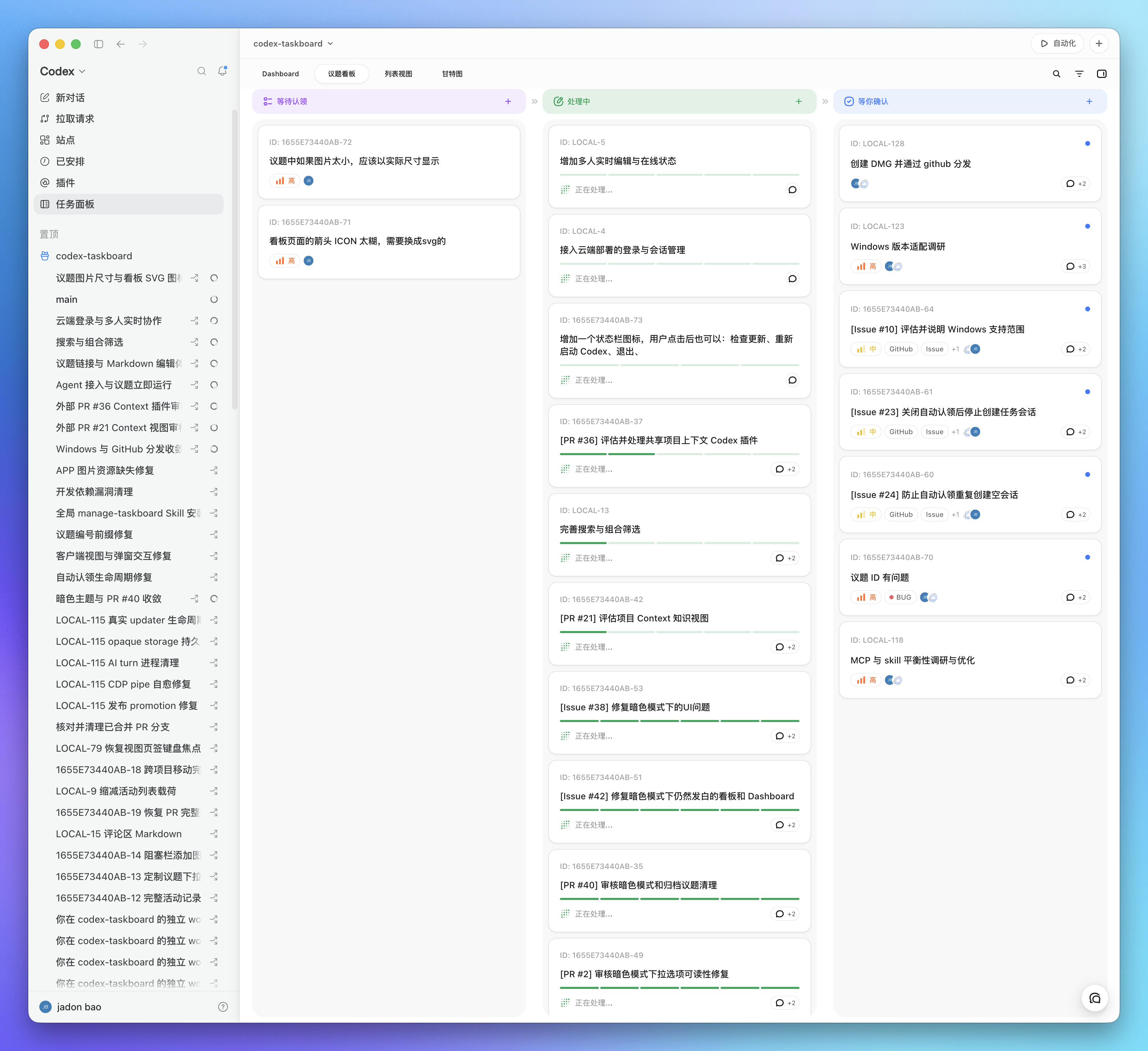
A local-first issue board that runs in a browser and can be embedded in Codex through the standalone CDP launcher or its injection script. The same HTTP API powers the React UI and the taskctl CLI used by the bundled Codex Skill.
Requirements
- Node.js 22.5 or newer
- macOS App and DMG builds: Xcode Command Line Tools and Rust 1.88 or newer with the
aarch64-apple-darwinandx86_64-apple-darwintargets.npm installinstalls the Tauri CLI used by this project. - Windows NSIS builds: the Microsoft Store Codex App, Rust 1.88 or newer, and Visual Studio Build Tools with the C++ workload and Windows SDK.
Run locally
npm install
npm run build
npm start
Open http://127.0.0.1:47823. The SQLite database is stored at .data/taskboard.sqlite.
For development with live frontend reload:
npm run dev
The Vite UI runs at http://127.0.0.1:5173 and proxies API requests to the local service.
Use the CLI
Run it from the project:
npm run taskctl -- project create \
  --id my-project \
  --name "My project" \
  --workspace-path /absolute/path/to/repository

npm run taskctl -- issue create \
  --project my-project \
  --title "Implement the next slice" \
  --status todo \
  --priority high \
  --labels product,mvp
Use npm link if you want taskctl on your shell path. Set CODEX_TASKBOARD_URL to point the CLI at another local or LAN service. Cloud deployments are configured through the loopback companion (device-local loopback service for auth and path mapping—not a chat persona) with taskctl cloud login.
Install the Codex Skill
Copy or symlink skills/manage-taskboard into the Codex skills directory, then start a new Codex task:
ln -s /absolute/path/to/codex-taskboard/skills/manage-taskboard \
  ~/.agents/skills/manage-taskboard
The desktop app keeps this same directory synchronized with its bundled Skill. The Skill teaches Codex to inspect an issue, move it to in_progress, use optimistic versions, verify the work, and then move it to in_review; it moves the issue to done only after the user explicitly confirms acceptance or asks to mark it complete.
Embed in Codex
Manual: use a dedicated CDP port
Keep the existing Codex window open. From the Taskboard repository, start a second Codex instance with a dedicated CDP port:
open -n -a /Applications/ChatGPT.app --args \
  --remote-debugging-port=9231 \
  --remote-allow-origins=http://127.0.0.1:9231
After the new Codex window appears, run the injector in another terminal:
CODEX_TASKBOARD_HOST=127.0.0.1 \
npm run codex:inject -- --port 9231 --open
Keep the injector terminal running while using the embedded panel. The original Codex window remains unchanged, and the new window receives the Taskboard sidebar entry. If port 9231 is occupied, use another port in both commands.
Recommended: launch an independent Taskboard window with one command
Keep existing Codex windows open and run:
CODEX_TASKBOARD_HOST=127.0.0.1 npm run codex
This starts the local Taskboard service when needed. It reuses an open Codex with a reachable CDP renderer, opens Taskboard in the native browser panel of an ordinary Codex without CDP, or launches the official macOS Codex app with an independent profile and loopback-only port 9231 when no Codex is open. It injects a native-looking Taskboard entry after Plugins when CDP is available and keeps watching both the service and replacement renderers. Keep this command running while using the embedded panel. The launcher does not modify ChatGPT.app or its app.asar.
The source launcher writes its authenticated endpoint to .data/launcher-runtime.json. A taskctl command installed with npm link reads this file by default, so a normal shell and a Codex task opened from the panel use the same Taskboard service without an extra environment variable.
macOS App: open and inject without a terminal
For Tauri development, run:
npm run app:dev
To build the local App and DMG, install the two Rust targets once, then run the build:
rustup target add aarch64-apple-darwin x86_64-apple-darwin
npm run app:build
Open src-tauri/target/universal-apple-darwin/release/bundle/macos/Codex Taskboard.app from Finder. The DMG is in src-tauri/target/universal-apple-darwin/release/bundle/dmg/. If you only want the stable App, download the current DMG from GitHub Releases.
The App contains its own Node runtime, Taskboard service, built web UI, Skill, CLI wrapper, and injection script. It starts the service, reuses an open Codex with a reachable CDP renderer, opens Taskboard in the native browser panel of an ordinary Codex without CDP, or launches the official Codex app when no Codex is open. It waits for the renderer, injects the sidebar entry when CDP is available, and opens the panel without showing a terminal window. The App can be copied away from this checkout; the target Mac only needs the official Codex app and does not need this repository, a system Node installation, or a separate Codex CLI installation. Taskboard data is stored in ~/Library/Application Support/Codex Taskboard, and launcher output is written to ~/Library/Logs/Codex Taskboard/codex-taskboard-launcher.log.
Linux App: Ubuntu 24.04 x64 packages
The first Linux desktop release supports Ubuntu 24.04 LTS on x64 only. Install the official ChatGPT desktop .deb first and confirm that chatgpt opens it. Then download either the Codex Taskboard .deb or .AppImage from GitHub Releases. Replace <file> below with the downloaded filename.
Install the .deb package:
sudo apt install ./<file>.deb
Or run the AppImage:
chmod +x ./<file>.AppImage
./<file>.AppImage
To build both packages on Ubuntu 24.04 x64, run:
npm ci
npm run app:build:linux:x64
This first release does not support ARM64, Fedora, RPM packages, or other Linux distributions.
Windows code signing
For official Windows releases after the application is approved: Free code signing provided by SignPath.io, certificate by SignPath Foundation. Current Windows CI artifacts remain unsigned until that approval. See the Code signing policy, Privacy policy, and Windows uninstall instructions.
The local build uses ad-hoc code signing for direct verification. A public macOS download still needs Developer ID signing and Apple notarization.
Windows App: tray launcher and bundled Taskboard
Install the official Codex App from the Microsoft Store. To build the current-user NSIS installer on Windows x64, run:
npm ci
npm run app:build:windows
The installer is written to src-tauri/target/x86_64-pc-windows-msvc/release/bundle/nsis/. It installs a tray launcher, bundled Node runtime, local service, built web UI, Skill, taskctl.cmd, and injection script. Taskboard data is stored in %APPDATA%\Codex Taskboard; logs are stored in %LOCALAPPDATA%\Codex Taskboard\Logs; the Skill is copied to %USERPROFILE%\.agents\skills\manage-taskboard.
Windows CI artifacts are intentionally unsigned and do not auto-update. Review the code-signing policy before distributing a build. See Windows uninstall for retained-data behavior.
Codex 26.715.52143 ships a renderer CSP that blocks arbitrary HTTP iframes. The launcher therefore enables CDP CSP bypass, reloads that renderer once, installs the document-start script, and waits until the Taskboard OOPIF is actually loaded. CDP is unauthenticated to other processes on the same machine, so only run trusted local code while the launcher is active.
To inject into a Codex instance that was already launched with CDP by another method, run:
npm run codex:inject -- --port 9229 --open
This command also stays resident so the injected tab can restart Taskboard after a service exit. Stop it with Ctrl-C.
The script adds a Taskboard entry to the Codex sidebar and renders the iframe across Codex's complete main workspace, including the contextual titlebar area so Taskboard's own header does not leave an empty strip. That full rectangular header is placed above Electron's draggable layer and marked no-drag; because the native contextual actions are suppressed while Taskboard is active, its own actions use their normal edge padding without an artificial right-side gap. The native sidebar stays mounted, while the previous page selection and contextual header are temporarily suppressed; choosing another Codex page restores them.
“在对话中打开” selects the corresponding native Codex project when one is available and opens an unsent native composer with an e-taskboard instruction and the issue's actual identifier. The installed Skill is selected implicitly from that instruction, so the composer does not add a $manage-taskboard mention. A conversation is attributed only after it actually processes the issue: taskctl reads Codex's CODEX_THREAD_ID and records that ID on the issue or comment mutation. Recorded IDs are clickable through Codex's native route bridge. Each issue can bind either one Git branch or one worktree; the options are scanned from the selected Codex project's repository instead of being typed by hand. The integration uses Codex's existing project, composer, and route markers; it does not patch React, replace fetch, load private chunks, or edit Codex data files.
To use a different UI origin, set window.__CODEX_TASKBOARD_URL__ before the user script runs.
Configuration
| Variable | Default | Purpose |
|---|---|---|
CODEX_TASKBOARD_HOST | 0.0.0.0 | HTTP bind address; use 127.0.0.1 to disable LAN access |
CODEX_TASKBOARD_PORT | 47823 | Local HTTP port |
CODEX_TASKBOARD_DATA_DIR | .data | SQLite data directory |
CODEX_TASKBOARD_URL | http://127.0.0.1:47823 | CLI API origin |
npm start prints both the local URL and the available LAN URLs. Teammates on the same trusted network can open one of those LAN URLs and use the same taskboard service. Task, comment, and attachment changes are broadcast to every open client through server-sent events; reconnecting clients perform a full refresh so changes made while disconnected are not missed. A teammate using taskctl can point it at the shared service with CODEX_TASKBOARD_URL=http://<host-ip>:47823.
LAN mode has no account authentication: anyone on the trusted local network who can reach the URL can read and write the taskboard. Public internet and cloud deployment require an authenticated deployment boundary.
Share through Cloudflare
For two trusted collaborators, the taskboard can run on Cloudflare with Worker Static Assets and API routes, D1 as the authoritative business database, and a private R2 bucket for attachments. The deployment uses HTTPS Basic Authentication with a shared password and refreshes open boards after a global revision changes.
Each device keeps its own project checkout mapping and continues to use a local companion for Codex, Git/worktree, Skill, and MCP capabilities. Cloud mode never falls back to or double-writes the local SQLite database.
See Cloud collaboration for owner deployment, existing GitHub installation setup, password rotation, local path mapping, and the one-time local-data migration flow.
Verify
npm run check
This runs TypeScript checking, a production frontend build, the component tests, and the server/CLI/injection test suite.
Task Markdown
Task descriptions and comments support GFM, including tables and task lists. Fenced mermaid blocks are rendered as read-only diagrams after the viewer loads; the diagram source remains available when rendering fails. Markdown HTML comments, such as <!-- trace-analysis:v1 ... -->, are hidden from the rendered document. Raw HTML is not enabled.