Claude Sidebar
Run Claude Code (and other agent CLIs) in your Obsidian sidebar.
Built by Derek Larson - Pairs with Delegate commands →
Features
- Auto-launches your agent - Your default CLI starts automatically
- Multiple tabs - Run multiple agents side by side
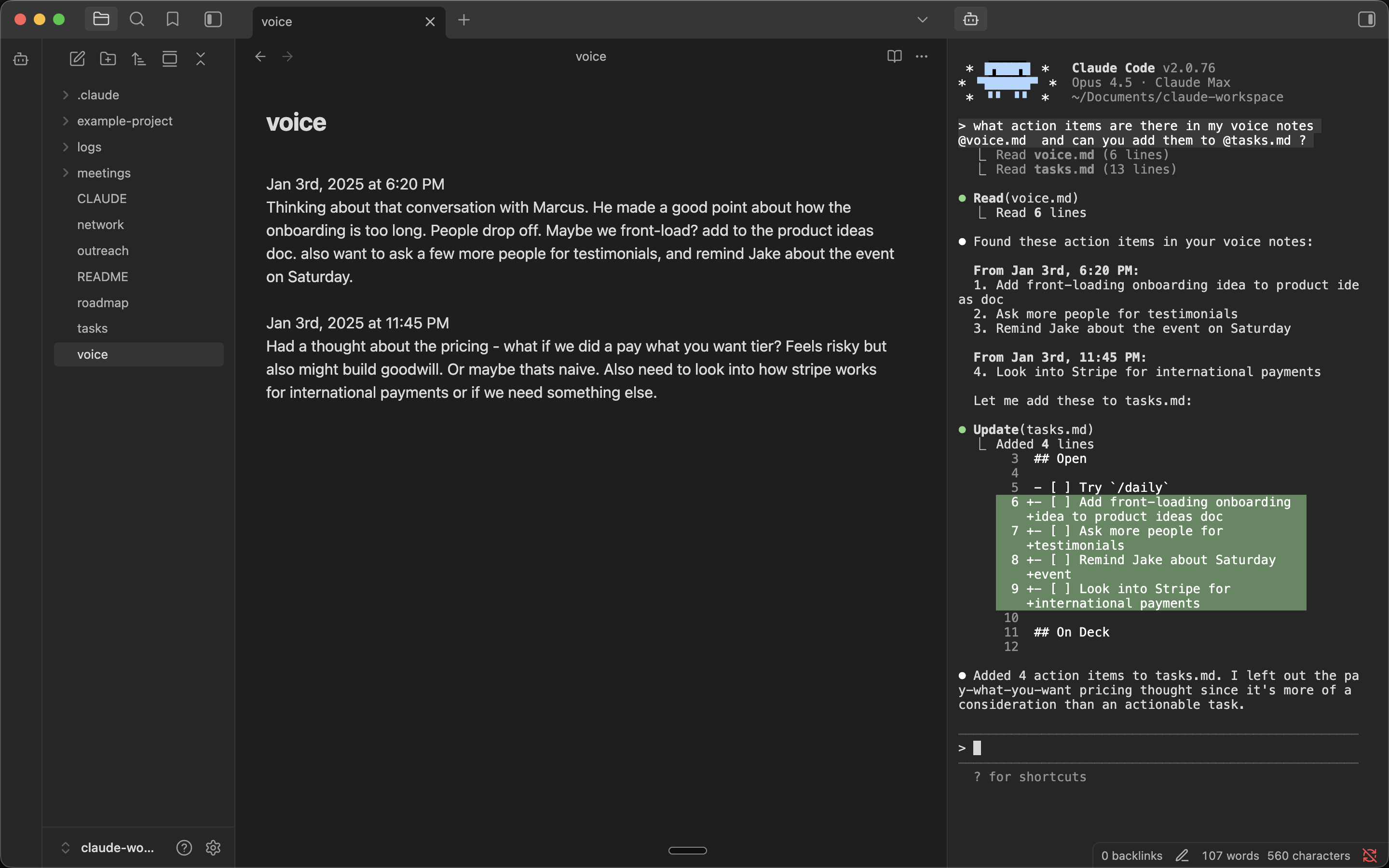
- Embedded - Full terminal with an agent in your Obsidian sidebar
- Folder & file context menu - Right-click any folder to open your agent in that directory, or a file to send it the path
- YOLO mode - Launch your agent with YOLO mode via right-click menus
- Multi-backend - Switch between Claude Code, Codex, Grok Build, OpenCode, Antigravity CLI, Kimi Code, GitHub Copilot, Cursor Agent, and Pi in settings, or via Switch CLI provider… in the command palette
Requirements
- macOS, Linux, or Windows
- Python 3
- An agent CLI — Claude Code (default), or any other supported backend
Installation
From Community Plugins (recommended)
Visit the plugin listing at community.obsidian.md/plugins/claude-sidebar and click Add to Obsidian. Then in Obsidian, click Install → Enable.
Windows: See Windows Setup below.
Manual Installation (Mac/Linux)
In your vault folder, run:
mkdir -p .obsidian/plugins/claude-sidebar && cd .obsidian/plugins/claude-sidebar && \
  curl -LO https://github.com/derek-larson14/obsidian-claude-sidebar/releases/latest/download/main.js && \
  curl -LO https://github.com/derek-larson14/obsidian-claude-sidebar/releases/latest/download/manifest.json && \
  curl -LO https://github.com/derek-larson14/obsidian-claude-sidebar/releases/latest/download/styles.css
Then in Obsidian: Settings → Community Plugins → Refresh → Enable "Claude Sidebar".
Manual Updating
In your vault folder, run:
cd .obsidian/plugins/claude-sidebar && \
  curl -LO https://github.com/derek-larson14/obsidian-claude-sidebar/releases/latest/download/main.js && \
  curl -LO https://github.com/derek-larson14/obsidian-claude-sidebar/releases/latest/download/manifest.json && \
  curl -LO https://github.com/derek-larson14/obsidian-claude-sidebar/releases/latest/download/styles.css
Then restart Obsidian or disable/re-enable the plugin.
Windows Setup
After installing the plugin (via Community Plugins or manually), add Windows-specific dependencies:
- Install Python 3 from python.org
- Install pywinpty into the Python the plugin will use:
py -m pip install pywinpty
Use py -m pip (not just pip) to avoid installing into a different Python interpreter than the one the plugin selects. If you see "pywinpty not installed" in the sidebar after installing, the error message will print the exact interpreter path — install pywinpty into that one.
- Pick whether to run your agent inside WSL or natively in
cmd.exe. Configure in Settings → Claude Sidebar → Shell (Windows only — Linux/macOS always runbash):
| Option | Spawns | Path translation |
|---|---|---|
| cmd.exe (default) | cmd.exe | none |
| wsl.exe (WSL) | wsl.exe | Windows paths → Linux paths via wslpath |
Use wsl.exe when your agent CLI, Node, or git toolchain lives in a WSL distro. Vault paths sent to the agent (file path command, selection context, drag-drop, image paste, wikilink references) are converted to Linux form before reaching the CLI. Translation respects a custom /etc/wsl.conf [automount] root, so paths still resolve if your C:\ mounts at /c/ instead of /mnt/c/.
Usage
https://github.com/user-attachments/assets/de98439a-8a1f-4a8a-9d02-44027d756462
- Click the bot icon in the left ribbon to open a tab
- Right-click the bot icon for YOLO mode, folder targeting, or resuming a conversation
- Right-click any folder for "Open here" or "Open here (YOLO)" - both name your current CLI
- Use Command Palette (
Cmd+P) for all commands:- Open terminal / New agent tab / Close agent tab
- New agent tab (other CLI)… - One-off tab on another CLI, default unchanged
- Switch default CLI provider… - Change which CLI every new tab uses
- Toggle Focus: Editor ↔ Agent - Quick switch between editor and agent
- Run agent from this folder - Start the agent in the active file's directory
- Resume last conversation - Pick up where you left off (
--continue) - Send file path to agent / Send selection to agent
- Press
Shift+Enterfor multi-line input - Set your own hotkeys in Settings → Hotkeys
Platform Support
| Platform | Status |
|---|---|
| macOS | ✅ Supported |
| Linux | ✅ Supported |
| Windows | ✅ Supported |
Want to use it on iOS or Android? See Claude Anywhere.
How It Works
- xterm.js for terminal emulation
- Python's built-in
ptymodule for pseudo-terminal support (macOS/Linux) - pywinpty for Windows PTY support
Development
The PTY scripts (terminal_pty.py for Unix, terminal_win.py for Windows) are embedded as base64 in main.js for Obsidian plugin directory compatibility. To rebuild after modifying:
./build.sh
Contributing
Hit a bug or want to develop a new feature? Point your coding agent at CLAUDE.md in this repo. It will walk you through diagnosis, filing a report, or opening a PR.
License
MIT