✈️ RoamRadar - your own personal travel hub
A free, open-source, self-hosted personal travel app. Keep every flight, hotel, ride, countdown, wishlist and past trip on one living timeline. Bookings can flow in automatically from Google Calendar and Gmail. Runs as a single Cloudflare Worker on your own account. Built with AI agents by Giovanni Brees.




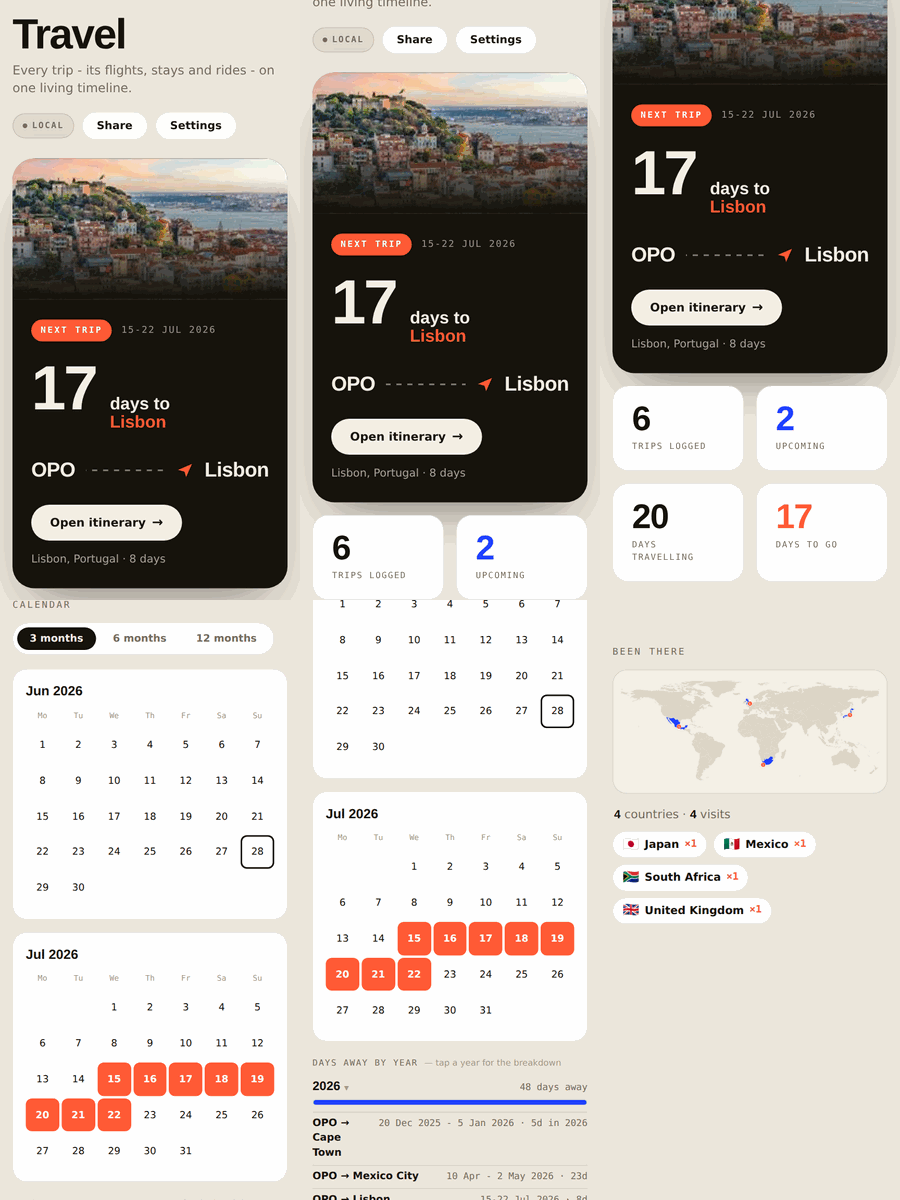
A single-screen travel app you host yourself, for free, on your own Cloudflare account. It pulls your trips together and (optionally) fills them in automatically from your Google Calendar and Gmail, then adds the extras: a year calendar, a "been there" world map, per-trip weather, currency, plug type, emergency numbers, and one-tap "add to any calendar."
Personal and self-hosted. Each person runs their own copy with their own data. Nobody logs into anyone else's instance; there is no shared server. Everything lives in your Cloudflare account, behind your password.
A look inside
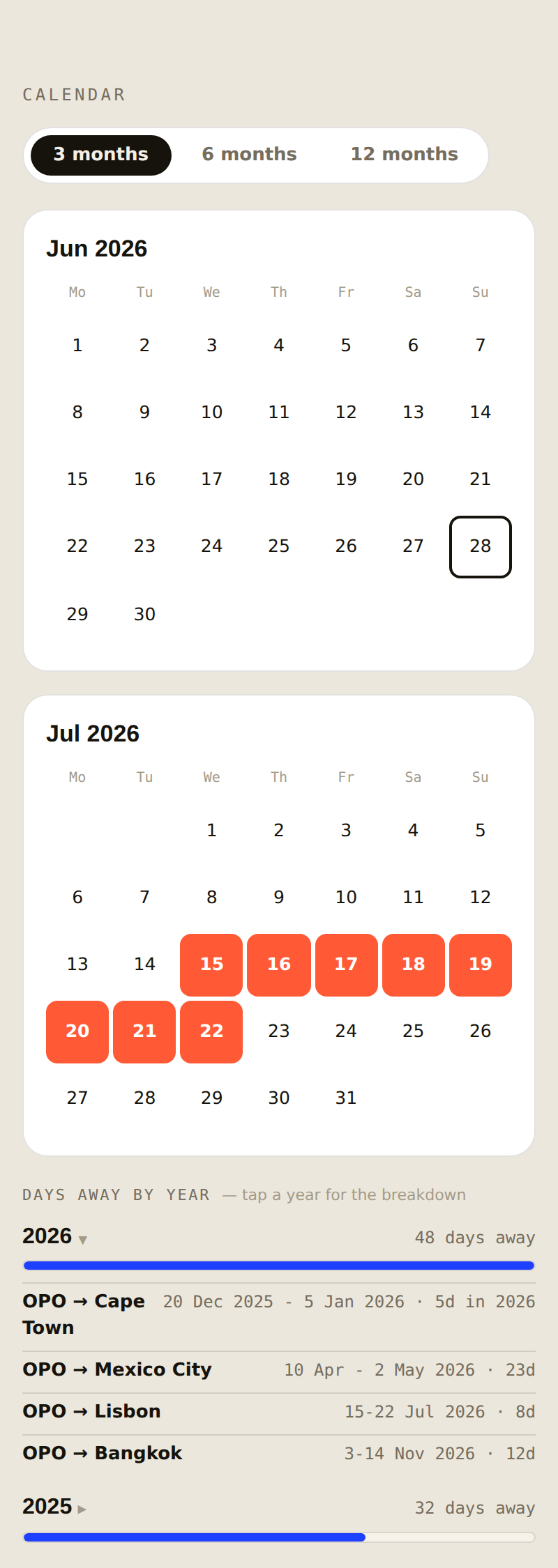
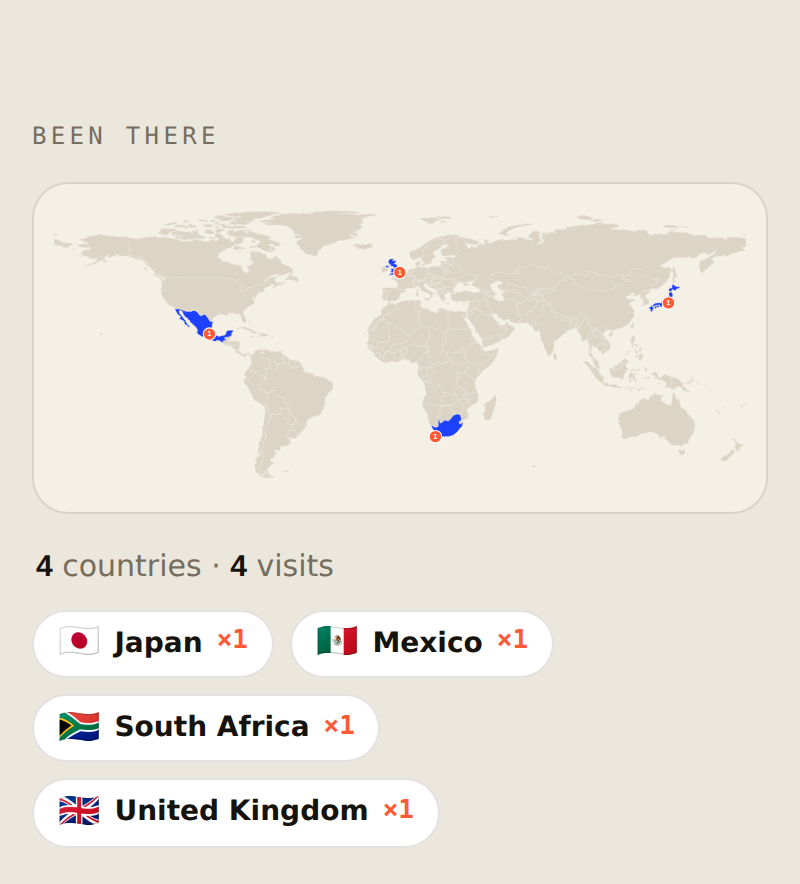
| A trip at a glance | Year overview + days away | "Been there" map |
|---|---|---|
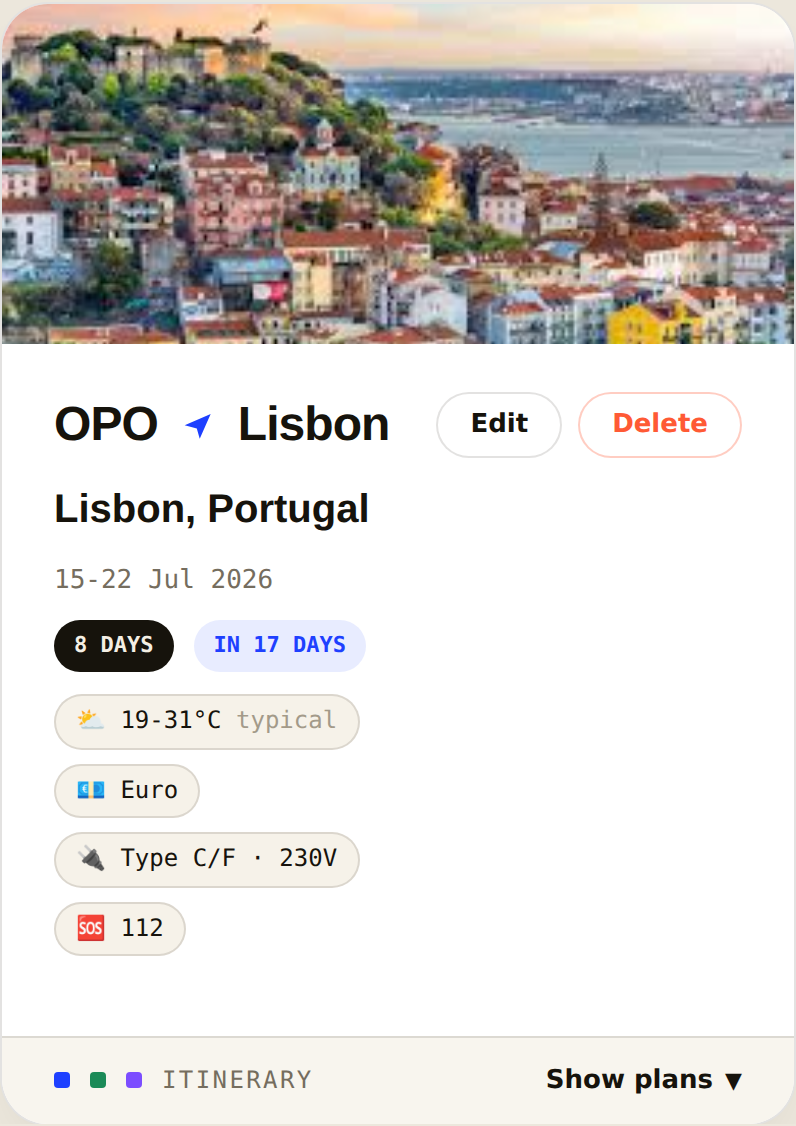 |  |  |
A sample “Lisbon” trip. The app pulls each destination's photo automatically.
✨ Key features
Trips & plans
- 🧳 Per-trip plans — attach flights, hotels, rides and free-text notes to any trip; manual plans are never overwritten by a sync.
- ✍️ Add by hand or let it fill itself in — type a trip in seconds, or connect Google (below) and let bookings flow in on their own.
- 🛟 Your hand-made plans are sacred — no automatic sync ever changes or deletes a plan you added yourself.
Planning & overview
- 🗓️ Calendar overview — a 3 / 6 / 12-month view of exactly when you're away, with every travel day marked.
- 📊 Days away by year — see total days travelled per calendar year (Jan 1–Dec 31); tap a year for the per-trip breakdown so any number is one tap from "why."
- 🌍 "Been there" world map — every country you've set foot in, filled in on a world map, each with a visit count (even tiny island nations).
- 🛫 Upcoming / Past / Wishlist tabs, with a fare-watch wishlist for trips you're still dreaming up.
At-a-glance destination intel (auto-filled per trip)
- 🌦️ Weather for your travel dates (forecast, or the typical climate if far off).
- 💱 Currency vs both € and $, live rates.
- 🔌 Plug type & voltage so you pack the right adapter.
- 🆘 Local emergency number.
- 🖼️ A real photo of where you're heading.
On your phone & yours alone
- 🔗 Share a trip — one tap copies a private read-only link so a travel companion sees the live itinerary (hotel door codes included), no login.
- 🎉 Year wrapped — flip the share card to your year in review: trips, days away, countries, distance — story-ready.
- 📅 Add to any calendar — one-tap
.icsexport for Apple / Google / Outlook, plus a private subscribe-by-URL feed of all trips that stays updated. - 🩹 Weekly snapshots — an automatic full backup every Sunday (4 weeks kept, plus one before every destructive action), restored in one tap.
- 📱 Installs like a native app — Add to Home Screen on iPhone or Android, opens full-screen, works offline (it's a PWA). (Step-by-step below.)
- 🔐 Your own password — set once, stays signed in for 30 days per device.
- 🗄️ Backup & import — export all your trips as JSON, re-import any time.
- 🛡️ 100% your data — everything lives in your Cloudflare account; nobody else (not even the repo author) can see your trips.
Deploy your own (≈5 minutes, free)
1. Click the button
This copies the repo into your GitHub, creates the Worker in your
Cloudflare account, and auto-creates the KV namespace it needs. (Free plan
is plenty.) When it finishes you'll get a URL like
https://travel-roamradar.<you>.workers.dev.
No keys are needed to deploy. If the form shows any variables screen, leave everything as-is and continue — Google and Claude both connect inside the app afterwards (Settings), never at deploy time.
"An unknown error occurred" under Project name? Almost always one of: a leftover repo from an earlier attempt with the same name on your GitHub (delete it or pick a new project name), the Cloudflare GitHub app not having access to the selected Git account (github.com → Settings → Applications → Cloudflare Workers & Pages → grant access), or a brand-new Cloudflare account that hasn't registered its
workers.devsubdomain yet (Cloudflare dash → Workers & Pages → set your subdomain, then retry).
2. Open the app and set your password
Open your new URL. The first person to log in sets the email + password — so do this immediately. (Use any email; it's just your login.)
3. Start adding trips
That's all you need — add a trip with dates and everything else (weather, currency, map, calendar) fills in around it. Want your bookings to import themselves? Connect Google in the Automatic import section below.
4. Put it on your phone's home screen
See "📱 Add it to your home screen" just below for the per-phone steps.
That's it. 🎉
📱 Add it to your home screen
The app is a PWA — once it's on your home screen it opens full-screen with its own icon, no browser bars, and works like a normal app (even offline for the parts that don't need the network).
iPhone / iPad (Safari)
- Open your app URL (e.g.
https://travel-roamradar.<you>.workers.dev) in Safari — this must be Safari, not Chrome, on iOS. - Tap the Share button (the square with an arrow pointing up).
- Scroll down and tap Add to Home Screen.
- Edit the name if you like → tap Add (top right).
- Open it from the new icon. Log in once; it stays signed in for 30 days.
Android (Chrome)
- Open your app URL in Chrome.
- Tap the ⋮ menu (top right).
- Tap Add to Home screen (or Install app if it's offered).
- Confirm Add / Install.
- Open it from the new icon and log in.
Tip: add it on every device you use — each one stays signed in on its own, and they all sync through your Worker.
Prefer the command line? (optional)
git clone https://github.com/giovannibrees/travel-roamradar && cd travel-roamradar
npm i -g wrangler && wrangler login
wrangler kv namespace create TRIPS      # paste the id into wrangler.toml
wrangler deploy
Automatic import (optional)
The app is fully usable by hand. To make trips fill themselves in, connect these from inside the app (Settings) — no Cloudflare dashboard needed:
- Google Calendar & Gmail — one-time setup at console.cloud.google.com (create a project, enable the Calendar + Gmail APIs, make an OAuth client; the app shows YOUR exact origin/redirect values to paste). Then Settings → Connect Google. Trips get written to your calendar, and bookings on your calendar attach to trips.
- Email → trip parsing (via Claude) — paste your own Anthropic API key in Settings. Booking confirmations in your inbox (Booking.com, Airbnb, airlines, Uber…) are parsed into plans automatically — hotel with door PIN, flight with number and times, transfer pickup info. An hourly background check files new mail even with the app closed; the daily sync does the full run.
- Forward anything: send any confirmation email to yourself with +trip
before the @ (e.g.
you+trip@yourdomain.com) and it's filed within the hour — whatever the sender. No matching trip yet? A forwarded hotel stay or return ticket creates the trip automatically. Filing is geography-aware (a Funchal hotel lands in your "Madeira" trip), and even a date-less hotel message (a door code, say) files into the right trip by destination. The in-app Help shows your personal forward address. - Calendly is supported as a Worker secret (see
docs/dev.vars.example).
Prefer dashboard secrets over in-app keys? Every credential can also be set via
wrangler secret put — a dashboard secret always wins over the in-app copy.
How it works
travel-app.html/public/index.html— the front end (one file, vanilla JS).worker.js— the Cloudflare Worker: serves the app, gates it behind your password, runs the optional Google Calendar + Gmail import, and stores everything in one KV namespace (TRIPS).wrangler.toml— Worker config: the KV binding, one full sync per day (18:00 UTC) and an hourly email-only check — the app's Sync button runs the full job on demand.
Trip: { id, from, to, start (YYYY-MM-DD), end, label, notes, segments[] }
Privacy
Everything lives in your Cloudflare account: your trips in your KV, your keys on your Worker, behind your password. The maintainer of this repo has no access to your instance or your data.
Anonymous install count
The one exception, and it's a narrow one: on first-time setup (the moment you
create your password), your instance can send one anonymous ping —
literally { "id": "<a random 128-bit number>" } and nothing else — to a
tiny counter Worker the maintainer runs, just so they know roughly how many
people are using this template.
That's the whole of it. No trip, no email, no key, no name, no location —
no data of any kind beyond that one random number — is ever sent, tracked,
logged, or available to anyone, at any time, for any reason. The id can't
be traced back to you; it exists only so your instance isn't counted twice.
To see the running total, open https://<your-counter>.workers.dev/count?key=<your READ_KEY>
in a browser — it's a plain page with just the number, nothing to parse.
The code for both sides is public: the ping is pingInstallCount() in
worker.js, and the counter that receives it is the whole of
counter/counter-worker.js — five lines that store an id and a total,
nothing more.
It is off by default — TELEMETRY_URL ships blank in wrangler.toml,
which means zero network calls, full stop, unless you deploy the counter
yourself and paste its URL in. Deploying from a public clone of this repo
where someone (e.g. the maintainer) already filled that line in means your
instance participates too; blank the line, or delete the one ctx.waitUntil (pingInstallCount(env)) call in worker.js, to opt out completely — nothing
else in the app depends on it either way.
Frequently asked questions
Is RoamRadar free? Yes. It is open-source and self-hosted - you run your own copy on your own Cloudflare account, which is free for personal use.
Where is my travel data stored? In your own Cloudflare KV, behind your own password. Nothing is sent to a shared server, and the repo author cannot see your trips.
Do I have to connect my email or calendar? No. RoamRadar is fully usable by hand. Connecting Google Calendar and Gmail is optional and only makes trips fill themselves in from your existing bookings.
What is RoamRadar built with? A single Cloudflare Worker serving a vanilla-JavaScript front end, with one KV namespace for storage. No framework, no build step.
Who made RoamRadar? Giovanni Brees, a founder and AI-first entrepreneur. His AI development agent built the app from scratch, with Claude Fable and Codex reviewing the code and Claude handling the visual design.
Author
Created by Giovanni Brees - a founder and AI-first entrepreneur building and writing at the edge of AI agents and automation. RoamRadar is one of his experiments in shipping complete, useful software with AI agents.
- Website: https://www.giovannibrees.com
- LinkedIn: https://www.linkedin.com/in/giovannibrees/
- Podcast, The Zero-Employee Company: https://open.spotify.com/show/033TuF4FmEurDDvBZlOAYr
License
PolyForm Noncommercial 1.0.0 — free to run, modify, and self-host for any noncommercial purpose. You may not sell it or use it commercially.